
cpbgcbmddckpmhfbdckeolkkhkjjmplo
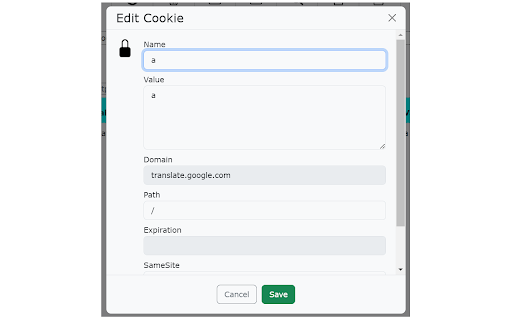


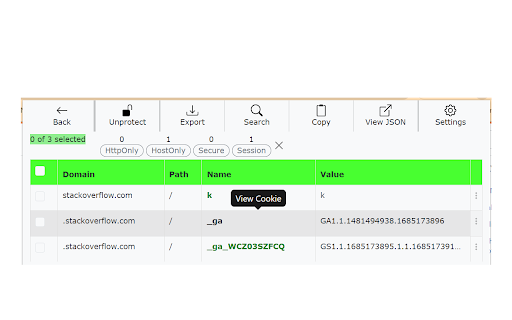
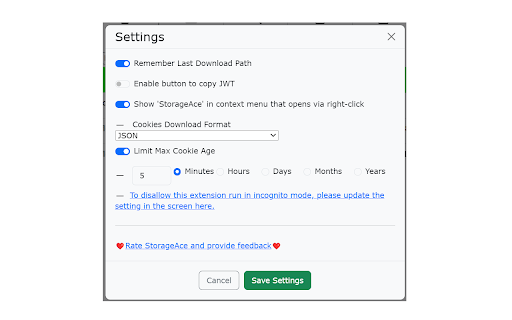
Easily manage Cookies, Local Storage and Session Storage for the selected tab. StorageAce provides ability to easily manage Cookies, Local Storage and Session Storage. ★ Add Cookie ★ Import Cookies in JSON format ★ Edit Cookies using form ★ Edit Cookies using JSON Editor ★ Delete Cookies ★ Search Cookies by cookie name or cookie value ★ Sort Cookies by cookie domain, cookie name, cookie path and cookie value by clicking table column headers. ★ Protect Cookies (Set cookies as read-only) ★ Block cookies by domain, name and value filters ★ Export cookies in JSON, Netscape HTTP Cookie File, Semicolon separated name=value pairs, Perl::LWP formats. Also, you can export cookies in JSON format that can be imported by Puppeteer. ★ Backup Cookies ★ Select multiple Cookies and do actions like view, edit in JSON editor, delete, protect, unprotect, block, save etc. ★ Limit Max Age of Cookies. ★ Quick Filters available for filtering cookies in one click. ★ Add item in local storage ★ Import items in local storage in JSON format ★ Edit item in local storage using form ★ Edit item in local storage using JSON Editor ★ Delete items in local storage ★ Search items in local storage by key or value ★ Sort items in local storage by key/value by clicking table column headers. ★ Export local storage items in JSON format ★ Select multiple items of local storage and do actions like view, edit in JSON editor, delete etc. ★ Add item in session storage ★ Import items in session storage in JSON format ★ Edit item in session storage using form ★ Edit item in session storage using JSON Editor ★ Delete items in session storage ★ Search items in session storage by key or value ★ Sort items in session storage by key/value by clicking table column headers. ★ Export session storage items in JSON format ★ Select multiple items of session storage and do actions like view, edit in JSON editor, delete etc. ★ Right-click and select "StorageAce" via Context menu ★ Incognito mode Supported and settings are synced in incognito and normal modes. ★ Beautified JSON View for storage items ★ Choose path for download. ★ Ability to Remember last download path. ★ Extra feature to allow copying JWT using "Copy JWT" button. It will copy the JWT in the selected storage type. ❚█══ Privacy ══█❚ StorageAce respects your privacy and all your data is safe. If browser syncing is enabled, then the settings of the extension is synced to any Chrome browser that the user is logged into. All your localStorage, sessionStorage and cookies remains offline.

Swoosh Cookie and Local Storage Specialist
Manage Cookies, Local Storage & Session Storage in one place. Powerful, intuitive, and real-time web dev toolkit. Swoosh Cookie and Local Storage Specialist is an all-in-one cookie editor and web storage manager designed for developers, testers, and power users. Manage Cookies, Local Storage, and Session Storage in one intuitive, fast, and powerful interface. Accelerate your web development workflow with real-time storage editing. View, search, create, delete, or batch modify cookies and storage data instantly — no refresh required. Key features: - Unified editor for Cookies, Local Storage, and Session Storage - Automatic real-time updates across tabs and domains - One-click URL encode/decode switch for clean data viewing - Friendly JSON viewer and formatter - Advanced cookie editor with attribute control (domain, path, expiration, secure, etc.) - Detachable full-window mode for focused debugging Why Swoosh? Unlike other cookie or storage extensions, Swoosh combines everything in a clean, developer-friendly UI that saves time and reduces friction in debugging and testing web apps. Privacy first: Swoosh works entirely offline. All operations happen locally in your browser — no data tracking, no analytics, no external servers. Perfect for developers, QA engineers, and anyone who needs a powerful yet simple tool to manage browser storage. Upgrade your workflow today — get Swoosh, the ultimate cookie and local storage specialist.

Storage Area Viewer
A storage area viewer for chrome.storage, support local, sync, session and managed Unlock the full potential of your browser storage management with Storage Area Viewer, the ultimate tool for accessing and editing Chrome storage. Designed for efficiency and ease of use, Storage Area Viewer provides a comprehensive solution to view and manage local, sync, session, and managed storage areas directly from your browser. 🚀Motivation: Due to the transition to Manifest V3, extensions are increasingly moving from localStorage to the Chrome Storage Area. However, there is no easy way for developers to inspect the Storage Area directly in the development tools. Inspired by the Storage Area Explorer and enriched with features commonly needed in development, I created this extension, Storage Area Viewer, to fill that gap. 🖥 Intuitive Modal Design: Experience a seamless interface that brings advanced storage management to your fingertips. The modal design ensures a clutter-free environment, allowing you to focus on the data that matters. 🔍 Search Capability: Quickly find the data you need with our powerful search function, saving your time and effort. 📊 Structured JSON View: Navigate through your JSON data with ease, thanks to our structured view that organizes information logically. 💻 Monaco Editor Integration: Enjoy the same editing experience as Visual Studio Code with the embedded Monaco Editor, making data modification both simple and efficient. 🔄 Storage Change Tracking: Keep an eye on storage modifications with real-time tracking, ensuring you're always informed of the latest changes. 🌙 Dark Mode Support: Protect your eyes with our dark mode feature, providing a comfortable viewing experience during both day and night.

Local Storage Manager
Manage your local storage variables in one single click. The best extension for devs. Copy, paste and edit your local storage variables in one single click

WebDataMaster
Export and import web site data WebDataMaster is a highly efficient and practical Chrome extension that offers users the convenience of importing and exporting local website data, covering various data types such as Cookies, localStorage, sessionStorage, and IndexedDB. 1. Data backup and recovery: With WebDataMaster, you can easily back up local website data to prevent accidental loss. If needed, you can restore the backup data to the corresponding website at any time. 2. Debugging and development: WebDataMaster provides convenience for website developers by helping them retrieve local cache when users encounter errors, making it easier to reproduce errors under specific conditions. 1. Install the WebDataMaster extension 2. On the website, open the right-click menu and select "Export Data" or "Import Data" Due to IndexedDB API restrictions, when restoring IndexedDB data, the database and tables must already exist (even if they are empty) in order to complete the recovery.
