
giompennnhheakjcnobejbnjgbbkmdnd
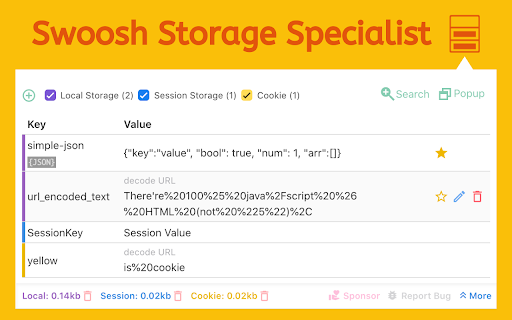


Manage Cookies, Local Storage & Session Storage in one place. Powerful, intuitive, and real-time web dev toolkit. Swoosh Cookie and Local Storage Specialist is an all-in-one cookie editor and web storage manager designed for developers, testers, and power users. Manage Cookies, Local Storage, and Session Storage in one intuitive, fast, and powerful interface. Accelerate your web development workflow with real-time storage editing. View, search, create, delete, or batch modify cookies and storage data instantly — no refresh required. Key features: - Unified editor for Cookies, Local Storage, and Session Storage - Automatic real-time updates across tabs and domains - One-click URL encode/decode switch for clean data viewing - Friendly JSON viewer and formatter - Advanced cookie editor with attribute control (domain, path, expiration, secure, etc.) - Detachable full-window mode for focused debugging Why Swoosh? Unlike other cookie or storage extensions, Swoosh combines everything in a clean, developer-friendly UI that saves time and reduces friction in debugging and testing web apps. Privacy first: Swoosh works entirely offline. All operations happen locally in your browser — no data tracking, no analytics, no external servers. Perfect for developers, QA engineers, and anyone who needs a powerful yet simple tool to manage browser storage. Upgrade your workflow today — get Swoosh, the ultimate cookie and local storage specialist.

Octotree - GitHub code tree
Browser extension that enhances GitHub code review and exploration. Features * Fast IDE-like code tree * Quick search in tree format * Bookmark repos, issues, PRs, files * Support GitHub themes * Support private repositories * High performance, working with repositories of any size NO BS POLICY: Octotree doesn't track you or share/care about your data at all. GitHub tokens are only needed when you want to access private repositories or exceed GitHub API rate limit. Octotree stores tokens in your browser storage and only uses them to authenticate with GitHub.

JSON-handle
It's a browser and editor for JSON document.You can get a beautiful view. And transcoding Unicode Base64 URL with decode & encode. Edit and browse JSON document in a node tree diagram. After installed, open the URL will trigger JSON-handle: 安装后打开下面网址可以看到JSON-handle启动的效果: http://jsonhandle.sinaapp.com/demo.json

Chrome Logger
For server side logging and debugging in chrome console. This extension is for debugging server side applications using the chrome javascript console. It was originally inspired by FirePHP. For help getting started check out http://www.chromelogger.com Version 4.0 is basically a complete rewrite to rebrand this extension as Chrome Logger instead of ChromePHP and bring it up to date with the latest Chrome extension guidelines. This extension was formerly known as ChromePHP. Change Log 4.1.3 - Updates extension to use manifest v3 to ensure it works with future versions of Chrome. Also fixes issue where some colors may not work on the options page. 4.1.2 - Fixes race condition where logs sometimes get lost after a page refresh 4.1.1 - Tweak styles of options page 4.1.0 - Improves tab switching logic and updates sticky behavior to be based on host name 4.0.5 - Adds native color picker for choosing colors 4.0.4 - Uses atob function for base 64 decoding 4.0.3 - Fixes race condition in Chrome 28 on linux 4.0.2 - Adds support for console.table

Quick source viewer
View current page sources: HTML + Javascript + CSS Displays HTML, Javascript and CSS sources of a page in a fast and compact way. Source code is syntax colorized and beautified for easy reading. Badge in the toolbar shows Javascript node counts. File size and cache header is displayed. Display onclick handlers with inline javascript. Look and feel can be modified with custom CSS. Selected urls can be hilighted in the list of source files.
