
coonllecklpiahhjkmnjidiaccefopli


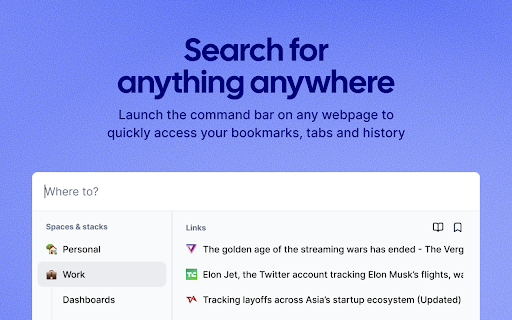
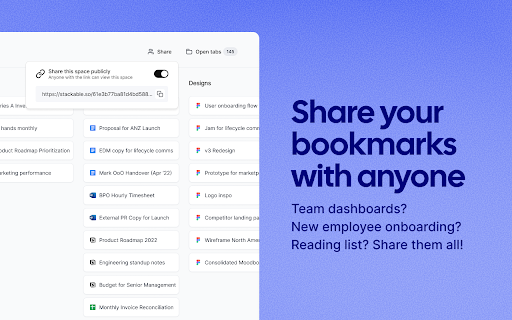
Stackable is a home screen for your browser. It's the best way to manage your bookmarks and tabs. We help you find your content… Stackable is a home screen for your browser. It's the best way to manage your bookmarks and tabs. We help you find your content and files super fast. Just open up a new tab in your browser. Stackable reimagines the way we organize bookmarks, manage tabs and search for things. 1) Home screen Just like your mobile phone's home screen that links you to all your apps, Stackable is a home screen for your browser. Open up a new tab and you'll see all your bookmarks and open tabs in one place. It's so much easier to find what you need! 2) Drag and drop bookmarks Everything in Stackable is drag and drop friendly! Organize your bookmarks into Stacks and move them around however you like. 3) Open 100 bookmarks instantly Always need to open the same links? Save them into a Stack and open all of them with one-click. 4) Powerfully manage open tabs View all your open tabs in one place. Quickly bookmark, rearrange tabs, go to tabs and close tabs. 5) Search for anything anywhere Launch the Stackable command bar on any webpage to quickly access your bookmarks, tabs and history. 6) Share bookmarks with anyone Team dashboards? New employee onboarding? Reading list? Share them all with a link. 7) Free forever Stackable was created to make your web browsing super efficient. It will always be free to use for individuals. We will never limit the number of bookmarks or tabs you have.

tabOS - Tab management, ChatGPT 4o, Docs/Images, RSS/YouTube/Reddit feeds
Enhance your New tab/Sidebar - Manage tabs, ChatGPT prompted chats, RSS/YouTube/Reddit feeds, write documents and save images. Meet tabOS - An operating system (sort of! 😇) for your browser. Add it with one click to gain a powerful new tab where you can manage your tabs and tab groups. Try it for free. Stop jumping from tab to tab, from tool to tool, losing your focus and time in the process. Declutter your browser by saving tabs not used at the moment, effortlessly create relevant tab groups, take notes anywhere, save images, and get answers from your library of AI helpers. Lay out everything on the same page to save time and discover new insights from your data. Stay on top of the news by creating and subscribing to RSS feeds, all inside your new tab. 🧑🏭 Assemble your custom-prompted AI helpers in a new tab, and then use them side-by-side with your web apps via the side panel view. Add powerful documents and note-taking capabilities anywhere. Integrate next-level, intuitive, and familiar tab and tab group management. Combined, these elements forge the comprehensive ecosystem of tabOS. 👌 Drag and drop to save and close your tabs and tab groups. Create and rearrange groups and organize them all in easy-to-use and familiar grid, column, list, and tree views. Additional features include discarding tabs, searching your library, and picking up where you left off, all within the new tab. ⭢ Tab Management: Easily handle your tabs with options to open, close, and manage them effortlessly. ⭢ Tab Groups: Organize your tabs into visually distinct groups for improved focus and organization. ⭢ Tab Folders: Further categorize your tab groups into folders for streamlined navigation. ⭢ Discard Tabs: Free up resources by discarding tabs without losing track of them. ⭢ Pin Tabs: Keep important tabs always accessible by pinning them to the browser window. ⭢ Move Tabs: Reorder and move tabs between windows and groups with a simple drag-and-drop. ⭢ Windows Management: Manage multiple cloud desktops to enhance multitasking and reduce context-switching. Bookmarks Integration: Seamless integration with your bookmarks for quick access and management. ⭢ Documents: Create and edit documents directly in your browser. ⭢ Notes: Take quick notes, save ideas, and manage to-do lists dynamically. ⭢ Markdown Support: Write and format using Markdown for clear, structured documents. ⭢ To-Do Lists: Organize tasks effectively with customizable to-do lists. ⭢ Bullet Point Lists: Make concise lists for easy readability and organization. ⭢ Code Snippets: Store and manage code blocks with syntax highlighting. ⭢ Highlight Colors: Visually prioritize information with color-coded highlights. ⭢ Images: Insert and manage images within your documents and notes. ⭢ Cloud Drive: Integrate seamlessly with your cloud storage for anywhere access to files. ⭢ AI Chats: Engage with AI-driven chat for help and queries. Custom Prompted Assistants: Tailor AI prompts to your specific workflow needs. ⭢ Vision AI: Utilize AI for image recognition and contextual actions. ⭢ ChatGPT 3.5 & 4.0 & Turbo: Choose from a range of AI versions, including the most advanced, for a personalized experience. ⭢ Global search: Powerful search across your entire workspace, including tabs, bookmarks, and cloud files. ⭢ Search open tabs: Quickly find and jump to the content within your currently open tabs. ⭢ Fuzzy search: Smart search technology that finds what you need, even with partial or misspelled queries. ⭢ Share data: Share tabs, documents, and notes easily with others. ⭢ Shared folders: Collaborate with team members using shared cloud folders. ⭢ Shared documents: Work on documents simultaneously for real-time collaboration. ⭢ Live collaboration: Interact and collaborate in live sessions with colleagues and friends. ⭢ New Tab view: A fresh perspective every time you open a new tab, with the option to pick up where you left off. ⭢ Sidepanel view: Multi-task with ease by using tabOS next to your web apps. ⭢ Web app: Access all your data from anywhere via our fully featured web app ⇨ Free Plan: Get started with the core functionalities without any cost.. Try out with an anonymous account. ⇨ Pro Plan & AI Plus Plan: Scale up as needed with extra cloud storage and AI sorting capabilities. ⇨ Automatic Daily Backups: Ensure all your data is secure and up-to-date with daily automatic backups.

Curateit
Introducing CurateIt - the ultimate all-in-one Chrome extension for organizing and saving your favorites. Introducing CurateIt - the ultimate all-in-one Chrome extension for Your Second Brain for AI Research, Productivity and to Showcase your work Organize and save your favorite ideas, articles, and inspirations from across the web. With CurateIt, you can keep track of all the exciting recipes, style ideas, DIY projects, and more, ensuring that you never lose access to the content you love. With CurateIt, you can easily import and connect to various platforms such as Pocket, Raindrop, and Kindle. Save content directly from Twitter, upload bookmarks, and even save highlights from text, images, PDFs, code, and YouTube videos. CurateIt’s extensive list of features includes: 1. Import and Save Features - Import from Pocket - Import bookmarks from Raindrop - Upload bookmarks - Save tweets (bookmarks, likes, tag @savetocurateit) - Save for later (Read later) - Highlight text (like weava, liner) - Save any image like Pinterest - Save Code snippets - Save or download any images - Save or annotate PDFs 2. Organization and Management Features - Bookmark manager - Web clipper - Text Expander - AI Prompts - Spotlight Universal search - Smart search assistant (using Gems & History) - Tabs Manager (like workona, toby) 3. Reading and Accessibility Features - Reader view mode - Dark reader mode - Read aloud (Text-to-speech) - Text Highlights - YouTube highlighter - Import your Kindle highlights 4. Advanced Features and Utilities - Image Screenshot (full page screenshot, select image area or component or annotate) - Image OCR to copy text or code (including language identification and code convert) - Site info on any page (company details, technology stack, brand, traffic, etc.) CurateIt also offers a unique browsing experience with its Spotlight Search and Reader’s View, making it easier to discover content tailored to your interests. Simply hover over an image, code and click to explore save you’re passionate about on CurateIt. Download CurateIt today and experience the convenience and simplicity of this easy-to-use Chrome extension!

Better Bookmarks | Streamline Your Favorites
Effortlessly organize bookmarks with advanced sorting, powerful search, bulk actions, and seamless import/export. Better Bookmarks is the perfect solution for users looking to efficiently organize, manage, and retrieve their bookmarks. With its sleek design and advanced features, Better Bookmarks replaces your browser's default bookmark manager, providing enhanced controls, faster search capabilities, and seamless functionality. Say goodbye to cluttered bookmarks and hello to streamlined organization. (1) Advanced Sorting Options (2) Powerful Custom Bookmark Search (3) Bulk Operations for Editing, Moving, and Deleting (4) Enhanced Bookmark Folder Organization (5) Optimized Bookmark Index View (6) Comprehensive Import and Export Options (7) Dark and Light Themes (8) Secure Bookmark Deletion with Undo Function (1). Advanced Sorting Options Organize your bookmarks your way: • By Date: Keep your most recent bookmarks on top. • By Name: Arrange them alphabetically for easy navigation. • Chrome Default Order: Maintain the default sorting for a familiar browsing experience. (2). Powerful Custom Bookmark Search Locate bookmarks instantly with our advanced search functionality. • Real-Time Results: Get results as you type for faster retrieval. • Efficient Search Filters: Narrow down your search to pinpoint the exact bookmark. (3). Bulk Operations for Efficient Management Manage multiple bookmarks effortlessly with powerful bulk actions: • Select Multiple Bookmarks: Easily select and perform actions on several bookmarks at once. • Open in New Tabs/Windows: Open multiple bookmarks simultaneously in new tabs, new windows, or private mode. • Edit Bookmarks: Update bookmark titles and URLs to keep them accurate. • Move Bookmarks: Reorganize bookmarks into appropriate folders quickly. • Delete Bookmarks: Remove unwanted bookmarks individually or in bulk. • Export Bookmarks: Save your bookmarks in HTML or CSV formats for backup or sharing. • Copy URLs to Clipboard: Select multiple bookmarks and copy their URLs to the clipboard for easy sharing with anyone. (4). Enhanced Bookmark Folder Organization • Folder View: See all folders along with the number of bookmarks in each. • Parent Folder Display: Every bookmark shows its parent folder name for better context. (5). Optimized Bookmark Index View • Comprehensive Overview: View all bookmarks in a neatly arranged list with folder names, URLs, favicons, and titles. • Better Navigation: Quickly identify and access bookmarks related to specific projects or categories. (6). Comprehensive Import and Export Options • HTML and CSV Formats: Import/export bookmarks for backups or sharing. • Seamless Sync: Sync bookmarks via your Chrome profile—no additional login required. • Data Safety: Always have a backup to ensure your bookmarks are secure in case of accidental deletion. (7). Dark and Light Themes Choose between dark and light themes to suit your preferences and reduce eye strain during extended use. (8). Secure Bookmark Deletion with Undo Function Accidentally delete a bookmark? No problem! Easily restore deleted bookmarks with the undo function. ⭐ Active Support Center At Better Bookmarks, we care deeply about our users. We continually improve the extension based on your feedback. Feature Suggestions: Share your ideas and requests for new features. Support Assistance: Need help? Our team is ready to assist you. ↪ Submit a Request: https://betterbookmarks.io/contact/?reason=feature ⭐ Privacy Policy Your privacy is our priority: • No Data Tracking: We don’t track your browsing data, website usage, or any personal information. • Local Storage Only: All data is securely stored in your browser. We don’t access or share your data. • Anonymous Analytics: We use Google Analytics solely for anonymous error reporting to improve extension quality. Have questions or concerns about your privacy? Contact us anytime: ↪ Contact Us: https://betterbookmarks.io/contact/?reason=general

Partizion — Tab and Session Manager
Partizion is a tab and session manager that just works. Never worry about losing tabs again. ✦ Magic tab manager — Partizion saves tabs for you ✦ Privacy focused — no ads, no tracking, and we never sell or share your data ✦ Reliable tab session manager — Over 1 Million sessions saved ✦ Used by professionals from Netflix, Google, Shopify, Uber, Spotify, and more ✨ AUTO-UPDATING TAB COLLECTIONS Don’t want to manually update tabs and bookmarks? Partizion’s powerful auto-updating feature will automatically save tabs when you open/close them so that you don’t have to. ✔️ Automatically saves tabs for you (when you open or close them) ✔️ Pick up where you left off — Just open your Partizion collection ✔️ Cloud synced — restore saved groups of tabs from any browser ☁️ CLOUD SYNCED SESSIONS A bullet-proof tab session manager for chrome. With local caching and backups, cloud sync, and a beautiful UI, you never have to worry about losing tabs again. ✔️ Automatically saves sessions for you ✔️ Restore a session or group of tabs anytime ✔️ Sessions are synced to the cloud ✔️ Privacy controls (encryption + auto-delete settings or completely disable syncing) Too many tabs open? Partizion tab manager helps you keep less tabs open by saving backups so that you can safely close any tabs that you don’t need open right now, knowing that you can always find and open them again later. Lost tabs? Partizion automatically saves cloud-synced tab sessions so that you can restore any tabs you may have lost. Want to pickup where you left off? Save groups of tabs, open them later in one-click. Enable auto-update and Partizion will save tabs for you. As a backup, you can always restore tabs from Partizion’s session manager. Organize your tabs Organize tabs into Collections by project, task, client, or anything else then close/reopen later from any browser. Restore tabs Use Partizion’s powerful tab search to search your saved tabs and collections. OR browse your sessions in chronological order to restore sessions that you may have forgotten to save. Custom Views View your saved tabs and collection how you like: Grid View, List View, Kanban View, and a Full view (shows everything). Sort and filter your views to create workflows and dashboards.
