
hhofkocnlefejficdipgkefgfmnenpbk
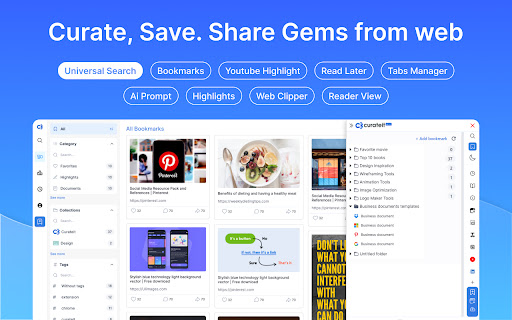


Introducing CurateIt - the ultimate all-in-one Chrome extension for organizing and saving your favorites. Introducing CurateIt - the ultimate all-in-one Chrome extension for Your Second Brain for AI Research, Productivity and to Showcase your work Organize and save your favorite ideas, articles, and inspirations from across the web. With CurateIt, you can keep track of all the exciting recipes, style ideas, DIY projects, and more, ensuring that you never lose access to the content you love. With CurateIt, you can easily import and connect to various platforms such as Pocket, Raindrop, and Kindle. Save content directly from Twitter, upload bookmarks, and even save highlights from text, images, PDFs, code, and YouTube videos. CurateIt’s extensive list of features includes: 1. Import and Save Features - Import from Pocket - Import bookmarks from Raindrop - Upload bookmarks - Save tweets (bookmarks, likes, tag @savetocurateit) - Save for later (Read later) - Highlight text (like weava, liner) - Save any image like Pinterest - Save Code snippets - Save or download any images - Save or annotate PDFs 2. Organization and Management Features - Bookmark manager - Web clipper - Text Expander - AI Prompts - Spotlight Universal search - Smart search assistant (using Gems & History) - Tabs Manager (like workona, toby) 3. Reading and Accessibility Features - Reader view mode - Dark reader mode - Read aloud (Text-to-speech) - Text Highlights - YouTube highlighter - Import your Kindle highlights 4. Advanced Features and Utilities - Image Screenshot (full page screenshot, select image area or component or annotate) - Image OCR to copy text or code (including language identification and code convert) - Site info on any page (company details, technology stack, brand, traffic, etc.) CurateIt also offers a unique browsing experience with its Spotlight Search and Reader’s View, making it easier to discover content tailored to your interests. Simply hover over an image, code and click to explore save you’re passionate about on CurateIt. Download CurateIt today and experience the convenience and simplicity of this easy-to-use Chrome extension!

Custom Cursor for Chrome™
Fun custom cursors for Chrome™. Use a large collection of free cursors or upload your own. Customize your Chrome browser experience with our free collection of mouse cursors at Custom Cursor. At Custom Cursor we have created a giant collection of hand-drawn cute cursors. We have over 10,000 different packs available on our website for you to enjoy. With your help, our collection has grown so big that we divided it into categories that should fit every taste, like: - Minecraft; - Cute Cursors; - Anime mouse packs; - Memes; - Spy x Family pointer packs with Anya Forger; - Among Us; - Two types of Minimal pointers for work and studies; - Games; - Roblox; - And many, many other funny elements for you to play with. Some of our mouse pointer packs are bundled with the Custom Cursor browser extension, but most of them await you on our website. Keep an eye out for new and trending additions. To simplify navigation, we've organised our collection into Editor's Picks collections, each with a unique theme. Examples include: - Green arrows for autumn; - Christmas themed arrows; - Holidays editor's picks; - Halloween; - Custom Cursor collaboration with Daieny Schuttz; - Pink pointers editor picks; - Summer mouse decorations; - Rainbow colors; and much, much more on our website. If you can't find what you're looking for, use the "UPLOAD CURSOR" button to add your own. Manage your personal arrow collection on the Upload page and adjust cursor size in the "Manage" section. Newly added collections will be uploaded to the Custom Cursor for Chrome extension and can be found at the bottom of the collection list. Your added packs will appear in “My Collection”. Create your own collection of mouse cursors from any images with Custom Cursor Creator tool on our website. It will allow you to create new packs from almost any arrow or pointer shaped image on the internet. ------------------- ! After installing the extension, refresh previously opened tabs to use it on those pages. Note that the extension may not work on Chrome Web Store pages or the home page. Open another website (e.g., google.com) to test the extension. If you like the extension you can also check our Custom Cursor for Windows app. Preview arrow appearance by clicking on it in the extension window and moving the mouse to the empty space within the window.

Custom Chrome - Extension Manager
A beautiful Google Chrome extension manager to turn on/off other extensions quickly and easily without leaving your current tab A beautiful Google Chrome extension manager to turn on/off other extensions quickly and easily without leaving your current tab. Make useful profiles which can turn on/off multiple extensions with one click. Have one for shopping which activates discount finding extensions or a profile for web developers who can activate colour palettes, debuggers, browser reloaders etc.

FanfictionUltimate
The ultimate Chrome Extension for the best Fanfiction.net experience. Read your next Dramione, Bedward or Drarry fic with this new Chrome extension! FanfictionUltimate is the perfect companion to Fanfiction.net. It adds additional functionality in a seamless, easy-to-use manner. -> Entire Work: Read the entire fanfiction on just 1 page. Highly recommended for readers with slow internet connections so you do not have to wait for the next chapter to load each time. -> Download: Download any fic with 1 click. Maintain a personal archive of your favourite fics so you can read whenever and wherever you want. Note from the developer: I am an ardent fan of Fanfiction.net and made this extension for other fans like me. If you have suggestions on other things that this extension could do, leave me a review and I'll try to incorporate it in the next version :) v.1.0.1 - Extension is back up on Chrome Web Store after migrating to manifest v3. v. 1.0.2 - Migration to manifest v3 broke the extension. Not to worry because it works now!

Shortcut Organizer
Chrome extension offering a sleek and customizable dashboard to organize your web shortcuts. Shortcut Organizer is a Chrome extension designed to enhance your browsing experience. It replaces the default start page with a sleek and customizable dashboard, allowing you to manage your shortcuts in an organized and efficient way. With Shortcut Organizer, you can create, rename, and reorganize your folders using an intuitive drag-and-drop feature. You can also add or edit shortcuts with custom labels and URLs, move shortcuts between folders, or even add a shortcut directly by clicking on an icon in the navigation bar. Additionally, you can customize your start page with a background image of your choice. The extension automatically fetches website icons, providing a clean and visually appealing display. Available in both English and French, Shortcut Organizer adapts to your needs with a seamless multilingual experience. Key Features: - Create, rename, and reorganize your folders easily with drag and drop. - Add or edit shortcuts with custom labels and URLs. - Move shortcuts between folders with an intuitive drag-and-drop feature. - Add a shortcut directly by clicking on an icon in the navigation bar. - Customize your start page with a background image. - Shortcuts automatically fetch website icons for a clean and aesthetic look. - Available in English and French to suit your preferred language. Why Choose Shortcut Organizer? - Ease of use: An intuitive interface, perfect for all users. - Efficient and organized: Save time and quickly access your favorite links. - Advanced customization: Personalize your start page to match your style and needs. - Open source: Contribute to the project's evolution and share your ideas on GitHub.
