
conjkhfodbbomjjhfanalejcidfkabpa
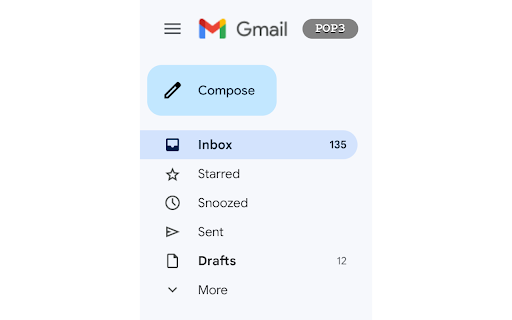
Refreshes all POP3 accounts when the POP3 button is clicked If you notice any bugs or have suggestions on how to improve this extension, feel free to contact me either by email or in the support tab! This small Chrome-Extension adds a button/shortcut on the Gmail Website for easy and fast refreshing of all POP3 Email-accounts liked to your Gmail account. Before, you had to go into the settings and click the "Check mail now" link manually but this extension now does all this automatically. IMPORTANT INSTRUCTIONS FOR USING THE EXTENSION To use it properly first navigate to mail.google.com/#settings/accounts and scroll down to "Check email from other accounts:". Here you will see the Email-accounts that are linked to your Gmail account together with a Button "Check mail now" (this may vary depending on your language). Copy the link text ("Check mail now" in English), click on the extension icon in the upper right corner, Click on the "Gmail POP3" extension, paste it into the "Your language" field, and press "OK". If you now navigate to mail.google.com you should see a gray Button with the Text "POP3" in the upper left corner, next to the Gmail logo. Pressing this, now should automatically go to the settings, click the required link and navigate back to the inbox page (This does not work reliably 100% of the time and it might get stuck in the settings page. Is this the case, just press the "POP3" button one more time and it should work). This Extension is heavily based on the "Easily refresh all your POP3 E-Mail accounts linked to Gmail" bookmarklet by David Mohr (https://david-mohr.com/blog/bookmarklet-refresh-pop3-accounts-gmail) so all credit goes to him for the internal workings.

Short Gmail Labels
Shorten your Gmail labels so parent labels are not displayed. Nesting gmail labels results in an unnecessarily long display that includes both parent and child labels. This will trim down the label names so you only see the child.

Gmail Settings Extender
Bookmark mails and start compose in chrome-like tabs, add custom rich-text editor, auto add CC/BCC, reverse conversations and more.. Version 4.6: -Added an option to always show attachments on top of the mail body. Version 4.5: -Fixed the new Google AI assistant is not working on tabbed compose window. -Fixed the compose window is not auto scrolling after adding new line. -Added an option to auto show CC or BCC list separately. By default, Gmail doesn't allow dragging mails outside the opened window, so you'll not be able to download your mails or transfer them as attachment to another browser window or tab, unless you download them manually from mail menu. Also, you can't drag an attachment from any opened mail and drop it into the compose window as attachment, the same when you need to transfer this attachment to another account opened in another browser window. By using this extension, you'll be able to drag attachments directly to any opened compose window, you'll notice a download mail button which is draggable to your file system, or to compose window, or even to another browser tab, you'll get another button which will move the attachment section to top. To make it easy for you to reply or forward mails, this extension adds action buttons and moves the inline compose view to top. A new tab bar will change the look of Gmail and will allow composing mails in new tabs inside the same window, or add mails as chrome like bookmark tab. For those who are using a delegated Gmail accounts and looking for a way to auto change the signature without being forced to select it manually on each compose or change it from the main settings, this extension adds an option to do it for you, just enter the name of the signature from the main settings and the account you are delegated access to and it will be selected automatically. That's it!. add this extension to your browser now and enjoy. wanted scrolling area.

Gmail: Atualizador de POP3
Atualize, gratuitamente, todas as contas de e-mail POP3 do Gmail com um intervalo a partir de 1 minuto. Essa extensão tem como finalidade atualizar as contas de e-mail POP3 configuradas no Gmail com uma frequência de 1 a 10 minutos. Se você usa contas POP3 no seu Gmail deve ter percebido que há uma demora de mais de 30 minutos para cada verificação de e-mails. Isso pode gerar muitos atrasos em respostas e no uso cotidiano do e-mail. Com esta ferramenta, a verificação passa a ser de 5 em 5 minutos por padrão. Para funcionar basta: 1) instalar a extensão; 2) clicar no ícone da extensão e escolher o intervalo desejado; 3) conforme o intervalo escolhido, uma aba com a página das configurações do Gmail (settings/accounts) será aberta no Chrome logado no seu Gmail. Google, Google Gmail e marcas e logotipos relacionados são marcas registradas da Google LLC. Todos os outros nomes de empresas e produtos são marcas registradas das empresas às quais eles estão associados.

Gmail Email & POP3 Reload
Refresh your inbox and load new emails from your POP3 accounts in Gmail automatically. Every Minute and when you go to Inbox Refresh your inbox and load new emails from your POP3 accounts in Gmail automatically. The extension will refresh your inbox and load emails from your POP3 accounts every minute and also every time you go to inbox, so you stay synced with your other POP3 accounts.
