
coafedlchdmbopniifkflhjkmjoldmbc

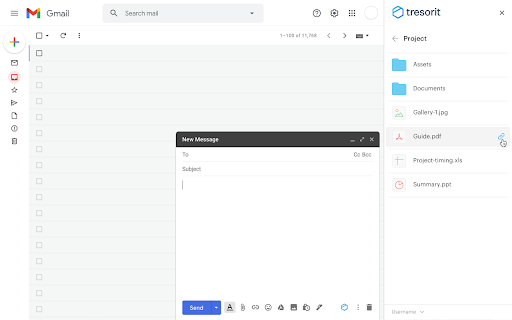
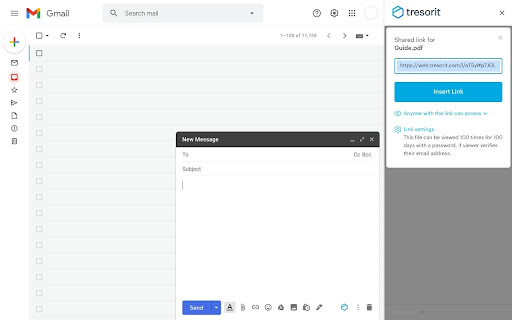

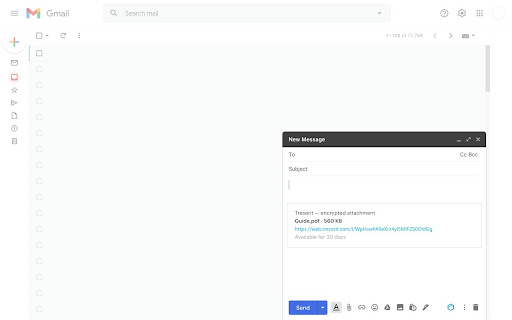
Share files and folders securely using Tresorit — without leaving your Gmail inbox. The Tresorit for Gmail extension lets you conveniently share your files with the outside world without compromising security, using a simple Tresorit link. - Replace risky email attachments with secure links - Attach files from your computer to your emails as secure Tresorit links - Access Tresorit directly within Gmail to share files and manage existing Tresorit links Requirements This extension requires a paid Tresorit subscription. Please visit https://tresorit.com/pricing for more information. If you need help, contact support@tresorit.com.

Standard Notes Clipper
Web clipper for Standard Notes The Standard Notes Clipper extension is the perfect tool for saving and organizing web content. With this extension, you can clip full pages, articles, or select specific elements to save to your Standard Notes account, which is end-to-end encrypted for maximum security. Whether you're doing research, saving recipes, or just want to keep track of interesting articles, the Standard Notes Clipper makes it easy to store your content in a safe and organized way. Plus, with the ability to link your clipped content to tags and other notes, you can easily find what you're looking for when you need it.

FlowCrypt: Encrypt Gmail with PGP
Simple end-to-end encryption to secure email and attachments on Google. 🟢 A simple end-to-end encryption to secure your emails and attachments on Google, including Google Workspace, Business, and Enterprise using OpenPGP. 🟢 FlowCrypt lets you use PGP encryption by generating a private and public key. It uses the recipient’s public key to encrypt the email, and only the recipient’s private key can decrypt the message and reveal its content. 🟢 Adds a Secure Compose button to Gmail, allowing you to send private PGP-encrypted emails when you choose to. 🟢 We update the extension regularly (see the "Updated" field to the right). FlowCrypt allows you to: ✔ Set up the extension in just a few clicks. ✔ Generate private keys using the ECC and RSA (up to 4096-bit) algorithms. ✔ Use FlowCrypt’s own Attester public key server. ✔ Send and receive encrypted emails and attachments (up to 25MB, with previewing functionality) to anyone. ✔ Send and receive encrypted emails directly or through Encrypted Contact Page. ✔ Send password-protected emails to the recipient who doesn’t have any OpenPGP software (as well as receive such emails). ✔ Sign encrypted emails to let your recipients verify that the message is from you and that the content hasn’t been modified. 📩 Looking forward to your feedback! Please email us at human@flowcrypt.com.

Mailvelope - Secure your email with PGP
Protect your email conversations and attachments on Gmail, Nextcloud, Outlook & more with PGP and end-to-end encryption. ➡️ Email encryption for individuals & businesses Mailvelope enables PGP for a wide range of webmail services, providing secure end-to-end encryption for emails and attachments. It can be used as a free solution for private users and as an enterprise-grade tool for organizations requiring enhanced security and compliance. ➡️ Mailvelope Business – Advanced encryption for organizations For businesses and large teams, Mailvelope Business provides an encryption solution with enhanced features and premium support. In order to sign up for Mailvelope Business, visit our website after downloading the extension. Mailvelope Business is currently available for Nextcloud and Google Workspace. Mailvelope Business for Outlook on the Web is coming soon. ➡️ Mailvelope for You – Secure emails on almost any provider Mailvelope's free version enables private users to encrypt their emails on nearly all webmail providers, including Gmail, Outlook, Nextcloud, Yahoo, and many more. Through our partnerships with WEB.DE, GMX, and Posteo, Mailvelope offers deep integration into their webmail services. With an intuitive interface and seamless browser integration, Mailvelope makes OpenPGP encryption accessible to everyone. ✅ End-to-end encryption – Encrypt emails directly in your browser before they leave your outbox. Only you and your recipient can read them. ✅ Works with major webmail providers – Compatible with Gmail, Yahoo, Outlook.com, and self-hosted webmail clients like Roundcube. ✅ Mailvelope Business – Secure email encryption for businesses, ensuring compliance with strict data privacy regulations. ✅ Mailvelope key server – A managed and protected key server, simplifying PGP key distribution and verification. ✅ User-friendly & seamless integration – Mailvelope integrates smoothly into your workflow, making encryption simple for everyone. ✅ Secure key management – Your private encryption keys are stored securely on your device, never exposed to third parties. ✅ GDPR & compliance ready – Protect confidential business emails and meet privacy and data protection requirements. ✅ Open source & transparent – Mailvelope's code is publicly available for security audits and community contributions.

Save to Koofr
Save to Koofr extension allows you to easily save content from the web directly to your Koofr account with a single click. Save to Koofr extension allows you to easily save content from the web while browsing directly to your Koofr account with a single click. Koofr is a safe, EU based cloud storage with up to 10 GB free storage space. It offers an option to connect multiple cloud accounts (Dropbox, Google Drive, OneDrive) and lets you organize all your files in one place. With it, you can access your data anytime, anywhere and on any device - be it a computer, a phone or a tablet. Koofr features: - On mobile or desktop, with any modern browser, through WebDAV or Rclone. Koofr works where you are. - Collaborate easily. Upload your files of unlimited size and share them with anyone. - Organize your life with ease. Connect your existing cloud storage accounts and utilize the unified search engine. - Automatically upload all your media files from mobile devices and access them in one place. - Synchronise files from your computers on Windows, macOS or Linux. - Protect your account with two-step verification for added security. - Effortlessly send and receive files and folders of unlimited size from anyone with sharing links. - Save anything from the web with a single click using Save to Koofr. - Simply transfer a copy of your Facebook media to your account. - Create, view and edit your documents with Office for the web. - Easily restore the accidentally deleted files and folders. - Never again worry about the privacy and security of your files. Go to https://app.koofr.net/signup and create a free account.
