
heapafmadojoodklnkhjanbinemaagok
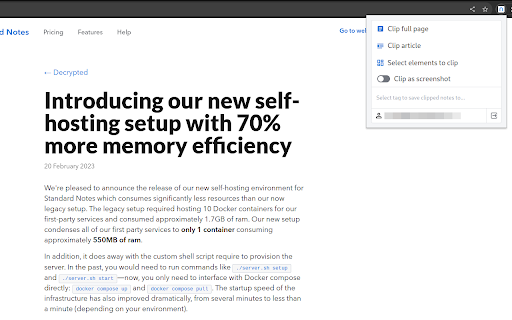
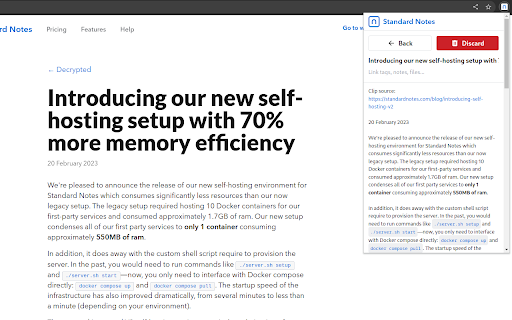
Web clipper for Standard Notes The Standard Notes Clipper extension is the perfect tool for saving and organizing web content. With this extension, you can clip full pages, articles, or select specific elements to save to your Standard Notes account, which is end-to-end encrypted for maximum security. Whether you're doing research, saving recipes, or just want to keep track of interesting articles, the Standard Notes Clipper makes it easy to store your content in a safe and organized way. Plus, with the ability to link your clipped content to tags and other notes, you can easily find what you're looking for when you need it.

SimpleLogin by Proton: Secure Email Aliases
Easily create a different email for each website to hide your real email. Protect your inbox against spams, phishing, data breaches Use email ALIAS instead of your real email address to: - defend your mailbox from spams, phishing and data breaches. - protect your privacy from cross-site tracking. 1- Next time a website asks for your email address, give an alias instead of your real email. 2- All emails sent to an alias is *forwarded* to your personal email address. 3- Just hit "Reply" if you want to reply to a forwarded email: the reply is sent from your alias and your real email stays hidden. You can also easily send emails from your alias. SimpleLogin is an *open-source* email alias solution that allows you to quickly create an email alias. Use an email alias when: - subscribing to a newsletter - signing up for a new account - giving your email to someone you don't trust. Later on you can simply block an email alias if it's too spammy. When you give away your personal email online, there is a good chance that your email address would end up with a spammer or leaked during a breach. You could check whether your email is leaked using website like https://haveibeenpwned.com SimpleLogin could also help manage your business emails. If you own a domain and don't want to pay a full solution like GSuite, you could add the domain into SimpleLogin and create emails like contact@my-domain.com, partner@my-domain.com with aliases. All our business emails (the @simplelogin.io) are actually aliases. ## What distinguishes SimpleLogin - Generous free plan: there's no cap on bandwidth or number of replies/sends. The Free Plan is enough for protecting your personal email. Premium Plan targets at more "advanced" users with features like custom domain, unlimited alias, PGP, directories, etc. - Fully open source: both SimpleLogin server and client code (browser extension, JS library) are open source so anyone can freely inspect and (hopefully) improve the code. You would not trust a blackbox to handle your emails, do you? - The only email forwarding solution that can be self hosted, i.e. you can run SimpleLogin on your server. - Not just email alias: we are working on providing a similar technology for phone number and credit cards. Stay tuned! - Easily export your data: allows you to change the service provider if someday you decide to leave SimpleLogin.

Kagi Search
Set Kagi as your default search engine while also preserving your session in private browsing. Remember to enable 'Allow Incognito'. - Easily set your default search engine to be Kagi - Allows Kagi to work in Private Browsing (remember to click 'allow incognito') - Search-by-image by right-clicking on an image Kagi Search for Chrome is fully open source. Please review the installation instructions, and if you wish, the source code available at: https://github.com/kagisearch/chrome_extension_basic

Readwise Highlighter
Save a page to Readwise Reader This is the official Reader browser extension made by and maintained by the Readwise team. You use the Reader Highlighter extension to: • Save articles to Reader – the first ever read-it-later app built for power readers. If you’ve ever used Instapaper or Pocket, Reader is like those, except it’s built for the modern era and brings all your reading into one place including: web articles, email newsletters, RSS feeds, Twitter threads, PDFs, EPUBs and more. You can get started with Reader here. • Highlight and annotate the open web. All highlights that you make using this extension will be synced with the Readwise ecosystem and, optionally, to your note-taking app of choice such as Obsidian, Notion, Roam Research, Evernote, Logseq, and more. Note: You must have an existing Readwise account to use this extension. If you are not already a subscriber, you can get a free 30-day trial with no credit card upfront. At the end of the trial, you will not be charged unless you choose to subscribe.

Notejoy Web Clipper
Save and share anything you see on the web directly to Notejoy. CLIP ANYTHING - Clip any web page you find across the web - Save as a simplified article for easy reading within Notejoy - Or save a bookmark to get back to the original at any time - Clip images, PDFs, and videos in addition to articles - Great for saving any content you come across as part of your project's research EASILY SHARE - Simply save your clip in a team library to give your colleagues access - Add a comment and @mention colleagues to bring the clip to their attention and start a conversation - Easily maintain a central hub for your team to come back to so important research doesn't get lost in email or Slack
