
cnanceabnogiieiepiehjhpnmgpagjbm
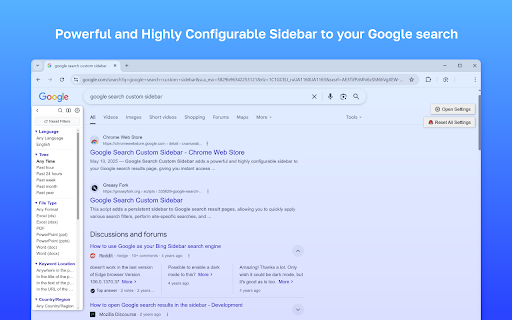


Google Search Custom Sidebar is a powerful Chrome extension that enhances Google Search by adding a fully customizable sidebar with advanced search filters and tools directly to the search results page. This Google Search extension gives you instant access to advanced search operators without digging through menus. The search sidebar lets you refine Google Search results by language, time range, file type, country or region, and keyword location with a single click. Google Search Custom Sidebar includes quick filters for searching content anywhere on the page, in titles, text, or URLs. You can filter Google Search results by file type such as PDF, DOCX, XLSX, PPTX, and more, or limit results to specific countries and languages. The extension also provides enhanced site search tools. Quickly search within predefined websites, combine multiple sites using checkbox mode, or add custom domains and TLDs such as .edu, .gov, or country-specific domains. This makes Google Search Custom Sidebar especially useful for research, SEO, and professional analysis. Essential Google Search tools are built directly into the sidebar, including a Verbatim mode toggle, personalization on/off switch, quick access to Google Advanced Search with your current query, and a one-click reset for all filters. Google Search Custom Sidebar is highly customizable. You can show, hide, and reorder sidebar sections, adjust appearance settings like width, font size, and themes (light, dark, minimal, or system), choose where control buttons appear, enable accordion mode, and drag the sidebar anywhere on the page. The sidebar appears automatically on Google Search result pages. All settings are configured through a built-in settings panel accessible from the sidebar header. Google Search Custom Sidebar runs locally in your browser. No tracking, no analytics, and no data collection.

Side Search Panel
Activate this extension to open the side panel. Search for anything, and get result in new tab. With no Hassle, quickly search for the web while you surf. Install our Search Side Panel chrome extension which makes your browsing more comfortable by adding a feature-rich side panel. The panel extension on the side enables you to search anything directly on the web without navigating to another page. Simply input your search, explore results as well as clicking to open them in a different tab. With no hassle, get into research and shopping as never before! Key features of side search panel chrome extension Side Panel Access: At any time, open the side panel for quick searches without disturbing your browsing. Seamless Integration: Provides a browser extension which is easy to find and use. Fast Search: Quickly, search the internet for anything you need without leaving the web page that you are on. One-Click Results: Look at the search results in the side panel and open the desired links in new tabs with just one click. How to use this chrome extension 1: Enable the Add-on Let us go to the Google Web Store. Look for the "Search Side Panel" chrome extension. Click on "Add to Chrome" and confirm it by clicking "Add extension". 2: Open the Side Bar. After the installation is completed, click on the extension icon in the Chrome toolbar. The side panel will be launched on the side of your browser window. In the side panel, you will find the search bar. Press "Enter" or click on the search button to begin the search process. Look through the search results that will be shown on the right panel. Move your cursor over a result to get a short description or a preview. The "Search Side Panel" Chrome extension is a very helpful tool to a diverse group of users such as researchers, students, multitaskers, online shoppers, content creators, professionals, and casual browsers. Through this, a handy side bar for instant web searches that do not interrupt the browsing process is created, which in turn increases productivity and efficiency. Whatever purpose the user has for searching, be it to perform research, compare prices while shopping, get inspiration for content creation, or just explore the topics of interest, this extension automates the process by keeping the search results in the browser window. It's perfect match with the user’s needs and the time-saving features, this "Search Side Panel" extension is designed for individuals who are looking for convenience and efficiency in their online activities. It is useful because opening the 'Search Side Panel' extension for Chrome is incredibly convenient, and then a small search box appears right on the side. As for the web searches, you can just type in the words or phrases you like, and the results will appear right there on the same page without the need to switch tabs or leave the site you are browsing. It is like you have a friendly little search assistant right there with you, which makes it simple to find whatever you need without any inconvenience. Regardless of if you are doing research for school, bargain hunting when shopping online or just wants to learn something new, this extension is beyond easy to use as it completely takes you out of the struggle to look for stuff on the web. 1. How can I see the panel if I have the extension already? The extension icon in the Chrome toolbar gives you instant access to the side panel. 2. May I be able to make some changes in the side panel's appearance or location? Consequently, your choice currently doesn't include customization and changing the look of side panel or its position. 3. Does it work with all the websites and search engines? Indeed, it is not only a service offered by most websites, but it also goes hand in hand with the major search engines. 4. Is it possible to disable or uninstall the extension if it is not of use anymore? Yes, the extension icon will appear when you right-click on it and you will be able to disable or uninstall it from Chrome.

SidePanel Buddy - Open Any Site in Side Panel
Browse any website in Chrome's side panel alongside your main tab. Your browsing session stays exactly where you left it. Unlike other side panel browsers, SidePanel Buddy automatically saves your last visited page - close the panel, switch tabs, or even restart Chrome, and your page will be right there waiting when you return. Choose your favorite search engine. Quickly switch between Google, Bing, Brave Search, Ecosia, or Yahoo directly from the side panel. Your preference is remembered across sessions. What is SidePanel Buddy? SidePanel Buddy transforms Chrome's side panel into a fully functional browser. Browse any website alongside your main tab - perfect for: - Research - Keep references open while writing documents - Comparison shopping - View product pages side by side - Social media - Check Twitter, Reddit, or news without leaving your current page - Tutorials - Follow along with guides while working in another tab - Multitasking - Watch videos, read articles, or chat while browsing Key Features ✓ Session Persistence - Your page is automatically saved and restored ✓ Multiple Search Engines - Google, Bing, Brave, Ecosia, Yahoo ✓ Drag & Drop - Drop any link into the panel to open it ✓ Dark Mode Support - Automatically matches your system theme ✓ Clean Interface - Minimal, distraction-free design ✓ Fast & Lightweight - No bloat, just browsing How to Use 1. Click the SidePanel Buddy icon to open the side panel 2. Enter a URL or search term in the address bar 3. Browse freely - your session is automatically saved 4. Close and reopen anytime - you'll be right where you left off Browse smarter. Browse together. Browse with SidePanel Buddy.

Side Panel Viewer
Open web pages like Google Calendar and Gemini in a side panel. Provides a customizable sidebar to quickly launch and use favorite web applications and websites. This enhances user productivity by keeping essential tools accessible in a side panel, reducing the need to switch between browser tabs.

QuickAccess Sidebar
Customizable sidebar to open Gmail, ChatGPT, WhatsApp and any custom URL. Add icons, set shortcuts, and stay focused. New Features: 🌙 Dark Mode: Toggle between light and dark themes 📍 Position Control: Move sidebar to left or right side ⏰ Auto-Hide Toggle: Keep sidebar always visible or auto-hide ⚙️ Settings Panel: Easy access to all customization options *Please restart the browser once so the sidebar loads on all tabs* *You will see the sidebar only when you take the cursor to the left edge of the screen or if you use any shortcut* *To edit shortcuts, go to chrome://extensions/shortcuts* QuickAccess Sidebar is a lightweight, customizable sidebar for quick access to your most-used web tools. Features: - Up to 10 configurable shortcuts - Custom icons - Keyboard shortcut support - Persistent across sessions - Auto-collapses after opening - designed to stay out of your way 📌 Notes: - All shortcuts are opened as pinned tabs within the browser. There is no option within chrome for opened tabs to not show up as a tab - To edit shortcuts, go to: `chrome://extensions/shortcuts` - The sidebar collapses automatically after use. This is intentional - loading websites inside the extension frame causes compatibility issues. We’ve optimized for a smooth, unobtrusive experience.
