
ocpkdaaigfdpeccdeiaopahjoeaikmjg
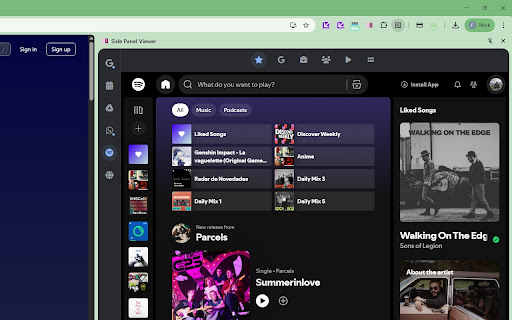
Open web pages like Google Calendar and Gemini in a side panel. Provides a customizable sidebar to quickly launch and use favorite web applications and websites. This enhances user productivity by keeping essential tools accessible in a side panel, reducing the need to switch between browser tabs.

SidePeek | Side Browser
A simple side browser for your favorite sites in Chrome's side panel SidePeek helps you browse smarter with a built-in side browser for Chrome. Open links, search the web, and view reference pages in a convenient sidebar without leaving your current tab. Use SidePeek to: - preview links quickly - keep docs and references open while you work - compare pages side by side - reduce tab clutter - stay focused on your main task Perfect for research, productivity, study, writing, coding, and everyday multitasking. Simple, lightweight, and easy to use — SidePeek makes side-by-side browsing feel natural.

Side Any
Open any website, webapp and webpage (such as AI Agent, tools and video website) in your web browser's side-panel/sidebar. Open any website, webapp and webpage (such as AI Agent, social meida, tools and video website) in your web browser's side-panel/sidebar.

SidePanel Buddy - Open Any Site in Side Panel
Browse any website in Chrome's side panel alongside your main tab. Your browsing session stays exactly where you left it. Unlike other side panel browsers, SidePanel Buddy automatically saves your last visited page - close the panel, switch tabs, or even restart Chrome, and your page will be right there waiting when you return. Choose your favorite search engine. Quickly switch between Google, Bing, Brave Search, Ecosia, or Yahoo directly from the side panel. Your preference is remembered across sessions. What is SidePanel Buddy? SidePanel Buddy transforms Chrome's side panel into a fully functional browser. Browse any website alongside your main tab - perfect for: - Research - Keep references open while writing documents - Comparison shopping - View product pages side by side - Social media - Check Twitter, Reddit, or news without leaving your current page - Tutorials - Follow along with guides while working in another tab - Multitasking - Watch videos, read articles, or chat while browsing Key Features ✓ Session Persistence - Your page is automatically saved and restored ✓ Multiple Search Engines - Google, Bing, Brave, Ecosia, Yahoo ✓ Drag & Drop - Drop any link into the panel to open it ✓ Dark Mode Support - Automatically matches your system theme ✓ Clean Interface - Minimal, distraction-free design ✓ Fast & Lightweight - No bloat, just browsing How to Use 1. Click the SidePanel Buddy icon to open the side panel 2. Enter a URL or search term in the address bar 3. Browse freely - your session is automatically saved 4. Close and reopen anytime - you'll be right where you left off Browse smarter. Browse together. Browse with SidePanel Buddy.

SideTab |浏览器侧边栏 open any page in side bar
🚀 Transform Your Browsing Experience with SideTab - Your Smart Browser Companion! Ever wished you could view multiple websites at once without the hassle of tab-switching? ✨ Meet sidetab, your new favorite browser extension that brings a sleek, customizable sidebar to your browser! Simply drag and drop any website to view it alongside your main content - it's that easy! 💡 What makes sidetab special? • Instant access to your favorite websites with a simple drag-and-drop • Smart search feature: drag highlighted text to instantly search without opening new tabs • Seamless multitasking that keeps you in your flow • Lightning-fast and lightweight design that won't slow you down 🎯 Perfect for: • Research and writing • Comparison shopping • Social media monitoring • Quick reference lookups • And so much more! Boost your productivity and make tab-juggling a thing of the past! With sidetab, everything you need is just a glance away in your browser's sidebar. Try it now and experience a smoother, more organized way of browsing! 🌟
