
cmcggkbbiapnpemadkojjbnopmipfldd


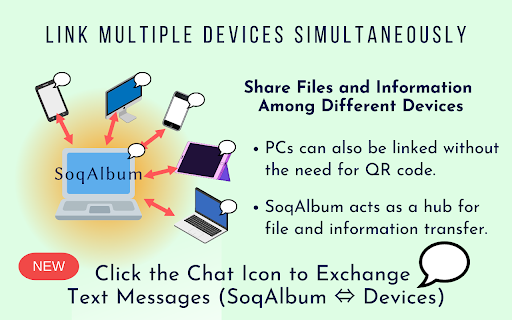
SoqAlbum directly links your smartphone(iPhone/Android) to chrome, allowing you to transfer and share files and photos via the link. (NEW) Added a simple chat feature. You can now exchange text messages between Chrome and your smartphone. (NEW) Added "Send Memo" and "Send Voice" tools to SoqTools. You can edit text or record audio on the fly, and send it directly to Chrome. SoqAlbum links your smartphone and chrome directly via P2P. The link is completed in just two easy steps: click on the extension icon to launch SoqAlbum, and then use your smartphone to read the QR code there. Using a simple tool on the smartphone app (SoqTools), you can easily transfer files from your smartphone to the chrome side. By selecting the camera tool, photos taken with a smartphone can be saved directly to the chrome side and viewed on the large screen display of the PC. It is also easy to send files from the chrome side to the smartphone. SoqAlbum provides advanced collaboration between smartphone and PC. Multiple smartphones can be linked to SoqAlbum at the same time. This allows you to transfer and share files across multiple devices, using chrome as a hub for file sharing. File exchange in SoqAlbum is done via P2P and does not go through the cloud, so there is no need to worry about file leaks from the cloud or censorship. We have offered "Adaptive Download Shelf" as an extension option, which allows you to disable the download shelf only when using SoqAlbum. This can make the full screen display of SoqAlbum more comfortable. SoqAlbum is a universal app supporting Win/Mac/Linux/ChromeOS/iPhone/Android. Even in situations where AirDrop or Nearby Share are not available, SoqAlbum can still transfer files. You can use this free app right now just in your browser, without creating an account. With this extension, enjoy the freedom of file sharing without the need to be aware of platform differences.

Megadisk - Send large files
Megadisk Send large files and share your photos and documents Megadisk offers a lightning-fast and highly secure file transfer system designed to simplify sharing your photos, documents, and large files. With our platform, you can effortlessly upload your data to the cloud and send a direct link to your friends, colleagues, or clients. Say goodbye to worrying about file size limits or compromising on security – Megadisk has you covered. Our extension provides a seamless file transfer experience without any intrusive advertisements. It's the perfect solution for sending photos, videos, PDF files, or any other large digital items to your desired recipients. Using Megadisk is as easy as a few clicks: simply add your files by clicking the large "+" button, proceed to upload and share, enter the recipient's email address, and include your own. It's that simple! One of the standout features of Megadisk is its user-friendliness. You can send or receive videos, photos, files, or documents within moments, with just two straightforward actions: uploading the items and sending them. Plus, unlike other platforms, Megadisk doesn't require you or your recipients to create an account or go through time-consuming registration processes. It's hassle-free and designed to save you time. While our extension offers an efficient file transfer experience, please note that it doesn't encompass all the functionalities available on our Megadisk online platform. For sending larger files and accessing personalized disk space, we recommend visiting our website, where you can enjoy additional features such as creating directories and editing Office documents online. Megadisk sets itself apart from other services like "GDrive," "OneDrive," "iCloud," or "Dropbox," offering unique advantages and capabilities, including a comparison with popular file transfer services like WeTransfer. For more detailed information, please refer to our FAQ section at https://www.megadisk.net/. Discover the convenience and security of Megadisk for your file transfer needs today.

iPhone 13 Pro Max Giveaway
Chance to win iPhone 13 Pro Max Giveaway 256 GB worth $1159 for chrome app. Apple iPhone 13 Pro Max Giveaway is the last product of Apple Company in the iPhone series. In addition to the best iPhone ever, yet additionally the one with the ‘greatest camera update ever’ – that would be the current year’s iPhone 13 Pro, which we have here in Max size. Joining those bigger and better cameras, we have a high revive rate show, more battery, the compulsory chipset redesign – the 13 Pro Max checks all the containers for further developing all that is significant. We’re here to see by exactly how much. Apple iPhone 13 Pro Max colors are Graphite, Gold, Silver, Sierra Blue. The storage capacity of new iPhone 13 Pro Max models is 128GB, 256GB, 512GB and 1TB. If you are anticipating this great model then keep following us and wait for our iPhone 13 Pro Max giveaway to get one of these models for free.

Phone On Web | Android in browser
- File Manager, download/upload file - Quick Start, low latency - HD quality - Keyboard and mouse operation - Turn off screen saver privacy & power - No internet connection required

Android Terminal
Access your USB-connected Android terminal without installing ADB This extension establishes an ADB-compatible connection with your Android device, eliminating the need for any native applications to be installed. It's designed to operate across various desktop environments, whether you're on Windows, Linux, macOS, or Chrome OS. Remarkably, the extension is written entirely in JavaScript, making it free from any native executables. Here are some of the key functionalities offered by this extension: 1. Multiple Terminal Windows: Easily open multiple terminal views to connect with your Android device, facilitating efficient debugging and interaction. 2. File Transfer: Streamline sending and receiving files between your desktop computer and the Android device. 3. Screenshot Capture: Capture screenshots of the current screen view on your Android device and store them on your desktop computer. 4. Application Backup: Perform comprehensive backups of your Android device, including all or select installed applications and their associated data. 5. Debugging with "logcat": Use the "logcat" command to debug your Android device directly from your desktop, enhancing your development capabilities. This extension serves as a compelling alternative to traditional native ADB (Android Debug Bridge) applications, offering a more accessible and platform-agnostic solution. If you already have the native ADB installed and want to explore this extension, ensure there are no ongoing communications with the ADB server by executing the "adb -kill-server" command. Then, refer to the instructions on the extension's homepage to get started seamlessly.
