
pgnojloljbbifjelbnefdkdmklfjlije

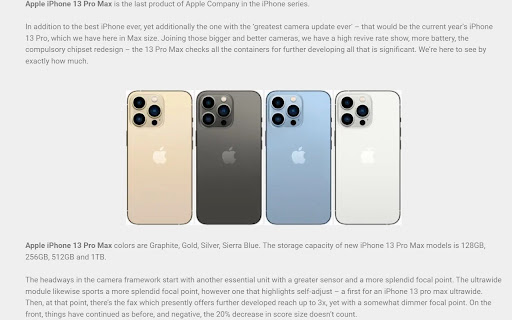

Chance to win iPhone 13 Pro Max Giveaway 256 GB worth $1159 for chrome app. Apple iPhone 13 Pro Max Giveaway is the last product of Apple Company in the iPhone series. In addition to the best iPhone ever, yet additionally the one with the ‘greatest camera update ever’ – that would be the current year’s iPhone 13 Pro, which we have here in Max size. Joining those bigger and better cameras, we have a high revive rate show, more battery, the compulsory chipset redesign – the 13 Pro Max checks all the containers for further developing all that is significant. We’re here to see by exactly how much. Apple iPhone 13 Pro Max colors are Graphite, Gold, Silver, Sierra Blue. The storage capacity of new iPhone 13 Pro Max models is 128GB, 256GB, 512GB and 1TB. If you are anticipating this great model then keep following us and wait for our iPhone 13 Pro Max giveaway to get one of these models for free.

How Much You Need to Pay Robux with Taxes
A roblox plugin That calculates how much you need to pay with taxes A roblox plugin That calculates how much you need to pay with taxes

Mobioptions ASO Best ASO Toolbox For App Store
Enhances the App Store with various ASO features. Mobioptions for iOS: Your Pinnacle ASO Companion in the Apple App Store - The Essential Chrome Extension for iOS App Store Optimization Introducing Mobioptions for iOS - the tailored solution for iOS app developers aiming for the summit in the Apple App Store. Infused with the intelligence and analytical power of tools like Sensor Tower and App Annie, Mobioptions is now ready to elevate your app's presence and success in the iOS ecosystem. Unlock iOS-Specific ASO Capabilities: Embrace the precision of ASOdesk and the insightfulness of Mobile Action with Mobioptions for iOS. It offers detailed analytics on app performance, insightful competitor analysis akin to Apptopia, and strategic keyword research, all fine-tuned for iOS apps. Outpace Your Competition: In the competitive spirit of Gummicube and TheTool, stay ahead with Mobioptions for iOS. Decode and outmaneuver your competitors' strategies, optimize your app's visibility, and clinch top download numbers. Enhance Your Keyword Mastery: Utilizing the depth of Keyword Tool for Apps and the strategic insight of SearchMan, Mobioptions for iOS helps you select impactful, relevant keywords, crucial for improving your app's discoverability and search rankings in the Apple App Store. User-Friendly Optimization: Mobioptions for iOS continues our commitment to simplicity and power. The extension offers an intuitive interface, easy-to-implement recommendations like AppTweak, and streamlines the optimization of your app’s metadata, saving time while maximizing results. In-Depth Performance Tracking: With analytics prowess akin to App Radar and Appfigures, monitor your app's progress in real-time. Mobioptions for iOS lets you track downloads, ratings, and reviews, allowing for agile adjustments to your ASO strategy. Join the Mobioptions Success Story: Be part of the growing community that trusts Mobioptions for their ASO needs, much like the followers of AppFollow and StoreMaven. Developers around the world have transformed their app's market performance, and now, with our iOS-specific tool, you can too. Stay Ahead with Constant Updates: In the dynamic style of Priori Data and SplitMetrics, Mobioptions for iOS stays abreast of the latest Apple App Store trends and algorithm updates. Leverage the most current ASO practices and never miss an opportunity for growth. Exclusive iOS Insights: Tap into insights much like Appstatics, accessing vital data on app age, download trends, and category rankings, providing a clear view of your app's position in the iOS market. Engagement and Feedback Tools: Embrace the focus on user engagement and feedback, crucial for enhancing user experience and functionality, much like the approach of Tune. Seamless Integration: Enjoy direct links to essential resources, making your app development and optimization process more efficient and effective, reflecting the convenience offered by tools like SplitMetrics. Mobioptions for iOS isn't just an optimization tool; it's your partner in redefining success in the Apple App Store, combining the strengths and approaches of leading ASO tools in the market.

Mac New Tab
A Simple New Tab (browser's home page) inspired by Mac OS design. Elevate your browsing experience with a sleek, minimalist design inspired by macOS. This stylish extension reimagines your new tab page, blending elegance and functionality to create a beautiful, personalized dashboard. Key Features You’ll Love: 🌟 Elegant Widgets Display an analog clock, date, and personalized greetings—just like macOS—for a refined touch every time you open a new tab. 🌤️ Weather Widget (New!) View current temperature and conditions directly on your new tab. Auto Location: Uses geolocation to automatically fetch weather for your area. Manual Location: Pin a specific city to always show its weather without sharing your location. Customizable: Toggle between Celsius and Fahrenheit. Privacy-first with no API keys required. macOS-style battery indicator with a circular progress arc and laptop icon. Displays current **battery percentage** and **charging status** in real time. Arc color adapts based on charge level — green when charging, yellow/amber normally, red when low. Toggle on or off from Settings → General. 🔍 Powerful Search Search effortlessly with an intuitive input bar, offering the flexibility to choose between your browser’s default search engine, YouTube, ChatGPT, or Spotify. ⚡ Quick Links & Favorites Navigate to your most-visited sites or add your own custom links. Fully Customizable: Add, edit, or remove links from the settings panel. Drag & Drop: Easily rearrange your quick links in any order you prefer. Custom Icons: Automatically fetches the site's high-quality favicon, or upload your own custom icon. Customize whether links open in the same tab or a new one. 📚 Bookmark Manager Browse and search through all your saved bookmarks in a clean, macOS-inspired interface. Quickly open any bookmark with a single click. Delete bookmarks that are not needed. Organized in a launchpad for easy access without leaving the new tab. ⚙️ macOS-Style Settings Panel A clean, familiar interface lets you fine-tune your browsing experience. Hide or show greetings, search engine options, and more—your new tab, your rules. 🎨 Customizable Themes & Wallpapers (New!) Switch between dark, light or system modes or choose between theme colors to match your mood or environment. Personalise your dashboard even further by setting your favourite wallpaper/GIF or choosing from our stunning collection. Dynamic Wallpapers: Choose from animated themes including Nature, Sci-Fi, and Abstract styles. 📅 Toggle Calendar Views Switch between month or date view with a simple toggle—stay organized without the clutter. 🗣️ Voice Search Activate voice search with a Siri-like button, making it easier than ever to find what you need hands-free. 📱 Launchpad & Dock Access your favorite links quickly with the customizable dock bar and Launchpad overlay for even faster navigation. 📝 Daily To-Do List Stay on top of your tasks with a simple, built-in to-do list. Easily add and manage daily items directly from your new tab. 🗒️ Sticky Notes Create colorful, draggable sticky notes directly on your new tab page Drag and drop notes anywhere on the screen for perfect organization Auto-save - all notes persist across browser sessions Quick access - create new notes instantly from the dock Editable content - click to type and edit your notes on the fly Perfect for quick reminders, ideas, and temporary notes 🗂️ Seamless Tab Management Stay in control of your browser with a built-in Tab Manager—beautifully integrated into the side panel: Instantly search through all open tabs, Switch to any tab with a click, Close tabs directly from the list Easily toggle the panel with a subtle notch on the screen’s edge Seamlessly integrates with Google Calendar using Google Sign-In. Displays your upcoming events for the next 30 days directly on the new tab page. Shows event title, time, and source calendar with a clean macOS-style widget. Clicking an event opens it instantly in Google Calendar. All authentication and data access happen securely through Google APIs — no user data is stored or shared externally. Optionally toggle this widget on or off from the settings panel for a clutter-free experience. 🍅 Focus Studio (New!) Stay productive with a built-in Pomodoro-style timer. Ambient Sounds: Mask distractions with Brown, Pink, White, Violet, and Blue noise generators. Task Integration: Link your timer session to a specific task from your To-Do list. Visual & Audio Alerts: Get notified with a gentle chime and notification when your session is complete. Customize your focus duration to match your workflow. 🖌️ Freeform Canvas (New!) An infinite whiteboard built right into your new tab — sketch ideas, build mind-maps, and annotate screenshots without ever leaving your browser. Drawing Tools: Pen, Fine Pen, Highlighter, and Eraser with adjustable sizes. Shapes: Draw Lines, Arrows, Rectangles, Circles, Triangles, Stars, and more. Sticky Notes: Add colorful sticky notes anywhere on the canvas. Text & Images: Place resizable text blocks and images freely on the canvas. Pan & Zoom: Explore an infinite workspace at any zoom level. Smart Eraser: Cleanly erase any part of your drawing without affecting the rest. Colors & Styles: Choose from a full color palette with per-stroke customization. Undo / Redo: Easily undo any mistake with a full history stack. Export: Save your canvas as a PNG image with one click. Auto-Save: Your canvas is saved automatically and restored the next time you open it. Toggle Freeform on or off from Settings → Dock. 🪟 Spaces (New!) Create entirely separate, customizable workspaces within your dashboard to keep your contexts organized. Independent Customization: Assign a unique wallpaper, theme, and custom launchpad icons to each Space. Isolated Workflows: To-dos, Sticky Notes, and Freeform Canvas drawings are saved independently per Space. Time-Sensitive Automation: Configure time ranges for your Spaces, allowing your dashboard to automatically transition between different layouts and aesthetics based on the time of day. Switch between Spaces seamlessly to stay organized, whether it's for work, personal use, or varying times of the day. 💾 Backup & Restore Never lose your setup! Easily export your settings, to-do lists, sticky notes, and custom wallpapers to a JSON file. Import your data to restore your dashboard on a new device or browser instance. 🌍 Multi-Language Support Available in English, Kannada, Portuguese, Chinese, Russian, Vietnamese, Hindi, Turkish, Spanish, Korean, Italian, French, Czech, Bengali, Japanese, Uzbek, Marathi, and Indonesian. Your browser, in your language. Why Choose macOS Inspired New Tab? It’s the perfect blend of style and practicality. Whether you crave a sleek minimalist look or a fully personalized dashboard, macOS Inspired New Tab gives you the tools to tailor your browsing experience to perfection. Add a touch of sophistication to your browser. Experience the elegance of macOS design today!

Robux Element Changer
Changes your robux and wallet display amount on roblox.com! DISCLAIMER! This does not give, change or take any robux/wallet balance from your roblox account. Ideal for streamers that don't want to show their robux. Compatible with BTRoblox and RoPro Hide your robux!
