
ckkdlimhmcjmikdlpkmbgfkaikojcbjk
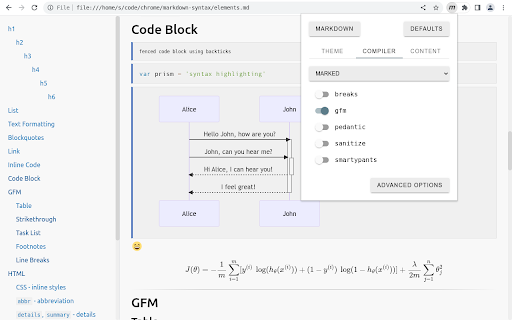

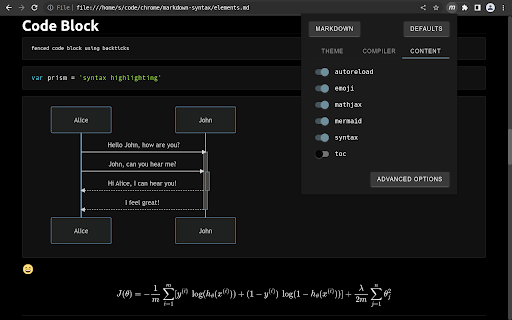
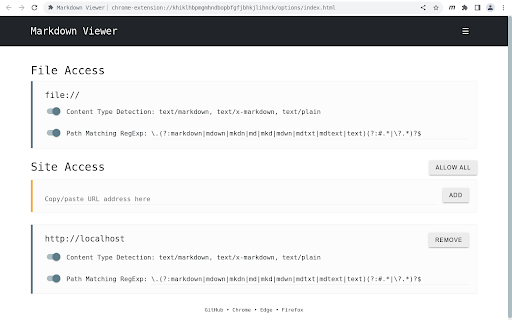
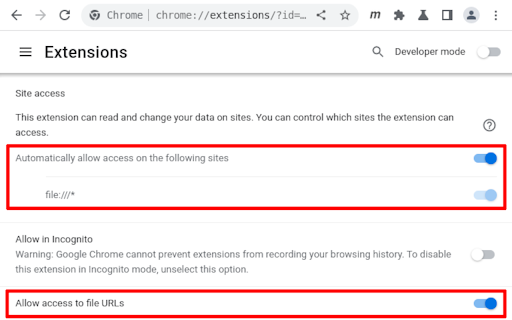
✔ Secure by design ✔ Render local and remote file URLs ✔ Granular access to remote origins ✔ Multiple markdown parsers ✔ Full control over the compiler options ✔ 30+ Themes ✔ Custom theme support ✔ GitHub Flavored Markdown (GFM) ✔ Auto reload on file change ✔ Syntax highlighted code blocks ✔ Table of Contents (ToC) ✔ MathJax formulas ✔ Mermaid diagrams ✔ Convert emoji shortnames ✔ Remember scroll position ✔ Markdown Content-Type detection ✔ Configurable Markdown file path detection ✔ Settings synchronization ✔ Raw and rendered markdown views ✔ Free and Open Source

MarkView: Markdown Viewer with Mermaid Diagrams, Math & Export
Markdown viewer with syntax highlighting, Mermaid diagrams, KaTeX math, TOC, DOCX/HTML export, folder browser & themes. Navigate markdown files with folder browser and bookmarks. Export to Word or HTML. Print to PDF with optimized layouts. View with Mermaid diagrams, KaTeX math, syntax highlighting, and smart TOC - all with 100% privacy (zero data collection). Works with local files, GitHub repos, GitLab wikis, and documentation sites. ⚡ PRODUCTIVITY & UNIQUE FEATURES - Export to DOCX and HTML with perfect formatting preservation - Print to PDF - clean, optimized layout without UI chrome, via browser print - Folder Browser - navigate your entire project structure without leaving the tab - Folder Bookmarks - save and instantly access frequently used directories - Live auto-refresh when files change - perfect for external editor + live preview workflows - Recent Documents tracking - quickly reopen recently viewed files from the popup - Word Count & Reading Time - live statistics as you read: words, characters, estimated time - Reading Progress Bar - visual indicator showing your position in long documents - Raw view toggle - instantly switch between rendered and source view - Table of Contents (TOC) with smooth scrolling for long documents - One-click copy button on all code blocks - KaTeX math equations - inline and display mode with full support for complex mathematical notation - Mermaid diagrams with interactive zoom & pan - download as SVG, PNG, or JPEG - Professional image viewer - lightbox with gallery navigation, zoom, pan, and lazy loading - External link indicators - visual previews and icons for outbound links - Render .txt as Markdown - perfect for llms.txt, changelogs, notes, and AI-generated content 🌐 UNIVERSAL MARKDOWN READER - WORKS EVERYWHERE - Local files (file:///) - enable "Allow access to file URLs" in Chrome settings - GitHub raw files (raw.githubusercontent.com) - GitLab, Bitbucket, Gitea raw file URLs - Any URL ending in .md, .markdown, .mkd, or .mdx served as plain text - Plain .txt files rendered as markdown for convenience 👥 PERFECT FOR - Developers previewing README, CHANGELOG, and API documentation - Technical writers using MarkView alongside their editor for live preview - Students and researchers reading notes with math equations and diagrams - Data scientists reviewing Jupyter markdown cells - AI developers reading llms.txt from repos and documentation sites - Content creators and writers previewing blog posts, wikis, and documentation drafts 🔒 100% PRIVACY-FOCUSED - Zero data collection - no personal information collected, ever - No analytics, no tracking, no telemetry, no cloud services - All processing happens locally in your browser - Your files never leave your device - Settings stored locally using Chrome's storage API - Built on trusted, audited open-source libraries: markdown-it, highlight.js, KaTeX, Mermaid 🚀 QUICK START 1. Install MarkView - click "Add to Chrome" 2. Test instantly: visit https://raw.githubusercontent.com/facebook/react/main/README.md 3. For local files: go to chrome://extensions → MarkView → Details → enable "Allow access to file URLs" 4. Open any .md file - drag & drop, File → Open, or click a link 🔐 PERMISSIONS - Storage: Save theme, font, and layout preferences locally - ActiveTab: Read file content from the current tab for rendering - Downloads: Export to HTML and DOCX files - File URLs: Access local .md files (disabled by default) - Host Permissions: Render files from GitHub, GitLab, and documentation sites All processing is local. No data is ever sent to external servers.

Copy as Markdown
Copy as Markdown is a browser extension that helps you copy the following things as Markdown to your system clipboard: On the web page: - Selection Text as Markdown - A Link on the Page - An Image on the Page, with or without wrapping link Exporting tabs in the current window, either all or highlighted tabs: - Current Tab as Link - List of Links - Task List (for GitHub-Flavored Markdown) - Including your tab grouping You can add Custom Formats to satisfy your needs! You can also specify keyboard shortcuts to speed up your workflow. - Cannot grab image.alt when copying image - On Microsoft Windows, copied page link doesn't come with the link title When using certain features such as tab exporting, you will be promoted to grant optional permissions, so that Copy as Markdown may read data from your browser. You may revoke permissions anytime on the Options page, from Extensions > Copy as Markdown > Extension Options. Copy as Markdown respects your privacy. It does NOT collect your browsing history, and will only access tabs when you use tab exporting features. - 3.7.0 - [FIX] Improved reliability of writing text to system clipboard - [BREAKING] This version requires minimum Chrome M116 or later. Users under M116 please use 3.5.0 or lower. - [NOITCE] You will see a permission warning about clipboard writing during upgrade progress. This is to grant the extension proper permission to write to the clipboard. To be clear, this extension has been writing to the OS clipboard since the very beginning using workarounds that did not require clipboardWrite permission, but now it requires. For past release notes please see https://github.com/yorkxin/copy-as-markdown/releases

Asciidoctor.js Live Preview
Render AsciiDoc (.ad, .adoc, .asc, .asciidoc) as HTML inside your browser! The extension can be configured via an options page. To open the options page, right-click the extension icon and choose Options on the menu. You can also go to chrome://extensions and click the Options link. The options page let you add custom attributes or change the theme of the AsciiDoc HTML output. • Migrate to manigest v3 -- `include` won't work anymore! • Migrate documentation to Antora: https://docs.asciidoctor.org/browser-extension/ • Reorganize use-cases to separate page, try-it-yourself to a quickstart page, diagrams try-it-yourself to a diagrams quickstart page (#652) (#654) • Fix MathJax equation numbering (#412) • Upgrade Asciidoctor.js from 2.2.0 to 2.2.1(based on Asciidoctor 2.0.12) • Upgrade Asciidoctor Kroki from 0.8.2 to 0.12.0 (add excalidraw, bpmn and bytefield as a supported diagrams) • Global configuration using `kroki-default-format` and `kroki-default-options` attributes • Upgrade bulma from 0.8.2 to 0.9.1 • Do not add the toc2 class if the document has no section - thanks @mnrvwl • Stop auto reload when the extension has been disabled - thanks @mnrvwl • Remove the deprecated options_page - thanks @mnrvwl • Upgrade Asciidoctor.js from 2.1.1 to 2.2.0 • Upgrade Asciidoctor Kroki from 0.7.0 to 0.8.1 • Support sidebar toc • Compatibility with Firefox, use the same codebase again! • Remove chartist sourcemap reference • Upgrade Asciidoctor.js from 2.0.3 to 2.1.1 • Show errors thrown by the background script on the page (thanks @doub) • Catch exceptions thrown by the initial XMLHttpRequest • Use the `Cache-Control` header to make sure that we fetch the latest version available • Upgrade Asciidoctor Kroki from 0.4.0 to 0.7.0 with new diagrams: `packetdiag`, `rackdiag`, `vega` and `vegalite` • Upgrade chartist from 0.11.0 to 0.11.4 • Upgrade bulma from 0.7.5 to 0.8.2 • Move the fetch and convert functions in the background script (as the latest version of Chrome 80+ blocks `XMLHttpRequest` sent by the content script) • Upgrade to MathJax 3.0.1 • Fix inter-document cross references by using `.adoc` as `outfilesuffix` (thanks @jmini) • Disable the diagram extension by default (can be enabled in options page) • The Kroki server URL can now be configured in the options page (for instance, you can point to a local instance) • Set built-in attributes docfile, docname and docfilesuffix (thanks @utopalex & @ehmkah) • Use Kroki extension to render diagrams (support BlockDiag, SeqDiag, ActDiag, NwDiag, C4, Ditaa, Erd, GraphViz, Mermaid, Nomnoml, PlantUML, SvgBob and UMLet diagrams!) • Load additional languages for highlight.js (using :highlightjs-languages: attribute) • Upgrade to Asciidoctor.js 2.0.3 • The default safe mode is now safe (was secure)

Markdown Preview Plus
Converts and previews markdown files (.md, .markdown) to HTML(include TOC) right inside Chrome and support live reload Automatically parses markdown files (.md) into HTML with live reload 1. Install extension from webstore (creates no new UI) 2. Check "Allow access to file URLs" in chrome://extensions listing: 3. Open local or remote .md file in Chrome. 4. See nicely formatted HTML! Note: The auto reload feature is disabled default. * Support auto reload. * Support external css file. * Customize theme for every md file. * Support github flavored markdown. * Export nicely formatted HTML. * Support render Katex, Mermaid. The extension is open source. https://github.com/volca/markdown-preview Fix a bug for the tag style * Fix a bug for load fonts of Katex * Fix a bug for "table of contents" * Compatible with Chrome 136 * Update mermaid lib * Update marked lib * Update marked lib * Fix a bug for clear custom CSS paths * Supports add custom CSS path. See #19 * Fix a bug for render mermaid. See #158
