
ckjjfpcdnccfjnkpnlfndpmlbdlohgcm
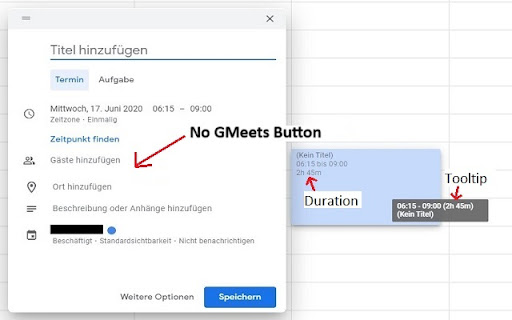


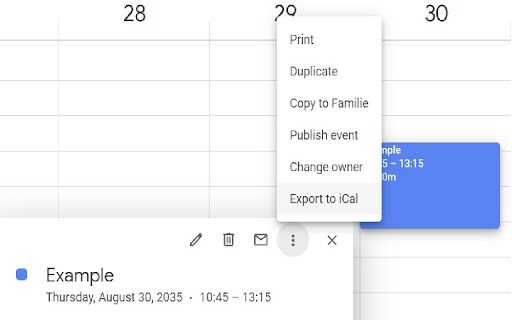
This extension provides multiple small tools for the Google Calendar™. This extension offers a suite of convenient tools designed to enhance your Google Calendar™ experience. You have full control over your experience. Customize it to your liking by disabling any or all features in the settings. Your calendar, your way. 1. Display Event-Duration : (all languages) Calculates and displays the event durations on the "by day", "by week" and "by month" view. 2. Information On Hover: Displays the event information, when hovering over an event on the "by day", "by week" and "by month" view. 3. Export Event As Ics: Seamlessly export events as ICS files for easy sharing and integration with other calendar applications. 4. Indicate Full-Day Events: Highlight full-day and multi-day events in day and week views by overlaying them on the main calendar background. 5. Remove GMeeting Buttons: Removes the Google Meet™ buttons from the event details page and the quick add dialog. This is useful if you don't use Google Meet™. Enhance your Google Calendar™ usage with this versatile browser extension!

Google Calendar Resize Sidebar
Customize your Google Calendar sidebar width with an intuitive resize handle. Simple, lightweight, and privacy-friendly. A simple yet powerful extension that enhances your Google Calendar experience by adding a resizable sidebar feature. Key Features: • Intuitive drag handle to adjust sidebar width • Double-click to reset to default width • Automatically saves your preferred width • Smooth and responsive resizing • Clean and minimal design that matches Google Calendar's aesthetics • Support for both light and dark themes Perfect for users who: • Need more space for calendar lists • Want to see longer calendar names • Prefer a customized layout • Work with multiple calendars This extension respects your privacy and requires no special permissions - it simply adds a resize functionality to the existing Google Calendar sidebar. How to use: 1. Hover over the right edge of the sidebar to reveal the resize handle 2. Click and drag to adjust the width (200px - 600px) 3. Double-click the handle to reset to default width 4. Your preferred width is automatically saved for future sessions Lightweight and maintenance-free - install and forget while enjoying the enhanced functionality.

Google Calendar Event Checker
Mark events as completed or cancelled in Google Calendar with emojis or strikethroughs. Mark Google Calendar events as completed with checkmarks, emojis, or strikethrough and turn your calendar into a task tracker. It’s the perfect tool for professionals, students, and anyone who wants to mark events as done or canceled and boost productivity. 🆓 Free Version Features 🆓 Available immediately after installation - no sign-in or subscription required: ▸ Customizable completion marks: choose between emojis (✅ or ❌), unicode checkmark (✓), or strikethrough effect (title crossed off). ▸ Automatic timestamps: save completion date/time in event description for easy reference. ▸ Edit-page marking: mark events as done from the calendar event edit page. ▸ Minimal and Privacy-Oriented: the extension is designed to be minimalistic and don’t track any user data. ⭐ Premium Version Features ⭐ Unlock advanced productivity and simplicity features: ▸ Quick-mark from event dialog: complete events with one click from the event popup. ▸ Daily events dashboard: view all today's events in the extension popup with completion status. ▸ Mark from any tab: complete calendar events without opening Google Calendar. ▸ Custom checkmark slots: add up to 5 emojis or unicode symbols as completion markers. ▸ Still Minimal and Privacy-Oriented: we don't see or store any of your events and never share your data. How to use free version: ▸ Install the extension, no sign in needed ▸ Open any Google Calendar event for editing ▸ Click the completion mark button (✅) ▸ Save the event ▸ Go to the extension's options to configure the completion marks and a strike-through effect. How to use premium version: ▸ Pin extension and sign in with your Google account ▸ Start free trial (no credit card needed) ▸ Mark events as completed from an event dialog ▸ Mark events as completed from "Today events" view ▸ Configure custom checkmarks and a strike-through effect in ⚙️ User Settings page (available after sign in). ⚠️ Troubleshooting ⚠️ If something isn't working properly, here's what you can try: ▸ Make sure you can edit event title from an event edit page - some events are not editable at all - for example: working locations, contacts’ birthdays calendar, shared calendars if you don’t have proper permissions. ▸ Sign out and sign back to the extension (for premium users). ▸ Reinstall the extension. ▸ Report an issue to support@calcheckr.com, include screenshots if possible as it might help to resolve your case more quickly, make sure to mention what browser you’re using. ❓Frequently Asked Questions❓ Q: How do I mark Google Calendar events as completed? A: Install the extension, open any event, and use the completion button or choose your preferred visual mark (checkmark, emoji, or strikethrough). Q: Will other people see my completion marks? A: Yes! Since changes save directly to Google Calendar, anyone with calendar access sees the completion marks. Great for team collaboration. Q: Does this work with Google Workspace? A: Absolutely! Works with personal Google accounts and Google Workspace (formerly G Suite) accounts. Q: Does it work with recurring events? A: Yes! Mark individual instances or the entire series. Q: Can I use the free version forever? A: Yes! The free plan includes core features. Upgrade to Premium only if you want one-click marking, daily views, and custom checkmarks. Q: Is my calendar data secure? A: Absolutely! We use only Google infrastructure. Authentication tokens are encrypted, and we never see, store, or share your calendar events data. Q: How do I cancel Premium? A: Cancel anytime from the Stripe customer portal. Premium features remain active until your billing period ends, then you automatically return to the free plan. 📧 Contacts 📧 For any questions, comments and ideas please reach out to support@calcheckr.com 2.2.0 - 12/10/2025: - premium: strikethrough effect in popup view - premium: date picker for quick navigation 2.1.2 - 12/06/2025: - internal fixes: make completion detection to be based on the default + custom checkmarks only 2.1.1 - 12/03/2025: - internal fixes - options page UI refactoring 2.0.2 - 11/24/2025: - internal fixes - add support id in extension options 2.0.1 - 11/18/2025: - internal fixes - show onboarding page once - start introducing premium version 1.6.2 - 12/13/2022: - Fix issue with not showing button (input selector got updated) 1.6.0 - 10/09/2022: - Add error and usage reporting option 1.3.0 - 10/07/2021: - the strikethrough effect is now configurable in options 1.2.0 - 10/05/2021: - issue with search was fixed by saving origin event's title in the description area (configurable in options) - add date and time label when it was completed to the description textarea (configurable in options) 1.1.0 - 10/04/2020: - add check emoji in the beginning (configurable in options) - fix issue for event titles with emojis

Tags for Google Calendar™
A little visual addon that adds special markup to tags and question marks in event names. This add-on causes two markup changes in of Google Calendar. Event names containing a colon (:) will have the part before the colon being displayed as a colored tag that helps discerning different kinds of events without the need for creating dozens of calendars. For example: "Tag: Event name" becomes "[Tag] Event name". Event names ending with a question mark will be displayed in italic and transparent, as a kind of optional or yet to be confirmed event.

Calendar Plus
Google Calendar extension that provides insights into where your time goes. Includes power user tools, data export and customization Features: - Plot your week/month/year using Bar Chart, Pie Chart or a Time Chart - Allows to automatically place events into correct calendars based on defined rules - Adds autocomplete for event names when creating events - Adds ability to condense the interface to have more space for events - Adds ability to ghost an event (make it semi transparent and non-interactive) - Supports exporting plotted data and exporting/importing plugin settings
