
cjipjfkpdofopkahiejimaihchkajfih
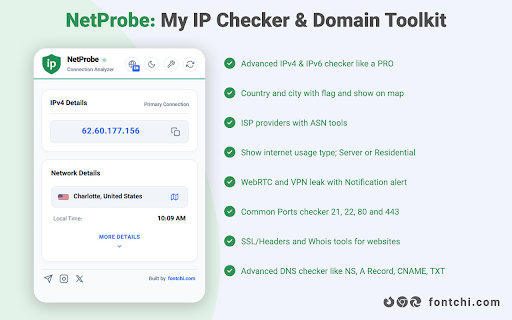


NetProbe: All-in-one IP address checker & domain toolkit. Real-time IP info (WebRTC, VPN leak, latency), SSL and DNS records Tools. Discover your real public IP address instantly with NetProbe, the all-in-one browser extension for checking "IPv4 and IPv6", revealing precise "geolocation", detecting "VPN/proxy usage", and providing powerful "domain analysis tools". Perfect for privacy-conscious users, developers, security professionals, and anyone needing fast, accurate network insights directly in Chrome. NetProbe delivers comprehensive IP checker functionality combined with advanced "DNS lookup", "Whois lookup", and "SSL certificate checker"—all without collecting any personal data. Stay informed about your online footprint with real-time privacy checks, including "WebRTC leak detection", "IP blacklist status", and "port scanning". Whether you're troubleshooting connections, verifying anonymity, or analyzing websites, NetProbe is your essential My IP address tool with a beautiful, intuitive interface. - Instant IP Information: View your public "IPv4 and IPv6 addresses" at a glance - Accurate Geolocation: Country, city, flag icon, local time, and one-click Google Maps integration - Detailed Network Insights: "ISP", "ASN", connection type (residential or datacenter), and ping measurement - Advanced Privacy Checks: Proxy/VPN detection WebRTC leak test IP blacklist status and VPN leak detection Quick scan of common ports (21 FTP, 22 SSH, 80 HTTP, 443 HTTPS) - One-Click Convenience: Copy individual fields (IP, location, ISP, ASN) or export full results as JSON Powerful Domain Toolkit (Analyzes the Current Website) - SSL/TLS Certificate Details: Validity, issuer, expiration, and security status - Whois Lookup: Domain registration info, owner, creation/expiry dates - Comprehensive DNS Records: A, AAAA, NS, CNAME, MX, TXT/SPF, SOA, SRV, CAA, PTR - Real-Time IP Change Notifications: Get alerted instantly when your public IP changes—ideal for IP-sensitive services - Dark Mode & Light Mode Support: Seamless theme switching for comfortable viewing - Full Persian Language Support: Complete translation and RTL layout for right-to-left readability - Zero Data Collection: Your privacy is guaranteed—no tracking, no logging, no data shared - Stunning UI/UX: Clean, modern design for effortless navigation and quick access NetProbe stands out as the ultimate free IP checker extension with professional-grade tools. No registration required, no ads, and completely privacy-focused. Install NetProbe today and take full control of your network identity and website intelligence.

Browsec VPN - Free VPN for Chrome
Browsec VPN is a Chrome VPN extension that protects your IP from Internet threats and lets you browse privately for free. Access any site and unblock any content with Browsec free VPN service. ## Subscribe to our Telegram for latest news and updates — @BrowsecVPNofficial Browsec VPN extension is a guaranteed solution to protect your Google Chrome browser and to get unrestricted access to any website on the Net. With Browsec VPN extension for Chrome, you get: A secure IP changer Free multiple virtual locations Unlimited access to music, video, books, and games Stable access to services like Youtube, Hulu, Spotify and many others ☆ Traffic encryption Browsec encrypts your traffic so that no one knows what you’re doing online. With this VPN for Chrome, you don’t have to worry about information leaks and data sniffers. ☆ No limitations Browsec erases geographical restrictions and unblocks any content you want. Use Youtube, Netflix, Hulu, Spotify, Pandora, and other services and social networks even if they are not accessible in your area or blocked. Hide your IP address, change the country, and you’re all set! ☆ Remote servers Browsec has proxy servers all around the world. They ensure a stable and private Internet connection and express access to the sites you need. You can choose the one that suits you best: the United States, the United Kingdom, the Netherlands, Singapore, and more. ☆ Safety and privacy Browsec values your right to remain unknown. We don’t reveal any of your personal data and don’t let others steal it. You can use public Wi-Fi without worrying about malicious ISPs with our VPN plugin for Chrome. ☆ Premium features Want more? Browsec has got you covered! You can surf the Internet at the speed of up to 100 Mbit thanks to dedicated remote servers. Choose a virtual location from 40+ countries and even match your browser timezone accordingly – and websites will not detect the difference! Select particular servers for different sites and take advantage of other smart settings. SETUP INSTRUCTIONS Get Browsec from the Chrome Store by clicking ‘Add to Chrome.’ Download and install the addon. Open the extension in your browser. Click ‘Protect me’ and choose a virtual location from the list. Now, you can browse anonymously. Browsec Chrome VPN is an easy way to stay safe and secure on the Internet and get the content you want.

IP, DNS & Security Tools | HackerTarget.com
Quick access to IP, DNS & Network Tools. Check DNS, Whois, ASN, Traceroute, Ping and more. Tools for technical operators. IP, DNS and Security tools for technical systems operators. Instant access to Whois, GeoIP, DNS, Traceroute, Ping, HTTP Headers, Nmap and more all from your browser. Perfect for: - security professionals - network operators - systems administrators - analysts - or simply those who are curious about technical aspects of the Internet While all these tools are available on HackerTarget.com, our Chrome Extension offers quick and easy access, saving you time. Perform external network queries in a single click. HackerTarget.com is an established provider of hosted open source security scanning services such as Port Scanners (Nmap), Vulnerability Scanners (OpenVAS) and Web application security (WordPress, Nikto) testing. Online Nmap Port Scanning has been available from HackerTarget.com since 2007. While continuing to provide a stable hosted vulnerability scanning service the site continues to evolve and provides tactical information to those who manage Internet connected systems. By using hosted security scanning and network testing tools you are able to probe and troubleshoot your networks, firewalls and servers from an external perspective. This testing from outside the network perimeter or firewall simulates probes and scanning that may be performed by a determined attacker. In addition to finding vulnerabilities and security configuration errors in your systems these types of probes will also enable you to test intrusion detection (IDS / IPS) and even incident response processes.

IP Address and Domain Information
The Ultimate online investigation tool! See detailed information about every IP Address, Domain Name and Provider. This extension displays detailed information about the current website. The information can be used for online investigation and SEO purposes. See IP info like (IPv4 and IPv6): location, DNS, whois data, routing, domain neighbors, blacklists and ASN information. Including a shortcut to Your public IP Address (myIP info). See domain info like: Alexa en Quantcast ranking, DMOZ info, social media activity, WOT ranking, whois data and PageRank of every domain. See provider info like: BGP, IPv4 subnets, IPv6 subnets, connected providers (peers), hosted nameservers, hosted domains, number of spam hosts, bogon subnets and whois data. ******************* This extension is also available for Firefox, Opera and Safari. https://addons.mozilla.org/en-US/firefox/addon/ip-address-and-domain-info/ https://addons.opera.com/extensions/details/ip-address-and-domain-information/ http://www.macupdate.com/app/mac/39018/ip-address-information

DNS Checker - SEO and Domain Analysis
SEO and Domain Analysis Tool by DNS Checker. Provides SEO Report, Meta Redirects and 404s, Client IP, Domain IP & Geo Location, etc DNS Checker is a well-equipped source that offers you an ultimate DNS tools package. From Domain DNS Check to Public DNS Checker and Global DNS Checker, from IP Lookup to IP Blacklist check, from Networking tools to SEO-based tools. It provides a single platform for your every concern. DNSChecker's free Google Chrome DNS, SEO, and Domain Analysis extension helps you carry your online errands and get an edge to increase the chances of your website ranking. It analyzes your competitors' websites and provides in-depth information about their weaknesses. The extension also provides SEO and Domain DNS analysis reports with a detailed description that helps you better understand the competitors and rank your website consequently. Along with DNS Checker’s IP location lookup, DNS propagation checker, DNS record lookup, and other online tools, DNS SEO and Domain Analysis extension help you get a comprehensive SEO report, error 404, Website's Geo location, and IP address. The other benefits you get include; - Geo-location and IP address of any domain - Website's traffic ratio - Upgraded SEO Analysis of webpages - Number of links internal and external links - HTML (images and tags) analysis - Ranked keywords summary - Headings from H1 to H6 (tags and text) - Do-follow and No-Follow links summary - Additional Alt tags attribute analysis - Redirection and page ranking status - Website or webpage response time and speed results DNS Check SEO and Domain Analysis Features: Where optimizing your content on the site is the utmost in deciding whether your website will hit the SERPs high ranking or not, the optimization of your domains is also necessary. Consequently, DNS checker offers both analyses along with other features that help you optimize your web pages and analyze and explore gaps in your competitor's website and domains. DNS Domain analysis helps you understand your competitor's website status in-depth. For instance, you can find a competitor's domain ranking, rating, position, and hold in the respective market using DNS Domain check. Skimming through the DNS checker domain report, you can make better and more effective decisions regarding your website domain name purchasing. Consequently, you can find the following things using DNS Domain analysis; - Domain Geo-Information - Internet Protocol (IP) Geo-Information - Analyze the HTML state DNS SERP preview lets you gain better insights into your competitor's website. You can also use a DNS-free SEO tool to use the information to develop a strategy for your website's successful launch. By analyzing your content and website domain status using DNS analyze the webpages tool, you can easily optimize the On-page SEO of your content to ensure higher ranking, more traffic on the website, and expanded reach. With DNS Checker On-Page SEO Analysis, you can; - Check Broken Links - Check Headings - Check Meta Title and Description - Link Redirection check - Analyze On-page SEO - Canonical tag check In this section, the DNS Chrome extension provides a quick summary of the respective website, including; - GEO status (Domain name, IP Address, City, State, latitude, and longitude) - Traffic rank (Ranked position and State) - SEO Analysis (Meta title and description characters, and number of headings) - Your IP address and Country name SEO report analyzes the following website ranking factors to help you develop a content strategy to ensure your high ranking; - Meta title - Meta description - Used keywords - Heading tags - Word cloud - Alt Attribute - External and internal links (with their anchor texts) With the DNS link Redirection checker, you can easily find the ratio of redirect links on the site you're analyzing. It shows the website's raw headers with; - IP address - Site status - Date - Content-type - Server - Cache-control - And other useful information Domain Geo Report: DNS checker also serves you by providing your competitor's websites; - IP address - Geo information - City - State, - Country - Latitude - Longitude - ISP - ASN - Country and postal code IP Geo-Information: DNS checker IP location tool works parallel with SEO and Domain Analysis to provide your current; Lastly, DNS checker provides the following free tools to help you find all your solutions under one roof. DNS Tools include; - Domain DNS validation and DMARC lookup check DNS status according to the standards. - Reverse DNS Lookup offers IP to hostname details. - DNS Lookup converts domain or hostnames into IP addresses for better search results. - NS and MX Lookup maintain records of your searched domains. - Flush DNS deletes all the stored information in the cache. - You can check your domain health status with Domain DNS Health Checker. - TCP and UDP, and port scanners identify ports available for the public. - Mac Address Lookup and ASN Whois Lookup check vendor and ASN owner, respectively. DNS IP Tools consist of; - IP address and location lookup that gives location information. - Trace email tool tracks the locations of email senders. - IP to decimal converter simply converts the given IP address into a decimal number. - IP Blacklist checker searches for blocked IPs. Webmaster Tools include; - Website Link Analyzer checks both external and internal links. - Check Google Page Rank tool allows you to find the rank of any website page in Google. - Downloading tools include Vimeo and Facebook video downloaders that download videos from respective platforms.
