
omghfjlpggmjjaagoclmmobgdodcjboh


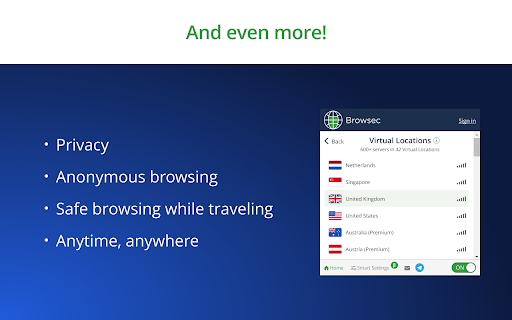
Browsec VPN is a Chrome VPN extension that protects your IP from Internet threats and lets you browse privately for free. Access any site and unblock any content with Browsec free VPN service. ## Subscribe to our Telegram for latest news and updates — @BrowsecVPNofficial Browsec VPN extension is a guaranteed solution to protect your Google Chrome browser and to get unrestricted access to any website on the Net. With Browsec VPN extension for Chrome, you get: A secure IP changer Free multiple virtual locations Unlimited access to music, video, books, and games Stable access to services like Youtube, Hulu, Spotify and many others ☆ Traffic encryption Browsec encrypts your traffic so that no one knows what you’re doing online. With this VPN for Chrome, you don’t have to worry about information leaks and data sniffers. ☆ No limitations Browsec erases geographical restrictions and unblocks any content you want. Use Youtube, Netflix, Hulu, Spotify, Pandora, and other services and social networks even if they are not accessible in your area or blocked. Hide your IP address, change the country, and you’re all set! ☆ Remote servers Browsec has proxy servers all around the world. They ensure a stable and private Internet connection and express access to the sites you need. You can choose the one that suits you best: the United States, the United Kingdom, the Netherlands, Singapore, and more. ☆ Safety and privacy Browsec values your right to remain unknown. We don’t reveal any of your personal data and don’t let others steal it. You can use public Wi-Fi without worrying about malicious ISPs with our VPN plugin for Chrome. ☆ Premium features Want more? Browsec has got you covered! You can surf the Internet at the speed of up to 100 Mbit thanks to dedicated remote servers. Choose a virtual location from 40+ countries and even match your browser timezone accordingly – and websites will not detect the difference! Select particular servers for different sites and take advantage of other smart settings. SETUP INSTRUCTIONS Get Browsec from the Chrome Store by clicking ‘Add to Chrome.’ Download and install the addon. Open the extension in your browser. Click ‘Protect me’ and choose a virtual location from the list. Now, you can browse anonymously. Browsec Chrome VPN is an easy way to stay safe and secure on the Internet and get the content you want.

ВПН для YouTube без ограничений в России. Ускорить ютуб на ПК
ВПН для ютуба, просмотр YouTube без замедления скорости 🔒 Расширение «Ускорить ютуб» или ВПН для ютуба Скачать ВПН для Ютуба - Яндекс или Google браузер. Если у вас возникли проблемы с работой на YouTube, такие как медленная загрузка видео, низкое качество или сбои в работе, то наше расширение ВПН для ютуба поможет вам решить эти проблемы бесплатно и просто. • ускоряет работу YouTube; • обеспечивает стабильную работу без прерываний; • помогает устранить сбои; • улучшает качество воспроизведения видео даже при слабом интернет-соединении. Теперь вы сможете наслаждаться любимыми роликами без задержек и лагов с ВПН для ютуба! ВПН для YouTube — Быстрый и Бесплатный VPN для YouTube Ищете ВПН для YouTube, чтобы обойти блокировки и смотреть видео без ограничений? Наше расширение для браузера ВПН для YouTube — это идеальное решение для безопасного и анонимного просмотра контента на YouTube. С помощью нашего VPN для YouTube вы сможете легко смотреть видео без рекламы и задержек. Расширение работает стабильно и быстро, предоставляя надежное соединение без необходимости дополнительных настроек. Включайте ВПН для YouTube в Яндексе и получайте качественный доступ к контенту в любом регионе! Особенности: VPN для YouTube бесплатно — доступ без ограничений. Удобная настройка и простота в использовании. Работает в Яндексе и других популярных браузерах. Наслаждайтесь качественным просмотром YouTube с VPN для YouTube уже сегодня! Повышение эффективности работы 1. Оптимизация воспроизведения при замедленной работе. 2. Ускорение загрузки видео на платформу. 3. Обеспечение стабильной работы даже при низкой скорости интернета, особенно когда платформа не работает. 4. Исправление ошибок, связанных с невозможностью загрузить видео или пропаданием изображения. Глобальная поддержка • Замедления в разных странах и регионах для доступа к видеохостингу, включая Россию. • Совместимость с различными интернет-провайдерами и сетями для стабильной работы. Безопасность данных • Инструменты безопасности для защиты вашей активности, особенно при сбоях. • Регулярные обновления для сохранения конфиденциальности и стабильности. • Поддержка при подключении через мобильный интернет, когда ютуб не работает. Мгновенный доступ к сайту с помощью «ВПН для ютуба» 1. Удобный вход на платформу с любого устройства. 2. Быстрое устранение ошибок при сбоях в работе. 3. Мгновенный доступ к любимым роликам, даже если платформа не работает или возникают проблемы с загрузкой. Улучшение качества видео • Устранение проблем с воспроизведением. • Поддержка высоких стандартов воспроизведения для всех видео. • Стабильная работа видео, даже при возникновении вопросов о работоспособности платформы. Часто задаваемые вопросы (FAQ) Что делать, если сайт не работает? Установите наше расширение, чтобы устранить замедления, ускорить работу платформы. Почему YouTube не грузит видео? Причины могут быть разными: от слабого интернета до проблем с сервером. Наше расширение автоматически решает эти проблемы и помогает ускорить загрузку видео. Как быстро загрузить видео? С нашим решением процесс загрузки ускоряется, и вы можете мгновенно наслаждаться видео. «Ускоритель» — это прозрачное использование: • полные инструкции по использованию расширения; • поддержка и обновления для улучшения работы сервиса; • раздел FAQ с ответами на популярные вопросы. Мы предоставляем поддержку на разных языках, учитывая культурные особенности пользователей по всему миру. Удобство использования • Интуитивно понятный интерфейс для быстрой и удобной работы. • Абсолютная безопасность и конфиденциальность данных. • Быстрый доступ ко всем функциям расширения. Основные преимущества использования расширения 1. Мгновенный доступ к вашим любимым видеороликам. 2. Устранение задержек, улучшение качества воспроизведения. 3. Поддержка всех устройств и браузеров. 4. Защита конфиденциальности, в том числе данных при просмотре. Дополнительные функции для обхода замедления: • ускорение загрузки видео при слабом интернет-соединении; • исправление ошибок, связанных с невозможностью загрузить видео или пропаданием изображения; • оптимизация воспроизведения на различных устройствах, включая ПК; • поддержка при возникновении сбоев и неполадок во время просмотра. Скачайте расширение ВПН для Ютуба прямо сейчас и наслаждайтесь плавным просмотром видео без замедления!

VPNTYPE - Free VPN еxtension Google Chrome
Download the best free VPNTYPE extension for browser Google Chrome for PC - Secure Private & unblock any website VPNTYPE is an extension for the Google Chrome browser designed to provide anonymity and security on the Internet. It allows users to easily connect to a distributed private network (VPN) by hiding their true location and encrypting Internet traffic. Advantages: - No registration or restrictions: Users can quickly start expanding their capabilities without going through a complex registration process. - High connection speed up to 100 Mbps: provides fast access to the Internet without slowing down the speed. - Secure encryption using modern protocols: guarantees the protection of user data from unauthorized access. - Low cost of the premium plan from 99 rubles: makes the use of accessible extensions for a wide range of users. The VPNTYPE extension works on any protocol: At the moment, the extension uses the most stable Shadowsosck protocol, which effectively bypasses all blocks, ensuring a reliable and secure connection. Is VPNTYPE secure? Our extension is based on the most popular and secure protocols, which ensures a high level of security and protection of users' confidential data. What does a premium subscription provide? 1. Stable operation is ensured: reliable connection without interruptions. High connection speed: difficulty loading pages and exchanging data. 2. Work on multiple devices: allows you to expand the possibilities of simultaneous use on different devices. 3. Available in 30 countries and IP addresses: Provides a wide selection of virtual locations. 4. Technical support 24/7: always ready to help resolve any issues. 5. Available for other devices: Windows, Android, iOS, MacOS. What to do if the Google Chrome VPN extension does not work: - Connect to another country from the list: this may help bypass local restrictions. - Update the extension if an update is available: new versions often introduce problems. - Remove other extensions as they may compare with each other: this will help avoid bugs and bugs. - Use a different Wi-Fi network: the problem may be related to the current network. - Write to us in technical support: we will try to help and offer a solution helpdesk@vpntype.com How to disable the VPNTYPE extension in Google Chrome 1. Install a VPN from the Google extensions online store; 2. Pin the jump extension to the top bar of your browser; 3. Open the extension and click the VPN enable button; 4. The color of the icons will change to green “VPN enabled”, now you can use any content that was previously unavailable.

YouBooster – Free VPN for Chrome Extension
Unblock any website with one click. Fast, free VPN extension for Chrome. Stream 4K without buffering. No sign-up. YouBooster is a free Chrome VPN extension for Google Chrome. It hides your IP address, secures your connection and gives you access to geo-restricted content. If you're looking for a free Chrome VPN that works without registration or data limits — this is it. Whether you need to access streaming content from another country, stay private on public Wi-Fi or browse without being tracked, YouBooster handles it from right inside your browser. No separate vpn download needed, no accounts to create. It's a free vpn Chrome extension — no extra software required. Getting started takes seconds. Install YouBooster from the Chrome Web Store, accept the privacy agreement and pin it to your toolbar. Hit connect and you're browsing securely. • Country selection: Choose any server location or pick "Random" for automatic connection. • Auto IP rotation: Your IP address changes at intervals you set — a fresh address every time. • Smart mode: Enable VPN on a site once and it remembers. Next visit, it activates on its own. • Selected sites or all traffic: Run the VPN only where you need it or route everything through the server. Default is selective — change it in settings. • Proxy management: Block slow proxy servers so you never reconnect to them. Got your own proxy? Add it and use it. • On-page button: A compact toggle appears on the page. Drag it wherever suits you. • 4K video support: Servers optimised for streaming. Watch 4K content without buffering. Your connection is routed through an encrypted tunnel. Browsing history is not logged or shared with third parties. Safe even on public Wi-Fi. Looking for a free vpn in the UK or anywhere else? YouBooster is a reliable vpn app for Chrome — available worldwide. Install it now from the Chrome Web Store — no sign-up, no payment, no limits. Private browsing, one click away. #####Fix 2.3 - Removed the proxy block list. This feature confused many users and caused negative feedback, so we decided to remove it. - All proxies now work without filtering. - Code optimization and performance improvements.

TwiHD - вернет качество 1080p на Twitch
Увеличивает качество 1080p на Твиче бесплатно и без рекламы. Смотрите твич в высоком качестве как раньше. Вернуть качество 1080p в Twitch? — TwiHD вернет Твич в Chrome, Яндекс.Браузера, Opera, Edge. Смотрите стримы в 1080p и выше в твич в России. Бесплатное расширение TwiHD без рекламы, чтобы вернуть 1080p качество на Twitch, как раньше: без ограничений, без лагов, без мыла. Twitch ограничил качество до 720p? С TwiHD вы снова смотрите любимых стримеров в Full HD. Никаких подписок, никаких всплывающих баннеров. 🔧 Возвращает 1080p в твиче — стримы снова чёткие и резкие. 🚀 Твич без лагов и тормозов. 🖱 Установка за 1 минуту — просто установите и откройте Twitch. 🧘 Без рекламы — никаких баннеров, трекеров и отвлекающих окон. 💡 Ничего настраивать не нужно. 🎥 Смотрите Twitch в 1080p так, как он должен работать — с TwiHD, бесплатно и без рекламы. Работает сразу после установки. Следите за новостями в Telegram: https://t.me/Twitch1080
