
cjgjbjogfodppempgdlppgefojbcmjom


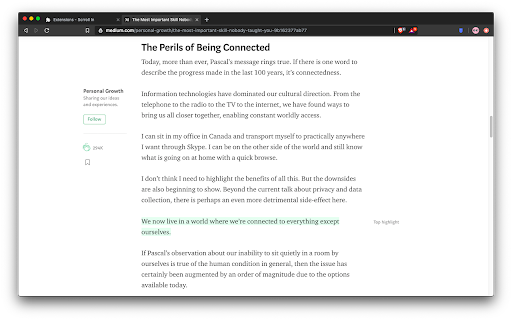
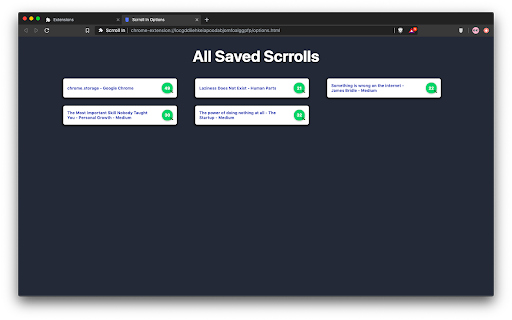
An extension to save scroll position of a webpage ✨ What's new - - You can now save upto 20 scroll positions for any page and manage (get, update and delete) them individually. - Added an opt-in to show toasts when performing actions with a scrroll for better UX (Experimental). You must have been in a situation wherein you are reading a long article but you don't have enough time to finish it so you close the tab, and the next time you open the article again, you have no idea where you left it. Well not anymore, with this extension you can save the scroll position of the page and then revisit the page at any time to continue where you left. I know that there are other extensions similar to this, but most of them either don't work reliably or lack the features mentioned below - 🤹 Color changing icon The icon changes color whenever the extension detects that you have already saved a scroll position for a page. ✨ Sleek UI Ability to add, remove, update or delete the scroll position directly from the popup menu. 💾 Unlimited Storage Under the hood this extension uses chrome's local storage API, so you'll never run out of storage for your articles. 🤳 View all your saved scrrolls An options page to view all your saved pages, with the percentage of the page completed. 📜 Completely free and open source Scrroll In was and will always be free to use and open source. Feel free to open an issue for feature request or bug report on the issues page on Github

Bookmarkify
Save and revisit specific sections inside webpages to quickly continue reading without scrolling. Bookmarkify helps you save and revisit specific sections inside long webpages. Many times we read long articles, tutorials, or documentation and cannot finish them in one go. When revisiting the same page later, finding the exact place where you left off can be time-consuming. Bookmarkify solves this by allowing you to create contextual bookmarks directly inside webpages. Save it as a bookmark for that page When you revisit the same URL, saved bookmarks are available for quick access Instantly jump back to the saved section without scrolling Create bookmarks for specific sections within webpages Bookmarks are stored per unique URL for accurate navigation Free users: Bookmarks are stored locally in the user’s browser Pro users: Bookmarks are securely stored on Bookmarkify servers to enable account-based access and syncing Bookmarks are used only to provide bookmarking and syncing functionality No data is sold or shared with third parties No advertising or tracking is performed Authentication is handled securely using session-based login 🎯 Ideal for Reading long articles or blogs Tutorials and documentation Research and study workflows Resuming reading exactly where you left off Bookmarkify is a lightweight productivity extension designed to make reading long-form content on the web faster and more convenient.

Scroll Preview
Scroll Preview integrates a whole-page preview with scrollbar that inspired by Sublime Text's mini map. HOW IT WORKS • Alt + A — get a new scrollbar with rough preview • drag/click the scrollbar — just like how you used to • Alt + Shift + A — get a refined preview (please wait patiently) • tired of key pressing? — turn on Automatic or Conditional mode in option page UPDATES • Floating handle • Conditional mode for articles • Setting synchronization FEATURES • Captures whole-page snapshot (Alt+A) • Adds an additional easy-to-drag scrollbar which works nicely with the native one • Integrates snapshot with scrollbar for better previewing • Refreshes snapshot while window is resized • Allows hide/show toggling (Alt+A again) • If you found blank areas shown in snapshot, let the browser re-scan the page to refine it. (Shift+Alt+A) • Applies anti-aliasing on snapshot. • Jumps to where you click on the snapshot. • Magnifier on snapshot (works great with click-to-jump). • Always-on mode (Options > Basics > Automatically) • Option page (chrome://extensions/ > Scroll Preview > Options) • Auto-hide • Blacklist / Whitelist

Scrollbar of Contents
Adds clickable heading markers on the scrollbar. This extension creates clickable markers for all the headings on a page and places them proportionately on the scrollbar. The markers enable you to jump between different sections of the page and help to quickly find what you are looking for. They are especially useful when navigating long webpages. Featured in CNET, Lifehacker and Mashable. • After a page is loaded, click on the extension icon on the toolbar to display the heading markers. • Click on a marker to scroll to the corresponding section. • You can minimize, hide, or show the markers using these keyboard shortcuts: ⁃ show/hide ( Shift + Alt + v ) ⁃ minimize/maximize ( Shift + Alt + b ) • You can customize the behavior of this extension on the options page. View the source code, contribute, report issues, or request new features here: github.com/mlijanto/scrollbar-of-contents Thanks for your comments and suggestions, keep them coming!

modern scroll
One of Opera's most popular and highest-rated extensions of all times is finally available here! Check it out and experience its beauty and simplicity for yourself. :) + scroll bars don't take up any space so the whole screen width can be used to display what a browser is made for: websites + elements or whole pages don't shift by some pixels when content changes and bars become (un)necessary + scroll bars are usable in fullscreen mode as well + scroll bars automatically hide when they are not needed + behavior and appearance is fully customizable + can boost your scrolling performance + scrolling speed and behavior is adjustable + unique "superbar" which makes it possible to scroll horizontally and vertically at the same time + buttons for scrolling to top and bottom of the page + JavaScript interface for custom mouse gestures / bookmarklets
