
cfmkncejaemmcobmaabfigljmnkeecdm
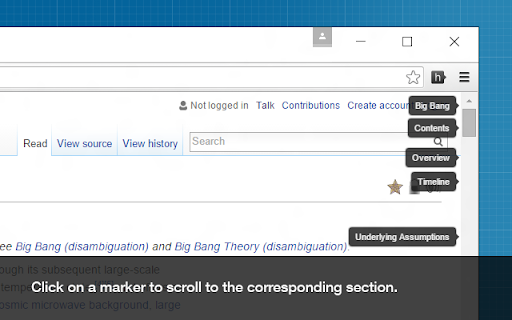
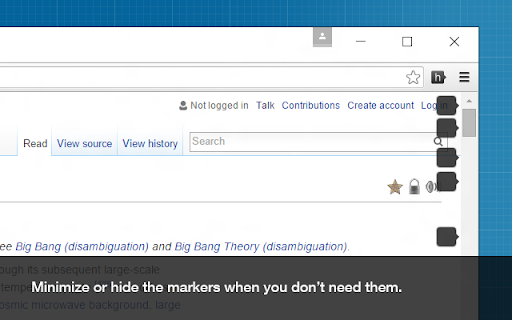
Adds clickable heading markers on the scrollbar. This extension creates clickable markers for all the headings on a page and places them proportionately on the scrollbar. The markers enable you to jump between different sections of the page and help to quickly find what you are looking for. They are especially useful when navigating long webpages. Featured in CNET, Lifehacker and Mashable. • After a page is loaded, click on the extension icon on the toolbar to display the heading markers. • Click on a marker to scroll to the corresponding section. • You can minimize, hide, or show the markers using these keyboard shortcuts: ⁃ show/hide ( Shift + Alt + v ) ⁃ minimize/maximize ( Shift + Alt + b ) • You can customize the behavior of this extension on the options page. View the source code, contribute, report issues, or request new features here: github.com/mlijanto/scrollbar-of-contents Thanks for your comments and suggestions, keep them coming!

Ultra Button
A button for everything. You can now access most of chrome features in one Ultra Button. Functions Including: Bookmarks, Extensions, Downloads, History and Tabs. Mouse Middle Button Behaviors Bookmarks: Open bookmark in background Extensions: Remove extension Downloads: Remove download record History: Open history in background Tabs: Close tab or window ~~~~~~~~~~~~~~~~~~~~~~~~~~~~~~~~~ The icons in this extension were downloaded from Noun Project. https://thenounproject.com/ v 0.9.0 add download notification You can enable it in the options v 0.4.1 add session control You can now restore closed tab or windows

2chRevival
2ちゃんねる、5ちゃんねる、BBSPINKのDAT落ちしたスレを簡単復活! 2.3.15 ManifestV3に暫定対応 2.3.14 5chに対応 2.3.13 2chの仕様変更に対応 2.3.11 2chの仕様変更に対応、dat落ちしたスレッドの復活に対応 2.3.10 人大杉時の復活に対応しました。 2.3.9 スレッド以外でも動作してしまうバグを修正しました。 2.3.7-2.3.8 おまたせしました、仕様変更に完全対応しました 2.2.5 仕様変更に対応、DAT落ちや表示されないスレッドがある場合、過去ログを検索します。 2.2.4 今後の仕様変更に対応するため一時的に機能を停止しました。 2.2.3 細かいバグを修正しました。 2.2.2 拡張機能の仕様変更に対応しました。細かいバグを修正しました。 2.2.1 シークレットモードに対応しました。細かいバグを修正しました。 2.0.0 より快適にご使用いただくため、プログラムをフルスクラッチしました。バグの報告はコメント欄よりどうぞ 1.8.17 検索の高速化、ページアイコンクリック時の動作を変更しました 1.8.15 様々な仕様変更、機能追加を行いました。復活できる確率が上がりました 1.6.16 ボタンが表示されないスレッドがあるバグを修正しました ★動作に問題がある場合や要望がある場合はコメント欄にてお願いします。 改善点がある場合なるべく対応したいと思います。 2ちゃんねる(2ch)やBBSPINKでDAT落ち(過去ログ化)してしまったスレッドを復活させます。 ワンクリックで自動的に過去ログを検索するので難しい操作は一切必要ありません。 また、無駄なアイコンなどは一切表示されず、DAT落ちした時のみ復元ボタンが表示されるのでとても快適に使用することが出来ます。 >403になる方 Chrome以外で使用すると403を返す仕様になっています ユーザーエージェントを切り替えている場合も403を返しますので一度ご確認下さい

Scrollbar Customizer
Customize your Scrollbar easily, fast and however you want! Do you want to customize / edit your Chrome™ Scrollbars? Try Scrollbar Customizer! It's very easy, fast and you can change almost everything with the built-in editor! IMPORTANT NOTE: It is NOT possible to inject code to some Chrome™ specific sites like this Web Store, Chrome Settings, Chrome Extensions and other. Therefore it is NOT possible to customize scrollbars on these sites from this extension. Google™ has good reasons for this so as long as they are keeping up for these restrictions, we cannot offer our options on said sites. Want more? Leave a comment with suggestions and we will try to implement it! If you like Scrollbar Customizer, please rate us 5 Stars, give us a Plus 1 and share on Facebook!

ExtManager
Manage the chrome extensions. One click to enable or disable extension. Group extensions and drag it. Sort extensions by drag it. You can easily enable, disable, and uninstall your extensions,applications and themes by "ExtManager". No need to enter the chrome own extensions page every time. Features: 1. Display enabled extensions on top. 2. Display enabled/group/all extensions simply. 3. Enable/disable extension by one click. 4. Group extensions and drag it into the group. 5. Sort extensions by drag it. 6. Uninstall extension simply when you confirm. Support text list, large icon list and small icon list of a variety of permutations, suitable for different expansion of the number of people. You can easily open the system pages, such as the download page, history page, page extensions, plug-ins page, chrome settings page, the search engine settings page, clear the browser cache pages, page content settings, font and encoding settings, language settings, reset the browser settings page and so on.
