
cjdeidnceplfnabgonejmggjhgjmlpff
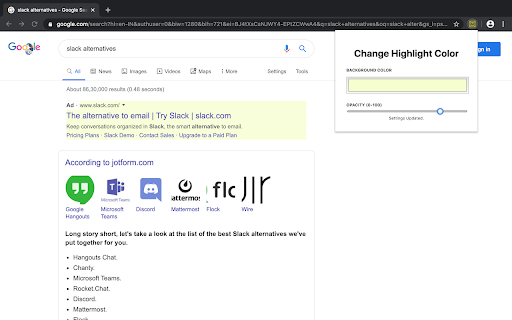

Highlight ads in Google Search results to avoid accidentally clicking on ads and focus on organic search results.

Mark My Search
Mark My Search is a complete word finder for anything you search online. Powerful highlighting and advanced features combine with a friendly, intuitive interface to provide effortless text finding without the compromise. Vibrant highlight colors look great on any page, complemented by scroll markers for locating matches and a keyword edit bar which stays until you're done. Shortcuts are available for every action while varied options let you personalise to your taste. Search for anything, on any search engine - DuckDuckGo, Google, Bing, even Reddit - and Mark My Search will pick out the words you're looking for, in that page and through any links you follow. Highlighting happens without having to press a button! Activate on any page using Alt+M or the context menu. Mark My Search is Free and Open Source on GitHub(1). See the Roadmap(2) for planned improvements! Main Features: • Enter keywords to find in the page • Create and automate keyword lists in the popup • Search query highlighting on any search engine • Compact toolbar to view and edit the query • Popup and settings menu for configuration • Rapid scrolling to matches • Keyword scrollbar markers • Completely operable by mouse or keyboard • Specific websites can be filtered To turn off visibility for automatic highlighting, simply open the options page at chrome://extensions > Mark My Search [Details] > [Extension options] and disable both visibility settings. The highlights will be hidden, while the toolbar and scroll markers remain visible, ready to be shown at a moment's notice. This does not apply to manually activated highlighting. To turn off automatic highlighting completely, click the extension's icon to open the popup, and disable "Detect search engines". You may wish to press the top-right puzzle piece (Extensions) and 'pin' the Mark My Search icon, so that you can easily click it to open the popup.

Google search results shortcuts
Keyboard shortcuts for google search results J/K(Down/Up): Navigate links H/L(Left/Right): Navigate page /: Focus input field G + [A/I/V/M/N]: [All/Image/Videos/Maps/News] G + shift-V: verbatim search

Google Search to Youtube Redirector
Simple browser extension to redirect YouTube videos being opened embed in Google Search to YouTube directly. Supports opening in a new tab and go back to Google Search with the back button. In addition, the extension also adds a YouTube button on the Google Search results page, allowing you to quickly and easily redirect your search query to YouTube. No configuration needed, just install and enjoy ! This project is entirely open source and can be found here : https://github.com/Drarox/GoogleYoutubeRedirect

Google Search date range shortcut
Add a date range shortcut to your Google search results.
