
chmeecgnmbnijigjhhgedjljgkgblmpo

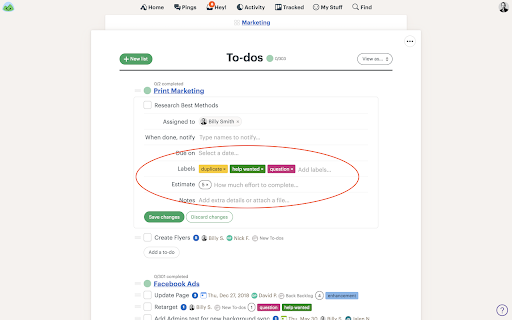
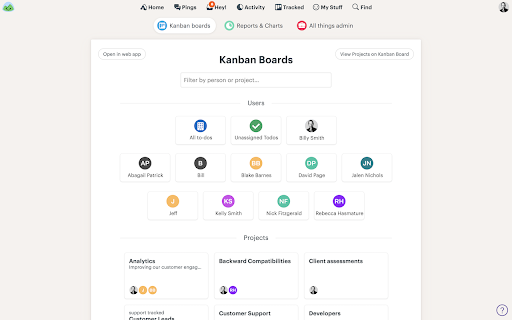
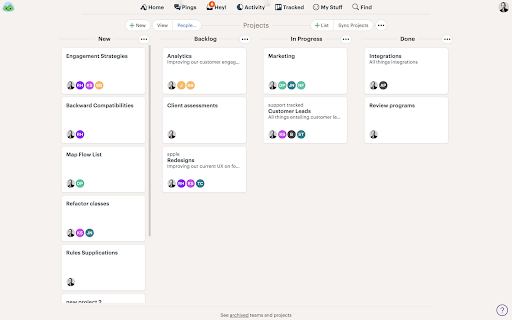
Understand where your to-dos are in your workflow and prioritize all your To-dos with all your To-do lists. Move to-dos between pipelines and prioritize them in each pipeline. This helps employees understand what to work on and helps you understand the status of a to-do. Turn on or off tracked Kanban boards per project to avoid cluttering your Basecamp account. Only use them when you need them.

Basecamp Extension
Speed up Basecamp time entry and graph your time report. Basecamp extension helps speed up the time entry for the previous dates. Plus you can also generate simple or multi-series charts of your task's hours. If you don't update hours daily on the Basecamp, and usually do this after a day, week or month; you know how tiring this process cold be. As when adding the back dated entries, you have to change the date every time, calculate the time spent on each task, and then post and verify each and ever entry time entry. If you share these feelings, then this extension is just what you are looking far. With this extension, you can set a default date which appears in all time entries, set the default person for whom you are adding these entries (your seniors or boss?), and auto calculate the time spent on the task from the pasted description text (I love this one). If you want to learn more about this, check our this video tutorial: http://www.youtube.com/watch?v=uo4AKy5Sukk Another interesting extension of this tool is to generate the graph/chart of the time hours data. So if you want to visually see how much time you are spending on each project per month, or how much effort your team members are putting on different project per week, then this extension helps you generate all these graphs directly in your browser with few clicks. Check the following video for detail on this feature: http://www.youtube.com/watch?v=u1qKqf-H5NY Warning: This extension is highly addictive, and there are good chances that it will make you even more lazy. I have warned you, so if you still use it, I'm not liable for any damage or claims, whether in an action of contract, tort or otherwise, arising from, out of or in connection with this extension or use of it.

BugHerd: Visual Feedback & Bug Tracking Tool
BugHerd is a visual feedback and bug tracking tool for websites BugHerd makes it easy for clients to leave website feedback and report on bugs. Let clients simply point, click and comment - BugHerd grabs a screenshot, saves technical details and creates a task for your team to track. Goodbye endless emails! 📝 In-context Feedback Clients drop a pin to show feedback in context on a web page. No need for accounts or log-ins - send clients a link and let them comment away. Feedback stays pinned to the exact page element, so your team always knows exactly what to change. 🖥️ Automatic Screenshot Capture You get a screenshot and all the technical details. No more chasing down browser versions, screen resolutions, and device details. Every client comment comes with all the information you need, captured automatically. ✅ Task Tracking Turn every comment into a clear next step. Every comment becomes a trackable task on a Kanban board, so your team can prioritize and resolve feedback easier than ever. Already using a project management tool? Send tasks there with one click. BugHerd integrates with popular PM and collaboration platforms. BugHerd has been adopted by over 10,000 companies and over 350,000 users across 172 countries, helping teams streamline website feedback, improve client collaboration, and deliver projects faster. Click “Add to Chrome” and create your first project right away.

Cledara Engage
Help your company understand what Saas applications are being used The extension lets your company know which SaaS applications (such as Pipedrive, Jira, Slack, Webflow, Salesforce etc.) people access to ensure that you and your colleagues are using all the best applications, customer data is safe and money is not being wasted on any duplicate subscriptions. Privacy disclaimer: Cledara Engage is built only for SaaS. This means that Cledara (and your company) will only receive browsing data that matches our curated list of SaaS providers, available on cledara.com/marketplace. All other browsing data stays on your device.

Timenotes - Time Tracker
Timenotes.io time trackers for the browser with native support for Basecamp UI and time tracking. Timenotes.io time tracker extension for the browser with support for Basecamp UI. An easy-to-use daily activity tracker that allows for reporting hours with a single push of a button. Timenotes is not only a browser add-on, sign in to timenotes.io to access a powerful time management tool for teams and solo users. Extension features: * extend Basecamp interface with time tracking functionality * start/stop time tracker with just one click * setup your working schedule to get time tracking reminders and never forget to track your time * get the alert notification in case you forget to stop the tracker * access daily time summaries of a day * assign time logs to task and project * bookmark ongoing tasks ABOUT TIMENOTES Timenotes Chrome Extension is a part of the web platform with complementary features that enables you to get an insight about your and your team members’ logged time. Visit Timenotes to access features like detailed reports, team and absences management, timesheets, team activity dashboard and much more. Timenotes will help you and your team bring your productivity to the next level. Browser add-on helps you to track your time from anywhere on the web. In case of any questions, feedback or feature requests, feel free to email us on support@timenotes.io.
