
ankjnefclmaakpbgfglfegfekiofndkm
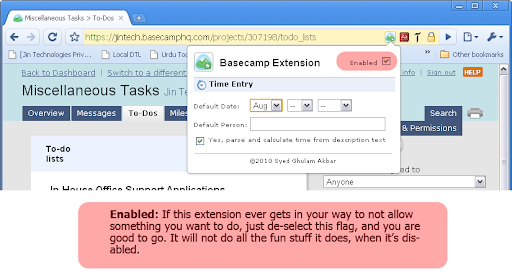


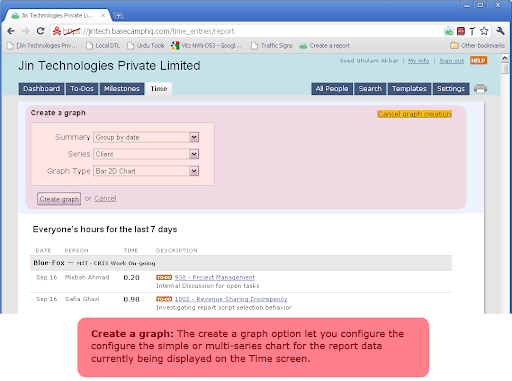
Speed up Basecamp time entry and graph your time report. Basecamp extension helps speed up the time entry for the previous dates. Plus you can also generate simple or multi-series charts of your task's hours. If you don't update hours daily on the Basecamp, and usually do this after a day, week or month; you know how tiring this process cold be. As when adding the back dated entries, you have to change the date every time, calculate the time spent on each task, and then post and verify each and ever entry time entry. If you share these feelings, then this extension is just what you are looking far. With this extension, you can set a default date which appears in all time entries, set the default person for whom you are adding these entries (your seniors or boss?), and auto calculate the time spent on the task from the pasted description text (I love this one). If you want to learn more about this, check our this video tutorial: http://www.youtube.com/watch?v=uo4AKy5Sukk Another interesting extension of this tool is to generate the graph/chart of the time hours data. So if you want to visually see how much time you are spending on each project per month, or how much effort your team members are putting on different project per week, then this extension helps you generate all these graphs directly in your browser with few clicks. Check the following video for detail on this feature: http://www.youtube.com/watch?v=u1qKqf-H5NY Warning: This extension is highly addictive, and there are good chances that it will make you even more lazy. I have warned you, so if you still use it, I'm not liable for any damage or claims, whether in an action of contract, tort or otherwise, arising from, out of or in connection with this extension or use of it.

Nimble Prospector
Lead Capture, Data Discovery, and CRM that works on every web page Nimble Prospector helps you create targeted lists of prospects, influencers, potential investors, and more within seconds -- from anywhere you work on the web. Don't have a Nimble account? Start your free 14-day trial at www.nimble.com/register. With Nimble Prospector 2.0, you can: - Easily build prospect lists from anywhere you work. From multiple pages across their browser, within your inbox, and across your favorite business applications. Easily create lists of conference speakers, influencers, employees from a company website, and more. Additionally, teams can make actionable lists from their LinkedIn, Twitter, and Facebook contacts. - Log notes, add tasks, attach files, and set Stay in Touch reminders to an existing contact record, or create a new contact record, to always follow up with your follow-through. - Easily view all interaction history (including past emails, Twitter conversations, events, deals, tasks, and more) to always stay up to date with next steps with key contacts. - Easily tag multiple contacts for quick list building, contact organization, and easy segmentation. - Target businesses using company profiles: including biography, industry, number of employees, year founded, keywords, company type, revenue, ticker, CEO name, address, and phone number. - Qualify prospects using auto-generated contact profiles which include biography, location, keywords, work experience, education, and social profiles - Discover verified business contact details, including email addresses, phone numbers, and address from any website, social network, or business web applications.

Zoho Projects
Project Management software that lets you manage projects and tasks online. Collaboration with your team is now easier than ever. Zoho Projects, our cloud-based project management software used for project planning, tracking, and collaboration, is now available as a browser extension for Google Chrome. Zoho Projects is preferred by more than three million users worldwide for project planning, tracking, and collaboration. This new Chrome extension keeps you updated even when you are working on other tabs. Access all the important Projects modules, such as task management, time sheets, news and updates feed, bug tracker— all available right from your browser. This helps you quickly take action without having to open the web app in a new tab. Use our built-in screen grabber to easily file bugs and upload edited screenshots directly from the extension. Here’s a glimpse of what you can do with Zoho Projects: * Easily manage complex projects using milestones, task lists, tasks, and sub tasks. * Quickly view ongoing discussions, tasks, comment threads, and much more by skimming through your Feed. * Use the timesheet module to log hours for your tasks and issues. You can also see a daily, weekly, or monthly view of your logged hours, making it easy to track all the hard work you've done. * Communicate effectively with your team using our rich collaboration options such as wiki, chat rooms, and forums. * Integrate with Google Drive, Google Calendar, and Gmail. * Get in-depth insights on your projects using Gantt Charts, advanced analytics, and reports. * Take advantage of other Zoho apps such as CRM, Docs, and Desk using integrations. * Stay on top of all your projects and work on the go with our iPhone and Android mobile apps.

Redbooth for Gmail
Supercharge your inbox with collaboration. Convert emails into tasks. Supercharge your inbox with Redbooth for Gmail: - Convert emails into tasks - Create tasks instantly, directly from your inbox Key Redbooth Features: - Create, assign and update tasks anytime, anywhere - Quickly access important projects, tasks and files - Share files through our integrations with Google Drive, Dropbox, and Box - Chat instantly with your team, on the go - HD video conferencing and screen sharing with up to 100 users - Available on iPhone, Android, iPad and web Work smarter with Redbooth! To start a free trial, visit www.redbooth.com.

GQueues Chrome Extension
Easily create tasks for GQueues - the task manager built for teams on Google Workspace. Capture your to-dos on the fly from anywhere on the web. Quickly create a new task to send right to your GQueues account, then get back to what you were doing. Want to save an article for your team meeting? Come across a source that could be useful for research on a big project? Just remembered you still need to book a babysitter for this Saturday? The GQueues Chrome Extension’s got you covered. Just log your thought and send it off to your GQueues inbox. If you select “From web page,” the URL of the site you’re on will be automatically added to the task so it’s easy to return to later. No more getting derailed from your work at hand. No more opening tabs on tabs on tabs of pages you want to read. The Chrome Extension makes it easy to capture it all in one central location so it’s not forgotten. The GQueues Chrome Extension requires a GQueues account to work. GQueues is a task management app designed specifically for Google users. With GQueues you get: • Deep integration with Google Workspace including Chrome, Gmail, Calendar, and Drive • Simple, intuitive interface • Core task management including subtasks and repeating tasks • Robust search and task filters • Easy collaboration with shared folders and assignments for delegating work • Mobile apps for Android and iOS
