
goleoncgpfpkngmfhalghaopbfooppbd

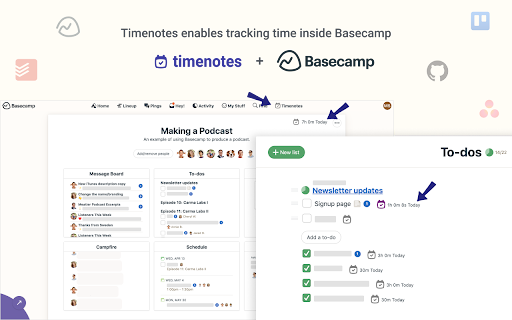
Timenotes.io time trackers for the browser with native support for Basecamp UI and time tracking. Timenotes.io time tracker extension for the browser with support for Basecamp UI. An easy-to-use daily activity tracker that allows for reporting hours with a single push of a button. Timenotes is not only a browser add-on, sign in to timenotes.io to access a powerful time management tool for teams and solo users. Extension features: * extend Basecamp interface with time tracking functionality * start/stop time tracker with just one click * setup your working schedule to get time tracking reminders and never forget to track your time * get the alert notification in case you forget to stop the tracker * access daily time summaries of a day * assign time logs to task and project * bookmark ongoing tasks ABOUT TIMENOTES Timenotes Chrome Extension is a part of the web platform with complementary features that enables you to get an insight about your and your team members’ logged time. Visit Timenotes to access features like detailed reports, team and absences management, timesheets, team activity dashboard and much more. Timenotes will help you and your team bring your productivity to the next level. Browser add-on helps you to track your time from anywhere on the web. In case of any questions, feedback or feature requests, feel free to email us on support@timenotes.io.

WebWork Time Tracker
The simplest way to track your work hours. Track your work hours effortlessly with the WebWork Time Tracking Extension for Chrome. 🔹 Choose a task, add an activity description, and start tracking. 🔹 Your time is automatically recorded and synced to WebWork reports. ⚠️ Note: The extension only tracks time and allows task selection and activity description. For advanced features like: ✔ Screenshots & app/web usage monitoring ✔ Productivity reports & work-life balance analytics ✔ Task & project management ✔ Payroll & Payments ✔ Geolocation tracking & team chat ✔ Leave & Shift Management ✔ AI-Powered Assistance → Use WebWork’s Desktop Time Tracker or Web Time Tracker 📌 A WebWork account is required to use the extension. Also, make sure you're not tracking time on other WebWork platforms simultaneously. Join 26,000+ businesses that rely on WebWork for smarter time tracking and workforce management!

Simple Time Tracker
Start tracking it right now with Simple Time Tracker. No need any registration, permissions or unnecessary features. How much time spend on tasks? Start tracking it right now with Simple Time Tracker. Tired of complicated time tracking applications? No need any registration, permissions or unnecessary features. Add a task, start and stop the timer. And that's it 🎉 - Fix reset tasks - Added dynamic ordering and sort by option - Added Migration WebSQL to IndexedDB (Origin Trials for WebSQL) and will be removed v3. Up to Chrome 123 (ends with the rollout of next Chrome release), no later than 29 May 2024

Lucen Track widget
Track your time directly from Google Chrome in all your favorite tools Lucen Track for Google Chrome™ is the simplest extension to track time from your favourite productivity tools. The extension automatically integrates with the Lucen Track web app and allows to start timers, log time manually and manage your time entries without opening a new tab. Start tracking your time from your browser and within leading project management tools. = Get started in 3 simple steps = 1) Click “Add to Google Chrome™”. 2) Click on the Extension Icon. 3) Log in with your Lucen Track credentials. 4) You will now find a little Lucen Track icon inside the supported tools. 5) Click on the Lucen Track icon next to the task or project you want to track time - the extension will automatically match the task description with the equivalent project in the web app. 6) Choose whether to start a timer or log time manually, and start boosting your productivity! If you are working on a project or multitasking between emails, meetings and social media, you can always monitor the time spent on each task or to-do by starting single or multiple timers. The extension already works in: - Basecamp - Asana - Microsoft To-do / Planner and many others. Find all of our supported sites at https://www.timeneye.com/integrations If you are experiencing problems or want to send us a feedback, please contact us at support@timeneye.com Please note that Lucen Track for Google Chrome™ requires a Lucen Track subscription: subscribe at https://www.timeneye.com

Time Tracker by TimeCamp
Put your favorite free time tracker into any tool you use. Add a timer to any web tool you use, and enjoy tracking time straight from the browser! TimeCamp Plugin for Chrome works two-way as: - An extra button within the task/card view of your tool, - Separate timer within a plugin interface under the TimeCamp icon next to the address bar. Start a timer whether you need it and stop it when you finish the task. The plugin syncs with TimeCamp automatically, so the records will immediately appear in your timesheets. Get the plugin in seconds: 1. Hit the “Add to Chrome” button and install the plugin, 2. Once installed, log into your TimeCamp account (or create a new one at timecamp.com). Voila! Don’t forget to pin it to the extension bar to always keep it handy ;) 82% of our users chose TimeCamp over other time trackers. Join them and enjoy clear-cut, data-driven project profitability analysis with estimates-based budget tracking.
