
iicegpchbcgjakgkpdmlaigmhfmioeei
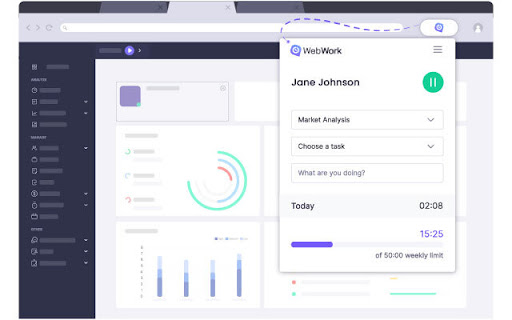
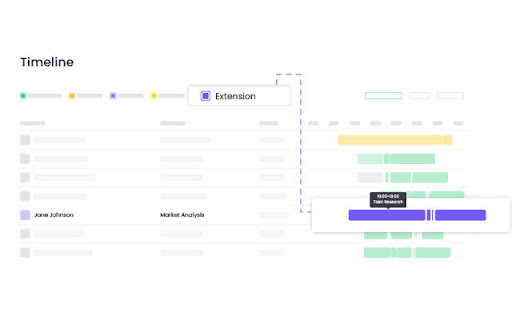
The simplest way to track your work hours. Track your work hours effortlessly with the WebWork Time Tracking Extension for Chrome. What you can do in the extension: 🔹 Track time and breaks with task selection and activity descriptions 🔹 View today's and this week's time overview 🔹 Check projects and tasks, and update task statuses 🔹 View time entries - and add or edit them if you have the required permissions For advanced features like: ✔ Screenshots and app/web usage monitoring ✔ Productivity reports and work-life balance analytics ✔ Payroll and payments ✔ Geolocation tracking and team chat ✔ Leave and shift management ✔ AI-powered assistance → Use WebWork's Desktop Time Tracker and Web account 📌 A WebWork account is required to use the Chrome extension. Join 26,000+ businesses that rely on WebWork for smarter time tracking and workforce management!

Webtime Tracker
Discover your browsing habits! Time tracking at its best. Webtime Tracker keeps track of how you spend time on the web and presents the stats in a useful and intuitive way. 🚀 What you'll see ⭐️ Time spent on individual websites ⭐️ Detailed domain stats ⭐️ Total time spent browsing ⭐️ Usage visualized by colorful graphs 🚀 Extras ⭐️ Backup and restore, export to CSV ⭐️ Screenshots (e.g. for sharing) ⭐️ Works even offline ⭐️ Precise algorithm measuring time only when Chrome window is active (not covered by other windows) 🚀 Customizable features ⭐️ Idle time interval ⭐️ Keep tracking when media is playing ⭐️ Doughnut graph gaps (for readability) ⭐️ Time tracker in icon Completely free and with no ads Made with ♥ by Peta Sittek

Web Timer
Keep track of how you spend your time on the web. Web Timer is a simple and intuitive extension that lets you keep track of how you're spending your time on the web. Web Timer keeps track of the tab that you are actively using and updates its stats every 3 seconds. Features: - Helps you visualize the time you're spending by displaying the data in a pie chart - Keeps track of stats for today, daily average, and all-time - Stops counting if your machine is idle for more than 30 seconds - Only counts time when Chrome has focus - Shows the number of minutes spent on current website over the icon - Easily share your Web Timer stats with friends Instructions: - Use the options page to avoid tracking certain sites Note: I originally sold the extension (https://chrome.google.com/webstore/detail/web-timer/ggnjbdfgigejghknieofeahaknkjafim?hl=en) but it seems that the buyer is injecting redirects and other suspicious behavior so I'm uploading a clean copy. The source code for this extension is at https://github.com/dskang/webtimer

Kronos Timer
Simple tool for tracking your working time. Whether you're a freelancer managing multiple projects or simply want to keep tabs on your daily activities, Kronos is your go-to time-tracking companion. This lightweight Chrome extension is designed to seamlessly integrate into your workflow, offering a fast and efficient way to monitor and manage your time. Features: * Fast, Simple, and Lightweight * Kronos is built for speed and simplicity. With a clean and intuitive interface, you can effortlessly track your time without any distractions. * Cross-Device Sync * Access your time logs from any Chrome instance! Kronos allows you to save and sync your data across multiple devices, ensuring you're always in control of your time. * Customizable Labels * Organize your time logs with personalized labels. Kronos lets you define labels that make sense for your unique workflow. * Sound Reminders * Stay on track with customizable sound reminders. Choose from a variety of tones to alert you when it's time to switch tasks or take a break. * Keyboard Shortcuts * Optimize your time-tracking experience with convenient keyboard shortcuts. Effortlessly start, stop, and navigate through Kronos without leaving your keyboard. * Timer Limit * Set time limits for your tasks and projects. Kronos helps you stay disciplined and focused by notifying you when your allotted time is up. * Colored Statuses * Visualize your time at a glance. Kronos uses colored statuses to represent different phases of your work, providing a quick overview of your day. * Idle Timer Pause * Forget to stop the timer? No worries! Kronos can automatically pause the timer when it detects inactivity, ensuring accurate time tracking. * Export Logs as CSV * Easily analyze and share your time data. Kronos allows you to export your time logs as CSV files, compatible with various productivity tools and platforms. * Editable Time Logs * Make adjustments on the fly. Kronos lets you edit your time logs to correct any mistakes or update entries with ease. * Hourly Rate with Price Preview * Monitor your earnings in real-time. Kronos enables you to set an hourly rate and provides a price preview in your time logs, helping you keep track of your income.

Freelance Time Tracker
Track and organize your work time as a freelancer with ease. 🌟 Hey freelancers! Meet Beease Timer, your new snazzy Chrome browser extension crafted just for you. 🚀 Looking for a virtual sidekick to track your precious work hours? Look no further! This little genius 🧠 keeps tabs on each task, makes client billing a breeze, and injects some sweet organization into your work hours. But wait—there’s more! Our interface couldn’t be more intuitive. 🎮 Start, stop, and pause the timer with a playful click—it’s like playing tag with your time. Fun, right? 😄 Beease Timer isn’t just a tool; it’s your new best work buddy. 🤝 It whips up detailed summaries of your work sessions, revealing just where your time slips away. 🕵️♂️ Ready to sharpen your focus, boost your productivity, and slice through your workday like a ninja? 🥷 Time waits for no one, but with Beease Timer, you’re not just keeping up—you’re mastering your own time. 🏆 It’s the ultimate partner for freelancers eager to spice up their routine, optimize their hours, and supercharge their output! Get ready to work smart, have fun, and Beease your way to success! 🌈 Let’s do this!
