
lbogpmhokkbbcfjabeibelaagefkbfca

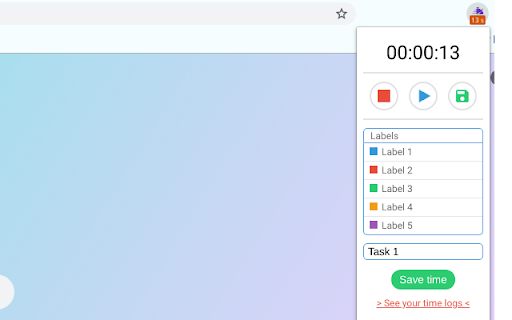

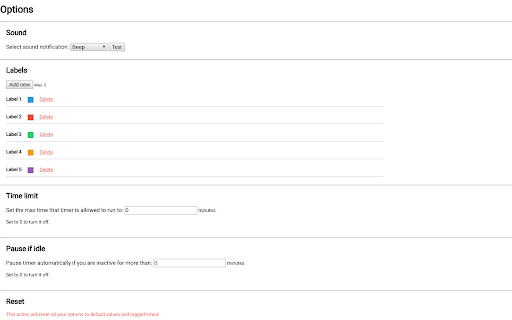
Simple tool for tracking your working time. Whether you're a freelancer managing multiple projects or simply want to keep tabs on your daily activities, Kronos is your go-to time-tracking companion. This lightweight Chrome extension is designed to seamlessly integrate into your workflow, offering a fast and efficient way to monitor and manage your time. Features: * Fast, Simple, and Lightweight * Kronos is built for speed and simplicity. With a clean and intuitive interface, you can effortlessly track your time without any distractions. * Cross-Device Sync * Access your time logs from any Chrome instance! Kronos allows you to save and sync your data across multiple devices, ensuring you're always in control of your time. * Customizable Labels * Organize your time logs with personalized labels. Kronos lets you define labels that make sense for your unique workflow. * Sound Reminders * Stay on track with customizable sound reminders. Choose from a variety of tones to alert you when it's time to switch tasks or take a break. * Keyboard Shortcuts * Optimize your time-tracking experience with convenient keyboard shortcuts. Effortlessly start, stop, and navigate through Kronos without leaving your keyboard. * Timer Limit * Set time limits for your tasks and projects. Kronos helps you stay disciplined and focused by notifying you when your allotted time is up. * Colored Statuses * Visualize your time at a glance. Kronos uses colored statuses to represent different phases of your work, providing a quick overview of your day. * Idle Timer Pause * Forget to stop the timer? No worries! Kronos can automatically pause the timer when it detects inactivity, ensuring accurate time tracking. * Export Logs as CSV * Easily analyze and share your time data. Kronos allows you to export your time logs as CSV files, compatible with various productivity tools and platforms. * Editable Time Logs * Make adjustments on the fly. Kronos lets you edit your time logs to correct any mistakes or update entries with ease. * Hourly Rate with Price Preview * Monitor your earnings in real-time. Kronos enables you to set an hourly rate and provides a price preview in your time logs, helping you keep track of your income.

Simple Time Tracker
Start tracking it right now with Simple Time Tracker. No need any registration, permissions or unnecessary features. How much time spend on tasks? Start tracking it right now with Simple Time Tracker. Tired of complicated time tracking applications? No need any registration, permissions or unnecessary features. Add a task, start and stop the timer. And that's it 🎉 - Fix reset tasks - Added dynamic ordering and sort by option - Added Migration WebSQL to IndexedDB (Origin Trials for WebSQL) and will be removed v3. Up to Chrome 123 (ends with the rollout of next Chrome release), no later than 29 May 2024

Simple Time Track
Easy and free time tracking of tasks in the browser running in the background. Simple Time Track — easy, FREE time tracking right in your browser. No subscription. No credit card. No cloud account. Your data stays on your device. Simple Time Track is a clean, distraction-free Chrome extension that lives in the side panel next to whatever you're working on. Start a timer with one click, switch between tasks, and always have your running tracker in sight without losing the page you're on. What you get - One-click start/stop timer for each task - Time multiple tasks simultaneously — the badge shows how many are running - Estimates with progress bars so you see when you go over budget - Drag and drop to reorder tasks the way you think - Project tags with auto-assigned colors for quick visual grouping - Archive instead of hard delete — restore old tasks or permanently remove them later - Dedicated reset confirmation so a stray click never wipes hours of tracking - Export and import your data as CSV or JSON anytime Available in English, Čeština, Slovenčina and Deutsch — switch languages directly in Settings. Privacy first: everything is stored locally in your browser. No telemetry, no analytics, no third-party servers. Open source. Requires Chrome 114 or newer (for the Side Panel API).

Timer, Alarm & Stopwatch
An easy-to-use and lite timer, alarm, and stopwatch for your browser. Timer, Alarm & Stopwatch is an extension that lets you easily set a timer, alarm, or adjust stopwatch in your browser. The interface for this addon can be opened in toolbar popup, a new tab, or a stand-alone window. Simply right-click on the toolbar button to choose the desired context. When you open the UI, there are three tabs on the left side, please click on each tab to see the details. At the top, there is a button to add a new timer or alarm. Click on this button to adjust the timer or alarm settings. For the stopwatch tab, there are the start, reset, and lap buttons. If you have a feature request or found a bug to report, please fill the bug report form on the add-on's homepage (https://mybrowseraddon.com/timer.html).

Tab Countdown Timer
A Chromium Extension that allows you to set a timer that counts down and then closes the tab. Set a countdown timer on any tab. When the timer expires, the tab closes — or for YouTube videos, you can choose to pause playback instead. Every tab can have its own timer. Enter time by typing or by scrolling with the mouse wheel (hold Shift to adjust in 5-minute increments). Changes for v1.6.0 - Twitch support: the "Pause video" action and per-content auto-start rules now work on Twitch Changes for v1.5.0 - Duration stepper buttons - hover the hours/minutes/seconds inputs to reveal up/down arrows for quick adjustments without clicking into the field. - New toolbar icon --- Changes for v1.4.0 - Auto-start rules: a timer can start automatically when you visit a saved URL or YouTube video. - Redesigned popup with tighter typography and spacing --- Changes for v1.3.1 Allow flexible minute input and improve UX. --- Changes for v1.3.0 - UI/UX improvements: Quick-set timers, updated layout and color scheme - YouTube pausing: Optionally choose to pause a YouTube video when the timer ends. - Faster Time Adjustments: Hold down the `Shift` key while using your mouse wheel to adjust the timer in 5-minute increments. --- Changes for v1.2.1 - Fixed "undefined" on first run issue. - Improved styling. - Time updates immediately upon opening popup. - Added error handling --- Changes for v1.1 - Add dark mode based on current system settings - Save last alarm values as default for next time - Update to chrome manifest v3
