
cgjkfhodbbeidhhfbjnjhcpjdimpfjaj
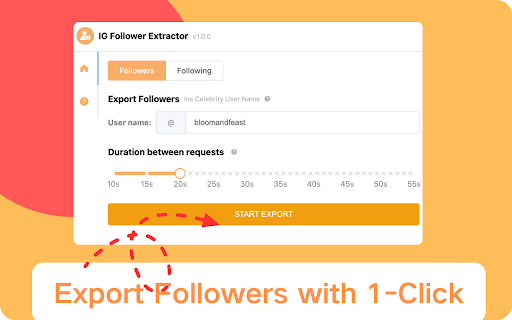


Effortlessly export Instagram followers and following lists to Excel or CSV formats with just one click. ▬ How to Use IG Follower Export Tool▬ 1. Click the “IGExport-IG Follower Export Tool” icon located on the browser toolbar, then open the IGExport-IG Follower Export Tool popup page via Net. 2. Input a valid IG profile URL or IG ID. 3. Click the "Start Export" button, which will open an option page. 4. Our IGExport Tools will run automatically. After the process is finished, you can download IG followers or IG followings in CSV or Excel format. ▬ Features ▬ 1. Export IG followers and IG followings with one click via the extension. 2. Export up to 50K IG followers or IG followings. 3. Supports CSV and Excel formats. 4. Handles IG rate limit errors. 5. Processing with one click via IGTools net. 6. Extract user profiles, including follower and following count, biography, public email, etc. ▬How to Get Started?▬ 1. Enter Instagram Username. 2. Select Export type: FOLLOWERS or FOLLOWING. 3. Click the Export Button. ▬Security▬ 1. The extension neither asks for your IG password nor any of your data, including IG user information, story, visit history, posts, and social relationships. 2. All the data you process is on your local computer and never passes through our servers. 3. IG enforces a rate limit, i.e., a limit on the number of requests. The rate limit is not public information and varies depending on your IP address. ▬How it works in IG Follower Export tool▬ 1. If you export a large list of IG followers, you may experience a rate limit error

Instant Data Scraper
Instant Data Scraper extracts data from web pages and exports it as Excel or CSV files Instant Data Scraper is an automated data extraction tool for any website. It uses AI to predict which data is most relevant on a HTML page and allows saving it to Excel or CSV file (XLS, XLSX, CSV). This tool does not require website specific scripts, instead it uses heuristic AI analysis of HTML structure to detect data for extraction. If the prediction is not satisfactory, it lets the user customize the selections for greater accuracy. This type of scraping technology is much more convenient, because it does not require large user created libraries of scraping scripts, which often become filled with outdated and redundant versions. This means that our scraping method works just as well with small and lesser known websites, as it does with global giants like Amazon. Also, our users do not need to have any coding, json or xml skills! Instant Data Scraper FEATURES: * Detecting data for extraction with AI. * Detecting when dynamic data has loaded. * Delay and maximum wait time customization for desired crawling speed * Support for pagination on websites. * Automatic navigation to next page via buttons or links. * Support for infinite scrolling. * Extracted data preview with copy and paste support. * Data export to Excel spreadsheet or CSV file. * Extracted data column renaming and filtering. This extension is completely FREE. Instant Data Scraper works well in unison with SEO tools, CRM recruiter systems, sales leads management tools or email marketing campaigns. Web scraping and data downloading is made easy with our tool. Furthermore, you have data security and privacy as the scraped data does not leave your browser. Instant Data Scraper USE CASES: * Lead generation for companies and freelancers. * Growth hackers looking for easy ways to collect data. * Recruiters looking for job candidates. * Crawl results from search engines. * Get product pricing data from e-commerce websites. * Amazon sellers, distributors and review analysts. * Get email and addresses and phone numbers from directories. * Get contact info from professional association websites. * Scrape reviews and ratings. * Analyze posts for likes, comments, connection and contacts. * Extract emails and ID from social media profiles. Developer promise: This extension does not contain any malware or spyware beyond standard Google Analytics.

IG Followers Exporter
Instantly export your followers and following to Excel/CSV formats with one click. "IG Followers Exporter" is a powerful tool that simplifies exporting Instagram followers and followings into a Excel/CSV file with just one click. This tool enhances your Instagram experience by providing a seamless way to export valuable follower data for analysis or management. 💡 Features ✓ Export followers from Instagram. ✓ Export following list from Instagram. ✓ CSV and Excel formats support. ✓ Extract user profile, includings User ID, User Name, Avatar URL, Profile URL, Followed By You. ✨Extra Features We also offer "More Tools" in the extension to help you discover more convenient and useful products. ⚙️ Get Started 1. Enter Instagram Username. 2. Select Export type: FOLLOWERS or FOLLOWING. 3. Click the 'EXPORT' button. 🔒 Data Privacy Your data privacy is paramount. All data processing occurs on your local machine; it never transits through our servers, ensuring no one else has access to your collected data. ⚠️ Disclaimer INSTAGRAM and IG are trademarks of Instagram, LLC. IG Followers Exporter is an independent tool and is not affiliated with, endorsed, sponsored, or otherwise connected to Instagram, LLC, Meta Platforms, Inc., or any of their affiliates or subsidiaries.

IGExport - Follower & Following Export for Ins
Easily export your Instagram followers and following to CSV or Excel with IGExport. The Ultimate Instagram Followers & Following Export Tool IGExport (also known as "Exporter for IG", "IG Exporter", "IGExport") is a powerful tool designed to quickly export Instagram followers and following lists to CSV or Excel files. With just a single click, you can extract follower and following details, making data management and analysis effortless. This tool is built to simplify your Instagram experience and provide a seamless way to retrieve valuable follower data. ✅ Quick & Easy Export: IGExport allows you to instantly export Instagram followers and following details into a CSV file, saving you time and effort. ✅ Detailed Insights: Export both your followers and the accounts you follow, including follower and following counts for a comprehensive overview of your Instagram connections. ✅ Simple & Intuitive Interface: Just enter the Instagram username, select the export type (followers or following), and click the export button to generate a CSV file. ✅ Privacy-Focused: Your data security is our priority. IGExport processes all exports directly on your device, ensuring no data is transferred to external servers. 1️⃣ Enter an Instagram Username: Input the username of the account whose data you want to export. 2️⃣ Select Export Type: Choose whether to export the followers list or the following list. 3️⃣ Customize Export Preferences: Optionally, include follower/following counts for a more detailed analysis. 4️⃣ Click Export: Initiate the export process and download the CSV file instantly. By following these steps, you can effortlessly extract Instagram followers or following lists in just a few clicks. ⚠️ Important Notice: To avoid potential restrictions on your primary Instagram account, we recommend using a separate account for data exports. This precaution helps minimize the risk of any interruptions to your main account. 💡 Frequently Asked Questions: For more details, visit our FAQ page at https://extfox.pro/faq. 📩 Contact Us: For any inquiries or assistance, reach out to us at contact@extfox.pro. 🔒 Privacy Policy: To learn how we protect your data, check out our Privacy Policy at https://extfox.pro/privacy. ⚠️ Disclaimer: IGExport is an Independent Tool, Not Affiliated with Instagram IGExport is an unofficial extension and operates independently of Instagram. It is not associated, endorsed, or connected with Instagram in any way. For concerns related to your official Instagram account, please contact Instagram's official support. Thank you for your understanding.

IG Follower Export Tool - IG Tools
IG Follower Export Tool can Export IG followers and following to Excel/CSV formats with one click. With the help of extension, Ins Tools - Ins Follower Export Tool, you can scrape over 50K IG followers or IG followings within one click. ▬▬▬▬▬▬▬ How to Use ▬▬▬▬▬▬▬ 1. Click Ins Tools - Ins Follower Export Tool icon, which is on browser toolbar, then open IGTools popup page via IGTools Net 2. Click "Export IG Data" button, an IGTools option page will be opened. 3. Input a valid IG profile URL or IG ID 4. Click "Start parsing" button, and our IG Tools will run automatically. After this processing is finished, you can download IG followers or IG followings to CSV or Excel. Another way, on the Instagram profile page, you’ll see an export button—click it to initiate the export process. ▬▬▬▬▬▬▬ Features ▬▬▬▬▬▬▬ ● Export IG followers and IG following with one click by extension ● Export up to 50K IG followers or IG following ● CSV and Excel formats support ● Handles IG rate limit errors ● Processing in one click via IGTools net ● Export user profiles from private accounts that either follow you or are followed by you. ● Extract user profile, including follower and following count, biography, public Email, etc. ▬▬▬▬▬▬▬▬ Security ▬▬▬▬▬▬ ● The extension neither ask for your IG password, nor any of your data including IG user information, story, visit history, posts, and social relationships. ● IG enforces IG rate limit, i.e. limit on the number of requests. The rate limit is not public information and varies depending on your IP address. ▬▬▬▬▬▬▬▬ How it works in IG Follower Export tool ▬▬▬▬▬▬ ● If you export a huge list of IG followers, you can experience a rate limit error. ● The extension goes into “Cooldown” mode. The timer shows the time remaining. ● If the limit error persist, the cooldown period increases 2x. ● Once the cooldown period ends and the subsequent request is successful, the IGTools switches to the Normal mode. ▬▬▬▬▬▬▬▬ Social Media Tools Recommendations: ▬▬▬▬▬▬ Our team has been conducting in-depth research in this field for a significant period. To further assist you, we recommend the additional tools 'IG Exporter' and more tools , which are located at the top of the extension page. ▬▬▬▬▬▬▬▬ Attention ▬▬▬▬▬▬▬▬ Please note that using this extension carries a risk of your account being deactivated or blocked by Instagram. You are responsible for managing the frequency of use at your own discretion. ●Account Usage: It is advised to avoid using your primary Ins account with IGExporter. Frequent data extraction via an IGExporter may trigger abnormal activity flags, potentially resulting in temporary restrictions or account suspension. ●Rate Limits: Ins imposes strict rate limits on the number of requests allowed within specific timeframes. Exceeding these limits while using an IGExporter may cause errors or temporary service suspensions. ●Automation Risks: While ig export streamlines data collection, Ins discourages automated activities. Excessive use of IGExporter may violate platform policies. ●Data Integrity: Data exported through IGExporter relies on publicly available information. Private accounts or restricted profiles may not provide complete data. ●Incomplete Exports: For accounts with a large follower base, IGExporter may occasionally produce incomplete datasets. Repeated executions of IGExporter might yield slightly varying results due to Instagram's limitations and dynamic follower list changes. ▬▬▬▬▬▬▬▬ Disclaimer▬▬▬▬▬▬▬▬ IGExport is an independent tool and is not officially associated with Instagram. Please note that our browser extension is a third-party service and is not formally affiliated with any official entities. We emphasize that this tool operates autonomously and is not endorsed or partnered with any official organizations. All activities conducted through this extension are entirely separate from the official platform. For official assistance, please reach out to the platform's designated support channels. Thank you for your understanding.
