
ngoflocpbpcmpekdadkmkicijbdgmnab
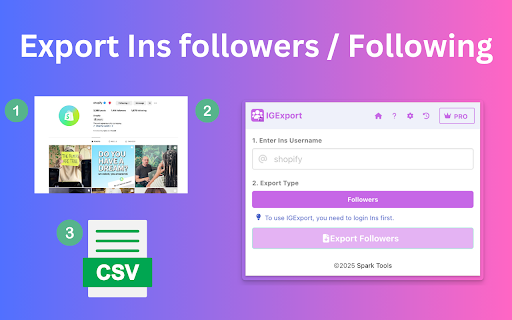


Easily export your Instagram followers and following to CSV or Excel with IGExport. The Ultimate Instagram Followers & Following Export Tool IGExport (also known as "Exporter for IG", "IG Exporter", "IGExport") is a powerful tool designed to quickly export Instagram followers and following lists to CSV or Excel files. With just a single click, you can extract follower and following details, making data management and analysis effortless. This tool is built to simplify your Instagram experience and provide a seamless way to retrieve valuable follower data. ✅ Quick & Easy Export: IGExport allows you to instantly export Instagram followers and following details into a CSV file, saving you time and effort. ✅ Detailed Insights: Export both your followers and the accounts you follow, including follower and following counts for a comprehensive overview of your Instagram connections. ✅ Simple & Intuitive Interface: Just enter the Instagram username, select the export type (followers or following), and click the export button to generate a CSV file. ✅ Privacy-Focused: Your data security is our priority. IGExport processes all exports directly on your device, ensuring no data is transferred to external servers. 1️⃣ Enter an Instagram Username: Input the username of the account whose data you want to export. 2️⃣ Select Export Type: Choose whether to export the followers list or the following list. 3️⃣ Customize Export Preferences: Optionally, include follower/following counts for a more detailed analysis. 4️⃣ Click Export: Initiate the export process and download the CSV file instantly. By following these steps, you can effortlessly extract Instagram followers or following lists in just a few clicks. ⚠️ Important Notice: To avoid potential restrictions on your primary Instagram account, we recommend using a separate account for data exports. This precaution helps minimize the risk of any interruptions to your main account. 💡 Frequently Asked Questions: For more details, visit our FAQ page at https://extfox.pro/faq. 📩 Contact Us: For any inquiries or assistance, reach out to us at contact@extfox.pro. 🔒 Privacy Policy: To learn how we protect your data, check out our Privacy Policy at https://extfox.pro/privacy. ⚠️ Disclaimer: IGExport is an Independent Tool, Not Affiliated with Instagram IGExport is an unofficial extension and operates independently of Instagram. It is not associated, endorsed, or connected with Instagram in any way. For concerns related to your official Instagram account, please contact Instagram's official support. Thank you for your understanding.

IG Post Export - Bulk Export Ins photos and videos to CSV
Quickly download and export Instagram photos, videos, and posts to CSV with one click! Perfect for leads and research. Easily Download and Export Instagram Posts, Photos, and Videos to CSV with Just One Click! Ideal for lead generation and research. 🏆 The Ultimate Tool for Exporting Instagram Posts, Images, and Videos into CSV Format. A simple, one-click solution to download posts, photos, and videos from Instagram users. 🖖 KEY FEATURES: • Export both photos and videos from Instagram posts. 🚗 STEP-BY-STEP INSTRUCTIONS: 1. Enter an Instagram username. 2. Hit the “Export” button. This tool uses Instagram’s official API to fetch and export the data. • Free users can export up to the first 100 records. • Pro users can export up to 10,000 records for only $9.99! 🔒 PRIVACY AND USAGE POLICY: No password required. All exported data is processed locally, ensuring complete privacy—no one else knows what you’ve exported.

IGFollow - Follower Export Tool
Export Tool for IG to Extract Instagram follower and following and export to CSV with one click IGFollow automatically scrape user profile from Instagram followers and followings and export to CSV. Features ✓ Export followers from Instagram ✓ Export following list from Instagram ✓ Extract user profile, including follower and following count, biography, public Email, etc. How to get started? 1. Enter Instagram Username 2. Select Export type: FOLLOWERS or FOLLOWING 3. Select Include user profile in the Extension Setting if you want to export user profile. This feature will take longer, as data needs to be requested for each user. 4. Click Export Button FAQ https://igfollow.converts.cc/#faq If you have any questions, please feel free to contact us at convertscc@gmail.com. Data Privacy All the data you process is on your local computer and never passes through our servers. Statement There is a risk that your account may be deactivated or blocked by IG when using the extension and you should control the frequency of use at your own risk. About Pro It's a paid extension, you can export the first 500 profiles of each extraction for free trial.

IG Follower Export Tool - Free Email Extractor by exporter24
Export Instagram followers and followings, profile with email. Free and unlimited. IG Exporter is a powerful Chrome extension that lets you export Instagram followers and followings to CSV files with ease. It supports detailed data scraping and helps you save time when managing large amounts of account information. How to Use: 1. Open the Instagram profile page of the account whose followers or followings you want to export. 2. Click the extension button located to the right of the followers or following count to open the IG Exporter extension page. 3. Choose the fields you want to scrape and decide if you need detailed profile information. 4. Click the "Start" button to begin scraping. 5. Once the scraping process is complete, download your data in CSV format. Features: - Export followers and followings quickly with a single click. - Supports detailed profile scraping with optional fields. - Handles Instagram rate limit errors automatically. - No Instagram password or sensitive data required for operation. - Works for private accounts that either follow you or are followed by you. Security: IG Exporter does not ask for your Instagram password or access any sensitive personal data, such as your posts, story views, or social relationships. Instagram's rate limits are automatically handled to ensure safe and efficient scraping. Attention: Using this extension may involve risks of temporary restrictions or blocks on your Instagram account. Please manage your scraping frequency responsibly to reduce these risks. IG Exporter is your ultimate tool for exporting Instagram data securely and efficiently.

IG follower Export Tool - Ins Followers Exporter
Effortlessly export Instagram followers and following lists to Excel or CSV formats with just one click. ▬ How to Use IG Follower Export Tool▬ 1. Click the “IGExport-IG Follower Export Tool” icon located on the browser toolbar, then open the IGExport-IG Follower Export Tool popup page via Net. 2. Input a valid IG profile URL or IG ID. 3. Click the "Start Export" button, which will open an option page. 4. Our IGExport Tools will run automatically. After the process is finished, you can download IG followers or IG followings in CSV or Excel format. ▬ Features ▬ 1. Export IG followers and IG followings with one click via the extension. 2. Export up to 50K IG followers or IG followings. 3. Supports CSV and Excel formats. 4. Handles IG rate limit errors. 5. Processing with one click via IGTools net. 6. Extract user profiles, including follower and following count, biography, public email, etc. ▬How to Get Started?▬ 1. Enter Instagram Username. 2. Select Export type: FOLLOWERS or FOLLOWING. 3. Click the Export Button. ▬Security▬ 1. The extension neither asks for your IG password nor any of your data, including IG user information, story, visit history, posts, and social relationships. 2. All the data you process is on your local computer and never passes through our servers. 3. IG enforces a rate limit, i.e., a limit on the number of requests. The rate limit is not public information and varies depending on your IP address. ▬How it works in IG Follower Export tool▬ 1. If you export a large list of IG followers, you may experience a rate limit error
