
cgelphinochnndbeinkgdjolojgdkabc
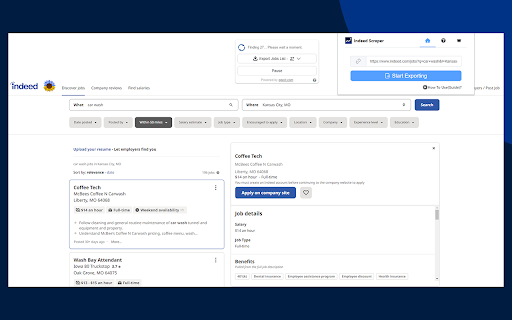
Extract Indeed job titles, salaries, locations, and apply links and download in user-friendly formats like Excel with ease. Introducing our Indeed Scraper, the ultimate tool for extracting job listings from Indeed with ease. With just a few simple steps, you can scrape job details, salaries, locations, and apply links, and save them to a CSV file for use in Excel. Indeed is a leading job site with a massive database of job listings, providing valuable information on job openings, salaries, locations, and job seeker profiles. Our Indeed scraper enables you to effortlessly Scraping this information without the need for coding knowledge. The benefits of using our Indeed scraper are plentiful. HR managers, recruiters, and anyone looking to create a database of candidates, track hiring trends, and stay informed about the job market can benefit from the valuable insights that our scraper provides. With our Indeed scraper, you can save time, eliminate the need to build and test your own scraper, and have immediate access to all the job information you need. The data extraction process begins immediately after your request, and the duration of the extraction will vary depending on the amount of information you need to retrieve. Don't waste any more time manually searching for job information on Indeed. Try our Indeed scraper today and gain valuable insights into the job market. ------------------------------------------ Data Privacy ------------------------------------------ All data is processed in your local computer, it is never passing through our web server, no one knows what you explore. The extension will NOT attempt to offload, distribute, broadcast, sell, or in any way share collected data. ------------------------------------------ LEGAL ------------------------------------------ Indeed is a trademark of Indeed Inc., registered in the U.S. and other countries.This is an unofficial enhancement for Indeed. This extension is not related to Google Maps of Indeed Inc.

Ultimate Web Scraper
Extract data instantly: Grab text, images, emails & links from any website with a single click. Fast, simple & powerful web scraper Your all-in-one tool for effortless web scraping, lead generation, and data extraction. No code, no setup — just instant results. + AI Assisted extraction for better results 😲 👇 One-Click Scraping Point the web scraper at any page with lists, tables, or directories and extract structured data instantly. Pagination and infinite scroll are handled automatically. 📄 Bulk Page Scraping Feed the data scraper a list of URLs and pull emails, business details, contact info, or custom fields from every page at once. 🖼️ Image Downloader Grab every image from a page in one click. 📬 Email Extractor Run the email scraper on one page or thousands — it finds and collects every address. 📊 Data Export Send your scraped data to CSV, Excel, or Google Sheets. 📧 Email Scraper — Pull email addresses for outreach and lead gen 📞 Phone Scraper — Collect phone numbers for sales follow-up 🏢 Business Scraper — Grab company names, addresses, and details 👤 People Scraper — Extract names, job titles, and work history 🌐 Social Scraper — Collect website URLs and social media profiles 💼 B2B Scraper — Get company size, industry, and revenue data 💬 Review Scraper — Scrape reviews and comments from any site 📄 Page Text Scraper - Scrape pages for clean text 📈 Sales & Marketing — Build lead lists with verified contact data 🎯 Recruiters — Scrape candidate info from job boards and LinkedIn 🛒 E-commerce — Monitor competitor pricing, products, and stock 🔬 Researchers & Data Scientists — Collect datasets for analysis and ML ✍️ Content & SEO — Gather data from blogs, news sites, and forums 📉 Brand & BI Teams — Track reviews, sentiment, and competitor moves ✅ AI‑powered extraction improves accuracy on messy, unstructured pages. ✅ No coding required, so anyone can start in seconds. ✅ Runs entirely in your browser, keeping your data private. ✅ Works on login‑protected pages and complex layouts. ✅ Handles pagination and infinite scroll for complete results. ✅ Fast exports to CSV, Excel, or Google Sheets. ☁️ Cloud Web Scraping — Run this web scraper in the cloud with cloud browsers for large‑scale data scraping. ⏱️ Scheduling — Automate web scraping and data extraction on a schedule. 🔗 Integrations — Connect your data scraper to n8n, Google Sheets, and Make.com. 1️⃣ Install the web scraper from the Chrome Web Store 2️⃣ Go to your target site 3️⃣ Click to scrape 4️⃣ Export your data

Indeed Scraper
Scrape Indeed jobs, salaries, locations, and apply links and save to CSV or Excel. Easy to use. Our Indeed Scraper extension is a powerful tool designed to extract valuable job data from Indeed's extensive database. Whether you're a job seeker looking for specific opportunities or an HR manager seeking insights into the job market, our extension provides the information you need without the hassle of manual searches or coding. Access Fresh and Extensive Data: With over 250 million users worldwide, Indeed is a goldmine of job information. Our scraper allows you to quickly gather fresh and extensive data, providing valuable insights into job trends, hiring patterns, and more. Extract Comprehensive Job Details: Our scraper extracts essential job details such as titles, dates posted, company names, locations, salaries, ratings, full job descriptions, and apply URLs. Using our Indeed Scraper is simple: 1. Open indeed.com and perform your desired search. 2. Click the "Export Jobs" button and wait for the extraction process to complete. 3. Download the extracted data in CSV or Excel file format. 🔹 No Coding Required: Our user-friendly interface eliminates the need for coding knowledge, making it accessible to users of all levels. 🔹 Real-time Results: Receive fresh and accurate data within seconds, eliminating the wait time for requested information. 🔹 Customizable Search Queries: Tailor your search criteria to match your specific needs, ensuring relevant and targeted results. 🔹 Time-saving: Our scraper saves you time by automating the data collection process, allowing you to focus on your core tasks. 🔹 Regular Updates: We consistently update our scraper to ensure compatibility with any changes made to the Indeed website.

Indeed Scraper
Introducing the Indeed Scraper Browser Extension: Your Ultimate Job Data Extraction and Saving Solution Whether you're a job seeker, HR manager, recruiter, or business owner, the Browser Extension is your go-to tool for in-depth job market analysis. With the ability to save and export data not only in CSV format but also in JSON and XLSX (Excel), this extension unlocks a wealth of information from Indeed's vast job listings. Our scraper simplifies the process of searching and extracting detailed job data, requiring no coding expertise. Why Choose the Indeed Scraper? Harness the full potential of Indeed's database to identify job trends, track hiring patterns, and pinpoint job openings that meet your specific needs. Our extension gives you the power to: - Effortlessly access up-to-date, extensive job data. - Analyze job market trends and recruitment practices. - Locate targeted job vacancies and craft more effective job listings. What Data Formats Can You Export? Our extension is adept at extracting crucial information from job postings, allowing you to save and export data in the following formats: - CSV - JSON - XLSX (Excel) This includes details like Position Name, Company, Location, Rating, URL, Id, Posted At, Scraped At, and External Apply Link. With the Pro version and settings activated, you can obtain additional columns such as: Salary, Job Type, Shift & Schedule, Description Text, Description HTML. How to Use the Indeed Scraper? Operating our extension is straightforward and user-friendly. Simply: 1. Navigate to indeed.com and conduct a search with basic parameters like job title, company name, and location. 2. Click the Download button next to the “Find Jobs” button. ( or you can copy the search results page’s URL from your browser's address bar, Paste the URL into our extension's input field). 3. select "EXPORT JOBS" and choose your desired format (CSV, JSON, or XLSX). 4. Wait for the scraping process to complete. 5. Click "Download Jobs" to receive your data in the chosen format, ready for thorough analysis. The Benefits of Our Extension Opting for our extension offers a multitude of advantages: - No need for coding expertise – we manage all the technical aspects. - Instantaneous results – obtain the latest data in a flash. - Customizable searches – refine your queries to fulfill your specific requirements. - Time-saving – bypass the lengthy hours of manual data gathering or scraper development. - Consistent updates – our tool is regularly enhanced to keep pace with Indeed's site modifications. Speed of Delivery Your data is just a few clicks away once you start the scraping process. The duration of extraction depends on the data volume, but our tool is optimized for swift and efficient performance. Prepare to revolutionize your approach to job market data access. The Indeed Scraper is the ideal solution for anyone aiming to optimize their job data collection and analysis process. Give it a try now and witness the impact firsthand! Data Privacy The data you work with remains confined to your local machine and does not traverse our servers at any point. In-App Purchases Our Extension is a freemium product with a nominal subscription fee. With a paid subscription, you can export up to 3000 items at a time and receive premium support. The exact cost is displayed in the extension's interface, ensuring transparency and ease of understanding. Disclaimer This extension is an independently developed product by ExtensionsBox and has no association with INDEED.

Map Scraper & Business Email Finder | map-scraper.com
Extract Maps data with one click to Excel or CSV, includes reviews, images, phone number, email address and social media profiles. The Map Scraper is a powerful tool that generates a vast number of leads worldwide. It extracts information like names, addresses, phone numbers, email addresses, websites, and social media profiles, and provides the data in an Excel (.xlsx/.csv) sheet. With this tool, finding the leads you need to grow your business is easy. What The Map Scraper can do for me? The Map Scraper can assist with various tasks, including: 🔴 B2B Lead Generation - By extracting data from Maps search results, you can identify potential business leads for your products or services. 🔴 Sales Prospecting - You can use the extracted data to reach out to potential clients and offer your products or services. 🔴 Marketing - The extracted data can be used to create targeted marketing campaigns, reaching potential customers in a specific geographic location. 🔴 Local Sales Leads Mining - The Map Scraper allows you to collect information on local businesses, which can be useful in identifying new sales leads in your area.
