
bneijclffbjaigpohjfnfmjpnaadchdd
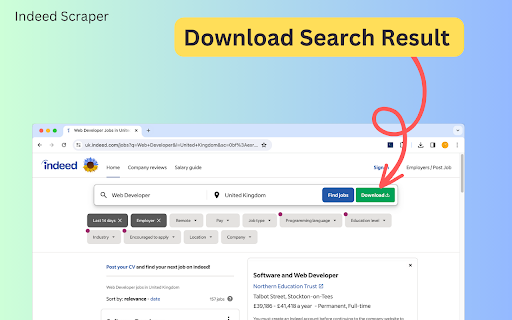


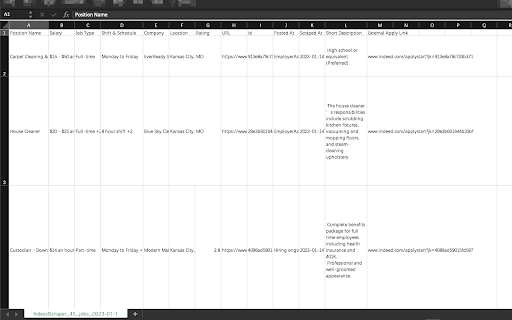
Introducing the Indeed Scraper Browser Extension: Your Ultimate Job Data Extraction and Saving Solution Whether you're a job seeker, HR manager, recruiter, or business owner, the Browser Extension is your go-to tool for in-depth job market analysis. With the ability to save and export data not only in CSV format but also in JSON and XLSX (Excel), this extension unlocks a wealth of information from Indeed's vast job listings. Our scraper simplifies the process of searching and extracting detailed job data, requiring no coding expertise. Why Choose the Indeed Scraper? Harness the full potential of Indeed's database to identify job trends, track hiring patterns, and pinpoint job openings that meet your specific needs. Our extension gives you the power to: - Effortlessly access up-to-date, extensive job data. - Analyze job market trends and recruitment practices. - Locate targeted job vacancies and craft more effective job listings. What Data Formats Can You Export? Our extension is adept at extracting crucial information from job postings, allowing you to save and export data in the following formats: - CSV - JSON - XLSX (Excel) This includes details like Position Name, Company, Location, Rating, URL, Id, Posted At, Scraped At, and External Apply Link. With the Pro version and settings activated, you can obtain additional columns such as: Salary, Job Type, Shift & Schedule, Description Text, Description HTML. How to Use the Indeed Scraper? Operating our extension is straightforward and user-friendly. Simply: 1. Navigate to indeed.com and conduct a search with basic parameters like job title, company name, and location. 2. Click the Download button next to the “Find Jobs” button. ( or you can copy the search results page’s URL from your browser's address bar, Paste the URL into our extension's input field). 3. select "EXPORT JOBS" and choose your desired format (CSV, JSON, or XLSX). 4. Wait for the scraping process to complete. 5. Click "Download Jobs" to receive your data in the chosen format, ready for thorough analysis. The Benefits of Our Extension Opting for our extension offers a multitude of advantages: - No need for coding expertise – we manage all the technical aspects. - Instantaneous results – obtain the latest data in a flash. - Customizable searches – refine your queries to fulfill your specific requirements. - Time-saving – bypass the lengthy hours of manual data gathering or scraper development. - Consistent updates – our tool is regularly enhanced to keep pace with Indeed's site modifications. Speed of Delivery Your data is just a few clicks away once you start the scraping process. The duration of extraction depends on the data volume, but our tool is optimized for swift and efficient performance. Prepare to revolutionize your approach to job market data access. The Indeed Scraper is the ideal solution for anyone aiming to optimize their job data collection and analysis process. Give it a try now and witness the impact firsthand! Data Privacy The data you work with remains confined to your local machine and does not traverse our servers at any point. In-App Purchases Our Extension is a freemium product with a nominal subscription fee. With a paid subscription, you can export up to 3000 items at a time and receive premium support. The exact cost is displayed in the extension's interface, ensuring transparency and ease of understanding. Disclaimer This extension is an independently developed product by ExtensionsBox and has no association with INDEED.

Job Scraper for LinkedIn™
Scrape, extract jobs from LinkedIn™ and export to CSV/Excel Extract jobs, locations from LinkedIn™ and exporting them to CSV, Excel or JSON file. Our scraper simplifies the process of searching and extracting detailed job data, requiring no coding expertise. # Features ✓ Extract jobs search results and all pages automatically ✓ Extract Company Details and Hiring Manager ✓ Capture external apply URLs (Greenhouse, Lever, Workday, and more) ✓ Export as Excel, CSV, and JSON # Supported fields: - Title - Description - Primary Description - Detail URL - Apply URL (direct link to company's application page) - Apply Type (External or Easy Apply) - ATS Name (Greenhouse, Lever, etc.) - Location - Skill - Insight - Job State - Poster Id - Company Name - Created At - etc. With the Pro version and settings activated, you can get additional fields such as: Company Details and Hiring Manager. # How to get started? 1. Enter Your Job Search Parameters Specify your target job title, location, keywords, and other filters. The more precise your search, the better the results. 2. Click the Download button next to the “Search” button. Then just wait to scrape complete. 3. Once extraction is done, click 'Export'. In the popup, we offer these extra features: Relevant-Ext: Brief recommendations and introductions to related extensions. # Data Privacy Your data's security is our top priority. Rest assured, all data remains on your device, ensuring 100% privacy and trustworthiness. # Statement LinkedIn™ is a trademark of LinkedIn Inc. Jobs Scraper for LinkedIn is not affiliated with, endorsed, sponsored, or otherwise related to LinkedIn, Inc. or any of its affiliates or subsidiaries. # About Pro Jobs Scraper for LinkedIn is a paid extension, you can get basic functionality and upgrade to get more functionality.

Simplescraper — a fast and free web scraper
A web scraper that's fast, free and simple to use. Scrape website data and table data in seconds 💡 In a hurry? Watch the short video above to see how to scrape in seconds. 💡 Simplescraper 2.0 is web scraping as it should be: automatic list detection, multi-page scraping, scheduling, saved recipes, and built-in AI that names your columns and enriches your data. Available everywhere - browser, cloud, and API - for every scale of scraping task. Try it for yourself: 1. Open Simplescraper on any website and press "Detect Lists". 2. The extension will find the data you want automatically. 3. Confirm your selection, and watch the data appear instantly, right beside the page you're browsing. 4. Click "AI Enhance" to transform, clean, or extract structured information from your data. Any type of data - product lists, search results, contact lists, social media feeds - can be scraped and enhanced in seconds. Start for free with unlimited single-page scraping in your browser, plus free credits for multiple page and cloud scraping. For powerful automation and scheduling, scale up with our Cloud scraping and API offerings. Simplescraper is your all-in-one data extraction platform. ⚡ NEW AI Property Naming: Instantly transform columns like "sc-1x2y3z" into meaningful names like "product_title" and "price". ⚡ NEW Transform scraped data with AI. Extract structured information from unstructured text, summarize content, translate languages, or clean messy data. Works with any data you've collected. ⚡ NEW Automatic List Detection: One click is all it takes. Our smart algorithm instantly scans the page and identifies all scrapable data. No more tedious setup—get the data you need in seconds. ⚡ NEW Sidepanel Interface: Scrape data without interruption. See your results in real-time while you continue to browse. ⚡ Unlimited Free Browser Scraping: Scrape any single page, as many times as you want, for free. ⚡ Scrape Anything: Automatically capture data from tables, text, images, and links. ⚡ Flexible Export: Download your data as a clean CSV or JSON file with a single click. ⚡ Save & Re-run Scrape tasks: Save scraping recipes to run again with a single click, either in the Browser or the Cloud. ⚡ One-Click Integrations: Send data directly to Google Sheets, Airtable, Zapier, Make (formerly Integromat), and more. Power-Up with Cloud Features: ⚡ Pagination & Crawling: Automatically navigate through multiple pages and links. ⚡ Historical Data Snapshots: Access all previous versions of your scraped data. - E-commerce: Scrape product listings and let AI extract prices, ratings, and specifications into clean fields - Lead Generation: Scrape contact information and have AI extract emails, phone numbers, and job titles - Content Creation: Gather data from websites and use AI to translate or reformat for your needs - Market Analysis: Collect competitor data and let AI structure it for easy comparison - AI Property Naming: Turn default column names like "sc-1x-ProductCard" into useful names like "product_title" and "price" in one click! - AI Enhance: Transform your scraped data with AI. Extract structured data, summarize content, translate text, or clean messy information - all with a single click. - All-new sidepanel experience: The extension has been completely redesigned. Scrape any website without leaving the page for a faster, more intuitive workflow. - Automatic List Detection: Click one button to automatically find all the scrapable data on a page. - Unlimited Browser Scraping: You can now scrape across multiple pages, right in your browser. - Flexible Recipes: Saved recipes can now be run either locally in your browser or in the cloud, giving you more control over how you scrape. - Selecting which data to extract is now faster, more reliable and requires fewer clicks - AI Enhance allows you to ask your data anything using AI. See the new AI Enhance tab on your saved recipe for more info - Easier cookies - add cookies to your recipe directly from the extension for data behind a login (note: using this feature will request optional permissions in order to save the cookies) - Bulk editor: edit the schedule or cookie settings for all your recipes with one click - URL generator: easily create a list of URLs to extract data from based on a single URL - Scrape speed: choose your preferred rate of data extraction - Starred recipes: star a recipe to keep it at the top of your recipe list - Improved property selector - it's now even easier to select the data you need! - Crawler can now scrape up to 5000 URLs at a time - Updated Airtable integration to optionally save metadata - Added Airtable integration - scrape any data directly into Airtable! - Added a new recipe overview section to make managing multiple recipes easier - Improved credits - unused credits now carry over to the next month - Improved selection process: easily select a single element using the new 'only this' menu option - Improved next page selection process - Design and layout improvements - CSS editor - you can now edit the CSS selector when selecting elements

Indeed Jobs Exporter
One-click extract Indeed jobs data from the search result page as Excel/CSV/JSON/HTML/XML file. 🔧 How it Works: 1️⃣ Go to the indeed.com jobs search page. 2️⃣ Perform a search, then click the "Start" button on extension popup. 3️⃣ Choose to download from the data scraping pop-up or the task list on extension. 🌳 What jobs data can I extract using this tool? jobTitle, jobId, jobUrl, companyName, location, formattedRangeSalary, minSalary, maxSalary, salaryType, jobType, jobShifts, jobRemote, jobBenefits, jobSchedules, createTime, publishTime, applyUrl, applyCount, companyRating, companyReviewCount, jobRequirements and so on. 🎯 Targeted Users: numerous parties, including HR managers, recruiters, and business owners alike. 💡 Benefit from our dedicated support team! We're here to assist you at every step and provide prompt, knowledgeable help. 💪 Take control of your jobs data management and make informed decisions with Indeed Jobs Exporter today! Note: This extension is an independent creation and is not affiliated with or endorsed by Indeed ❗️🔒

AI Job Match - Find LinkedIn Jobs
Streamline your LinkedIn job search with AI Job Match! Get tailored recommendations, match scores, and one-click applications. Find Your Perfect Job Faster with AI Job Match Looking for ways to streamline your job search on LinkedIn? AI Job Match for LinkedIn is the ultimate browser extension designed to save you time and effort. This AI-powered tool automatically matches your resume with LinkedIn job postings, providing personalized insights and recommendations to help you land your dream job. Whether you're actively applying for jobs or exploring new opportunities, this extension simplifies the process by analyzing job descriptions, identifying skill gaps, and offering actionable suggestions. Key Features - AI-Powered Resume Matching: Automatically compare your resume with LinkedIn job requirements to find the best-fit opportunities. - Match Scores & Insights: Receive a detailed match score (1–5 stars) for each job, along with key insights into matched skills, areas for improvement, and tailored recommendations. - Organized Dashboard: View all matched jobs in one place, complete with detailed analysis and direct links to apply. - One-Click Applications: Apply to jobs directly from the extension, saving you time and effort. How It Works 1. Install the extension and open it in your browser. 2. Upload your resume when prompted. 3. Search for jobs on LinkedIn as you normally would. 4. Click the "AI Job Match" button on the job results page to start analyzing your resume against job postings. 5. View detailed match results in a floating overlay or the dashboard. 6. Use the insights to refine your applications and click “Apply” to go directly to LinkedIn’s application page. Why Choose AI Job Match for LinkedIn? - Save Time: No need to manually compare your resume with job descriptions. Let the AI handle it for you. - Boost Your Chances: Get tailored feedback to improve your resume and better align with job requirements. - Stay Organized: Keep track of matched jobs and applications in a single, easy-to-use dashboard. - Seamless Integration: Works directly on LinkedIn, enhancing your job search without disrupting your workflow. Who Is This Extension For? - Job seekers looking to save time and improve efficiency. - Professionals aiming to align their resumes with job requirements. - Anyone who wants a smarter, faster way to explore LinkedIn opportunities. Start Your Job Hunt Smarter Take the guesswork out of job searching with AI Job Match - Find LinkedIn Jobs. Download now and take the first step toward your next career move. Your privacy is important to us. We do not share your data with any third parties. We prioritize keeping your information secure and confidential. Disclaimer This extension is an independently developed product by ExtensionsBox and has no association with LinkedIn.
