
cfodljgdikllebejmhoifnmmcbfmamij
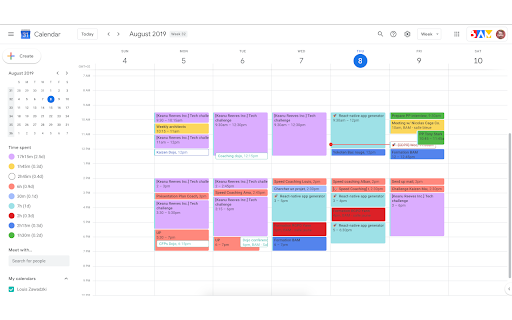
Displays time spent on each of your Google Calendar colors! This extension allows you to display the amount of time for each colour of your google calendar. It allows you to know how much time you have (or will) spend each week on each one of your categories. N.B. : * time slots that are not multiples of 15 minutes (e.g. 20 minutes, 55 minutes) might not be accounted correctly * meetings that are not accepted are counted in the "white" category.

Calendar Color
Customize your Google Calendar colors with ease. Choose from Google's palette or create your own custom colors. Now with a built-in Focus Timer to boost productivity during calendar events. 🎨 Google Calendar Color Categorization: Assign categories to Google Calendar's existing color palette, making it easier to remember the purpose of each color. For example, red could represent "Critical," blue "Learning," and green "Finances." 🖌️ Custom Color Groups: Add custom color groups that appear in the color picker on calendar events. Each color in the group can be customized with a unique color and label. ⏱️ Focus Timer: Start a productivity timer directly from any calendar event. Track your focus time, get completion sounds, and build better work habits. 🔍 Eyedropper Tool: Pick any color from the screen to use in your custom palette. 🔄 Reset and Disable Options: Clear all custom colors or disable them to use only categorization with Google's default colors. 🧩 Templates for Easy Setup: Pre-made templates including Time Blocking, Priority, Energy Levels, Schedule Type, Projects, Focus Mode, Mood, and Value. 🛠️ Dependency on Google Calendar Layout: This extension relies on Google Calendar's current layout. Changes by Google may temporarily break features. If this happens, reach out via email: ali@humanquest.net or visit: https://humanquest.net 💻 Desktop-Only: Chrome extensions don't work on mobile. For mobile, use Google's core colors. 🙏 Free Extension: This is completely free. Please reach out with issues rather than leaving a negative review. 🆕 v0.2.4 - Gmail Sidebar Support • Custom colors now appear in Gmail's sidebar calendar — click the Calendar icon in Gmail and your event colors should show up v0.2.3 - Storage & Color Reliability • Fixed custom colors reverting on page refresh — The local storage fallback now correctly reads chunked data, so your colors persist even when sync storage is temporarily unavailable. • Fixed potential infinite loop in storage sync — When Chrome's sync state changes (e.g. signing in/out), the extension no longer risks getting stuck in a recursive loop. • Fixed event viewer dialog coloring — The event detail popup no longer gets incorrectly painted with the event's custom color; only the color dot indicator is updated. v0.2.2 - Storage Health Warnings • Storage Health Warnings - Get notified when storage is running low, blocked, or when using incognito mode. Helpful tooltip explains what's happening and how to fix it. • Focus History now syncs across devices - Your timer sessions are now stored in synced storage, so your focus history follows you across computers. Last 50 sessions are kept. • Expandable Focus History - Click to see all your tracked events, not just the top 5. • Clear History confirmation - Prevents accidental deletion with a two-step confirmation. v0.2.1 - Focus Timer ⏱️ NEW: Built-in productivity timer for calendar events • Start a timer from any event's right-click menu • Timer adapts to remaining event time, full duration, or custom minutes • 7 pleasant completion sounds • Preview sounds and adjust volume in settings • Track focus sessions with history and statistics • Optional break suggestions after completing sessions • Focus mode dimming to reduce distractions • Beautiful floating widget with event color theming v0.1.0 - Task Color Support ✨ Customize colors for Google Tasks • Right-click any task and choose from your custom color palette • Works with timed tasks. DOES NOT WORK for all-day tasks since Google Calendar does not have colors for these v0.0.8 - Stability & Sync • Improved stability - addresses issues with lost colors and stuck dialogs • Better handling of Chrome sync on/off/changing states • Support for larger collections of colored events (smart chunking) • Enhanced cross-device synchronization reliability

Shade Calendar – Time Blocking for Google Calendar
Color-code your time blocks in Google Calendar. Make your schedule easier to read, plan, and manage 📆 📆 Shade Calendar – Color-Code Time Blocks in Google Calendar • Make your Google Calendar more visual and intuitive. • Shade specific time blocks in Google Calendar to organise your day, highlight events, and separate work, personal, or custom schedules. 💡 Features • Color-code time blocks in Google Calendar’s day, week, and 4-day views • Visually block out time for work hours, personal time, childcare, exercise, or focus sessions • Create your own weekly schedule with flexible, recurring time shading • Works seamlessly with multiple calendars, including personal and shared setups • Helps with time blocking, calendar planning, and visual scheduling 🧭 How to Use • Click the extension icon to open the time block editor • Choose which hours to shade and select a color • Set a unique time block schedule for each day of the week • View your new visual layout directly inside Google Calendar 🎯 Who This Is For This extension is perfect if you: • Practice time blocking • Use Google Calendar for both work and personal life • Want to separate tasks visually (e.g. meetings vs deep work) • Need better visual cues for commitments like workouts, childcare, or study time ⚠️ Disclaimer • Shade Calendar is an independent tool and is not affiliated with Google or the Google Calendar brand.

Google Calendar Weekend Highlighter
Custom Colour for Weekends in Google Calendar >>>>>>>>>>>>>>>>>>> LET'S GO DARK! >>>>>>>>>>>>>>>>> Important NOTE!!! >>>>>>>>>>>>>>>>>>>>> DONATE!

Time Tasker
Change the duration length of Google tasks on Google Calendar Easily set custom timeframes for your Google Tasks. This extension allows you to extend the duration of your tasks as desired. This will help you schedule your Tasks with accurate timeslots. Simply input the duration of the task and when you are ready to schedule it, drag and drop the task into your calendar. You will then see the task expand into the specified duration. For example, to customize the duration of a task to 3 hours, simply add “(3h)” to the end of the task title and watch as the task automatically expands to fill 3 hours when dragged into your Google Calendar. **3.0.0** - Updated the functionality with updates Google made. Time tasker should now correctly adjust the time of tasks. Updated November 21st 2025
