
ceglbfefclnlbemejafdmehdjnejadlb
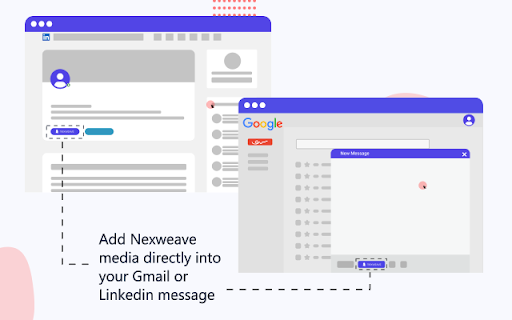


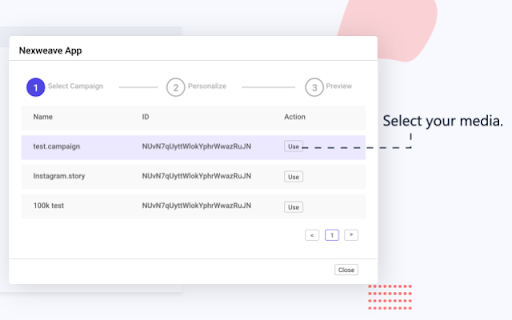
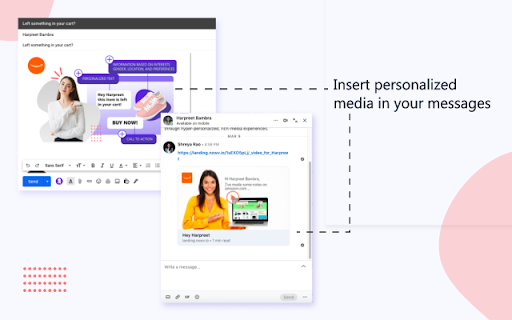
Nexweave plugin to create interactive experience right from the LinkedIn profile page and Gmail Inbox Personalized Outreach with Nexweave | Send Hyper-personalized Images and Videos to your prospects over email and LinkedIn How would you respond if … You received an image in your e-mail or LinkedIn chat that contains your name, company logo and a screenshot of your website You clicked on the image and it took you to a video that contains your name, logo and something that could help improve your website performance? Would it make you more curious? Would it increase the chances of you replying to the messages? You can now serve hyper-personalized images & video links through Gmail or LinkedIn with the help of Nexweave’s Outreach Plugin and boost your reply rates & engagement. Here is how you can put Nexweave to use for your Sales Outreach using Gmail STEP 1 - Set up an Image Template Create an image with placeholders for your prospect’s name, logo and company screenshot, if you want every recipient to see their name and company logo to be shown on the image. If you have other ideas, feel free to add your own personalization variables. Step 2 - Set up a Video Template Use the same personalization variables in the video to have coherence in the customer journey. When they feel like you’ve taken the effort to make something just for them, they will most likely want to respond to your video message. To make it easier for them to do so, keep the videos short and include a Call-To-Action in the video which will help then either ‘Book a Call’ or ‘Start a Trial’ Step 3 - Create a Campaign With Campaigns, you can have 3 flows - Serve personalized images in emails Serve clickable personalized images that redirect your prospects to a personalized video on your landing page. If you’re using LinkedIn, you can use the same method to include either images or video links with personalized images as previews. So go ahead and try them out. if you need assistance, send us an email on connect@nexweave.com or message us through the chat option on our website https://www.nexweave.com/

Hyperise: image & website personalization
Our brains are hardwired to process images in milliseconds, adding personalization creates pattern interrupts that captures attention and increases conversions. Add personalized images to your outreach emails and social messages, directly in Gmail, Outlook, LinkedIn and Facebook. Personalize your website and delight your visitors - Grow conversions with personalization of your images and website content. Personalize your existing website, with no coding, direct in the browser, with the Hyperise website personalization Chrome Extension. 🚀 Add personalization tags to your website's text, images, videos and CTAs for each visitor without writing a single line of code. 🚀 Define website segments based on visitor data and create personalization for each segment. 🤯 Edit images direct from a web page, direct into Hyperise and add personalization layers. 🤩 Replace any image on a web page with any image or video in your Hyperise account with a single click. 🔗 Create Personalized Short Links with a few clicks, to include in your email and social messages. 😲 Personalized Short Links are a great way to deliver personalized content in your messages. 🖼️ Using Hyperise personalized images, a short link will provide a personalised image as a visual placeholder for your links in used in social messages, such as platforms like LinkedIn, Facebook and Twitter. 📧 Also add images directly into Gmail and Outlook emails. 😍 Leveraging OpenGraph tags, the plugin will allow you to select your Hyperise personalized image template, title and destination URL and generate a short link that can me shared in your social messages. ⭐ Create Personalised Short Links in just a few clicks with the Hyperise: Personalized Short Link creator Chrome Extension.

Paced Email
Temporary disposable emails by Paced Email. Temp mail with extra privacy and anonymous identity protection. Create disposable or personalised email addresses from your browser with the official Paced Email extension. Anonymously shield your real identity from companies and advertisers who want to track you online. Block and unblock them anytime you want. Boost your productivity by choosing when inbound messages reach you. Batch into daily, weekly, or monthly digests for a calmer inbox. Extension features: • Email field icon to auto-generate burner emails with a single click • Right-click context menu • Single click copy to clipboard • Generate and manage Paced Email inboxes • Account switching

Vumu App
The ultimate screen recorder for Chrome: Powerful, intuitive, and feature-rich. Record, annotate, share, and beyond! Vumu is a platform designed to streamline the creation of customized videos that can be seamlessly integrated into your proposals. By opting for video content rather than traditional email or PDF formats, you significantly enhance the likelihood of receiving a positive response. With Vumu's user-friendly templates, crafting polished and professional videos is a breeze. Recording videos directly through the Chrome extension. Swapping out recorded videos with new content. Uploading pre-existing videos. Incorporating logos and background images. Adding annotations to recordings. Including calls-to-action (CTAs) within the videos.

tabExtend - Easy Tab manager
Transform your new tab into a powerful dashboard. Add notes, set reminders, and sync across devices to boost productivity. The best way to manage your tabs and organize your workflow on any device. (Chrome, Brave and Edge supported) TabExtend is the easiest way to manage browser tabs, offering a seamless solution for anyone looking to organize and control their tabs. The pain caused by having too many open tabs and disorganized windows in Google Chrome is a thing of the past. You might have tried other tab management tools, such as OneTab, Workona or Toby, and run into countless problems with feature limitations and organization. TabExtend is the ultimate replacement for this. We transform your new tab into an interactive dashboard and Kanban board, ensuring your tabs and workspaces are always organized and in sync. If you are looking for a way to manage tabs in Chrome, look no further. We have you covered with TabExtend - tab management has never been easier nor more efficient. What are you waiting for? Once you install, you will finally have a way to take control of your tabs. ✔︎ Manage tabs & tab-groups across multiple windows ✔︎ Notes / To-dos ✔︎ Setup reminders for sites and notes ✔︎ Popover with saved notes on any site ✔︎ Sync to Mobile apps(iOS & Android) ✔︎ Import bookmarks and top sites ✔︎ Save selected text-snippets ✔︎ Search sites and items ✔︎ Dark/light theme ✔︎ Shared workspaces ✔︎ Share categories via public link ✔︎ Upload custom emojis Try as guest or sign up for a free account. All features included up to 30 saves. Available for Chrome, Brave, and Edge TabExtend helps users with all sorts of questions; here are just a few: How do I manage too many tabs in Chrome? How do I organize my Chrome tabs? How do I save tab groups in Chrome? How do I sync tabs across devices? How do I manage browser tabs efficiently? How to organize Chrome tabs? How to save tab groups? How to manage multiple windows? How to sync tabs between devices?
