
ffikidnnejmibopbgbelephlpigeniph

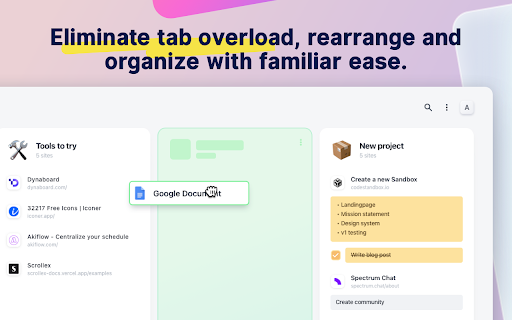

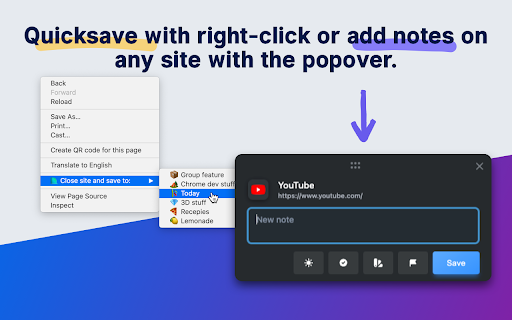

Transform your new tab into a powerful dashboard. Add notes, set reminders, and sync across devices to boost productivity. The best way to manage your tabs and organize your workflow on any device. (Chrome, Brave and Edge supported) TabExtend is the easiest way to manage browser tabs, offering a seamless solution for anyone looking to organize and control their tabs. The pain caused by having too many open tabs and disorganized windows in Google Chrome is a thing of the past. You might have tried other tab management tools, such as OneTab, Workona or Toby, and run into countless problems with feature limitations and organization. TabExtend is the ultimate replacement for this. We transform your new tab into an interactive dashboard and Kanban board, ensuring your tabs and workspaces are always organized and in sync. If you are looking for a way to manage tabs in Chrome, look no further. We have you covered with TabExtend - tab management has never been easier nor more efficient. What are you waiting for? Once you install, you will finally have a way to take control of your tabs. ✔︎ Manage tabs & tab-groups across multiple windows ✔︎ Notes / To-dos ✔︎ Setup reminders for sites and notes ✔︎ Popover with saved notes on any site ✔︎ Sync to Mobile apps(iOS & Android) ✔︎ Import bookmarks and top sites ✔︎ Save selected text-snippets ✔︎ Search sites and items ✔︎ Dark/light theme ✔︎ Shared workspaces ✔︎ Share categories via public link ✔︎ Upload custom emojis Try as guest or sign up for a free account. All features included up to 30 saves. Available for Chrome, Brave, and Edge TabExtend helps users with all sorts of questions; here are just a few: How do I manage too many tabs in Chrome? How do I organize my Chrome tabs? How do I save tab groups in Chrome? How do I sync tabs across devices? How do I manage browser tabs efficiently? How to organize Chrome tabs? How to save tab groups? How to manage multiple windows? How to sync tabs between devices?

Chrome Web Store
Add new features to your browser and personalize your browsing experience.

Hexomatic
The no-code, data extraction and work automation platform. Unleash the power of data with the Hexomatic Chrome extension. Instantly analyze websites and gather essential insights to speed up your sales, marketing, and research tasks. Key Features: - Tech Stack Analyzer: Discover the building blocks of any website to identify potential competitors or partners. - Domain Whois Lookup: Quickly access domain registration details to inform your business strategies. - Content Analyzer: Evaluate the effectiveness of website content with a single click. - Screenshot Capture: Create professional-quality screenshots for presentations or reports. - QR Code Generator: Instantly generate QR codes for any web page. - Grammar & Spelling: Detects grammar and spelling mistakes - Accessibility audit: Check page compliance with accessibility standards Automate Your Workflow Hexomatic is more than just an extension. It's a powerful automation platform that lets you build custom workflows to streamline tasks and boost productivity. Start saving time and making smarter decisions today with Hexomatic!

Fready
Stay focused for longer and spend less time reading. Ideal for students and people with a lot of reading to go through! ⚛️ It works just like using your finger on a physical book thanks to the scientifically designed word pacer that simulates the ideal eye movement 🤖 It slows down on hard, long, rare, and scientific words, ensuring you stay laser-focused. 📜 It scrolls automatically when you reach the bottom of the page, allowing you to get fully immersed in the text. Developed by 2 university students with ❤️ and 🍺 Everything happens locally! We're planning to add support for IPFS, so in the future you will be able to save your articles and preferences in a decentralized way. No data are collected, everything happens locally in your computer. Check out the code on GitHub (https://github.com/freadyapp/fready )

Blixem Tab Manager
Organize, save & share your tabs for easy collaboration with Blixem. Blixem helps you manage your tabs and windows efficiently, reducing distractions and improving performance. Homepage: Your new tab screen shows tabs vertically, gives quick access to favorite sites, and lets you launch Workspaces with one click. Customize with widgets, colors, and backgrounds. Workspaces: Save tabs into Workspaces for easy access, sharing, and collaboration. Customize Workspaces and share them with a few clicks. Collaborate: Share Workspaces by granting view or edit permissions. Teams can add content, comment, and invite others with a link or email. Collaborators don't need the extension installed. Windows: See all open tabs across all Chrome windows from one page. Rearrange, close, or add tabs to Workspaces. Pause tabs and windows to speed up your computer. Widgets: Add widgets like recently closed tabs, frequently visited sites, and top Workspaces to your homepage. Work-Personal Separation: Separate work and personal tabs using Categories. Hide work tabs when off duty and personal tabs during work hours. Blixem Tab Manager helps you control and organize your online life.
