
cedcejfiniojnlhlfhcppenochinijfo
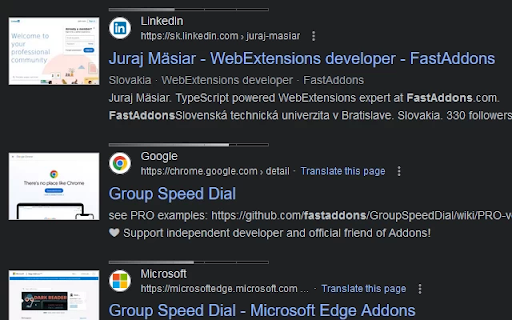
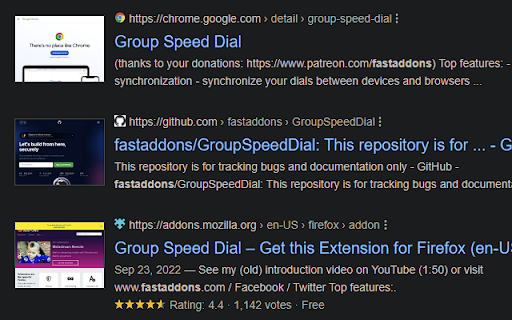

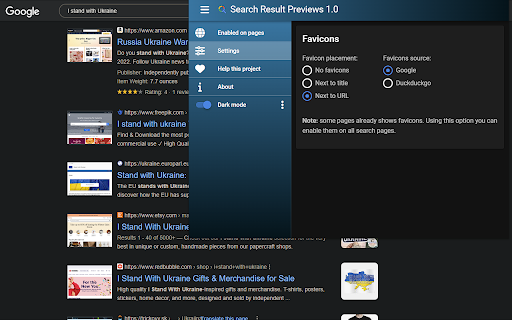
Search Result Previews adds "page previews" into Google search result page. PRO version shows also PageRank of each search result. 🔍 "Search Result Previews" shows you page previews (thumbnails) next to each search result. 🔥 Lifetime Premium version shows page result previews with PageRank bar above 📈: https://ko-fi.com/s/903f091296 🚦 Free version shows PageRank of current page in the tooltip icon badge (can be enabled in the settings). 🔐 Analyze links before you click them! Right click any link / "Compute link PageRank" on any page - you will see the rank and preview of the domain, AND can even test the link with 🛡️ VirusTotal page. ⭐ Supported search pages: - Google.com - DuckDuckGo.com - Bing.com - Baidu.com - and many others... 💌 Credits: - I would like to thank Edward Ackroyd for helping me create this project, for supplying me with his huge image collection and for making his "SearchPreview" addon in the first place - making me (and many others) more productive over the years! - PageRank is supplied by Open PageRank: https://www.domcop.com/openpagerank/what-is-openpagerank - icons by Font Awesome: https://fontawesome.com/license

uAutoPagerize
A browser Extension for auto loading paginated web pages!!! *What's this This is an extension that provides infinite scrolling on various sites. It is a derivative of AutoPagerize. It is an extension that automatically loads and appends the "next page" in search engine, blogs, etc. * How to use When you scroll to the bottom of the page, the page will be added without your permission. When you cannot use the comment box due to the addition, click the green icon in the page to pause it. This may not work well on sites that change pages dynamically using JavaScript. In that case, right-click on the toolbar icon and select "Disable on this page".

Weblioポップアップ英和辞典
Webページの英語にマウスオーバーさせることで「英和辞典」での意味を表示させるポップアップ辞書機能や、文章を選択することで翻訳結果へスムーズに移動することができる機能を備えた、Weblio公式のエクステンションです。 Weblio公式のポップアップ辞書です。 Webページの英単語にオンマウスしたりダブルクリックしたりすることで、Weblio英和辞典の意味や、Weblio英語翻訳の結果へのリンクを表示させることができるWeblio公式のPOPアップ辞書・マウスオーバー翻訳です。 ◆◆【Weblio 英和辞典エクステンションでできること】 ・マウスをかざすとポップアップするウィンドウでWeblioでの英単語やイディオムの解説を見ることができるマウスオーバー辞書です。 ・「英単語を選択状態にして検索する」を指定することで、英単語をダブルクリックするだけでWeblioの対訳が表示されます。 ・ポップアップさせるためのアクションは、Ctrlキーとマウスホバーを組み合わせることもできます。 ・名詞の複数形や動詞の活用形などにも対応しているため、単数形や原形に直してWeblioを検索しなおす必要がありません。 ・「英単語を選択状態にして検索する」を指定した場合、熟語やイディオムなどを連語検索することができます。 ◆◆【基本的な使い方】 1. 意味を調べたい英単語にマウスポインタをのせるか、調べたい単語やイディオムをハイライトにします。 (マウスカーソルを単語にホバーさせて検索を行うか、熟語やイディオムをなぞって検索を行うか、オプションから設定可能) 2. ポップアップする吹き出しに、ツールチップのように和訳や日本語訳の解説文が表示されます。 ◆◆【特徴】 ・「Weblio 英和辞典エクステンション」は英語を調べることに特化したマウスオン辞書の「拡張機能(アドオン・プラグイン)」です。 ⇒ 日本語を含む言葉には反応しないため、日本語の単語をブラウザ上からコピーする場合でも、スムーズに行うことができます。 ・mouseoverにより、スピーディに英語の対訳や熟語の意味を調べることができます。 ⇒ シンプルな翻訳ツールとしても利用可能です。 ◆◆【「Weblio 英和辞典エクステンション」のアップデート情報】 2017年3月30日(Ver 6.0.3) - 軽微なバグを修正しました 2016年9月5日(Ver 6.0.2) - ポップアップから単語を入力して英和・和英辞典を検索できるようにしました - ポップアップ内の部品レイアウト・デザインの調整を行いました 2016年5月2日(Ver 4.9) -Googleウェブストアの利用規約の変更などに伴い、機能をシンプルにして公開いたしました。 -Weblio英和和英辞典やWeblio翻訳への検索フォームを表示するためのエクステンションについては、下記を参照ください。 https://chrome.google.com/webstore/detail/coapchlfcemaamikdhfaaffocphgbaag?hl=ja 2014年12月9日(Ver 4.1、4.2) -検索部分のチューニングを行いました。 -デザインのリニューアルを行いました。 2013年11月27日(Ver 4.0) -httpsでの検索の不具合について対応しました。 2012年12月7日(Ver 3.5) -調べたい英単語について音声再生ができるようになりました。 ・2012年11月2日(Ver 3.4) -一定の長さ以上のテキストを選択状態にすることによって、Weblio翻訳へのリンクを表示し、翻訳結果のページへスムーズに移動できるようにしました。 ・2011年11月10日(Ver 2.5) -「検索を行う操作」に、『英単語にマウスカーソルをあわせ、Ctrlキーを押して検索』という操作方法を加えました。 (オプション画面から変更できます) ・2011年10月17日(Ver 2.4) -「検索を行う操作」に、『テキストを選択状態にし「E」キーを押すことで検索する』という操作方法を加えました。 (オプション画面から変更できます) ・2011年9月30日(Ver 2.3) -検索結果のポップアップが表示されるまでの時間を変更できるようにしました。(オプション画面から変更できます) -右クリックで表示されるコンテキストメニューに「Weblio検索」を追加できるようにしました。 (初期設定ではOFF。オプション画面からONにできます) -リンクの文字を検索できるようにしました。(初期設定ではOFF。オプション画面からONにできます) -右上のオレンジの「W」のアイコンをクリックすると表示される検索ボックスに、最初からカーソルが入っている状態にしました。 ・2011年5月27日(Ver 2.2) -Weblio英単語帳に追加できるボタンを設置しました。 ◆◆【「Weblio 英和辞典エクステンション」の補足事項】 ・一部のフレームのページでは正しく検索できないことがあります。 ・一部のhttpsのページでも検索することはできますが、オプション画面からhttpのみで検索するように設定することができます。 ・Weblio 英和辞典エクステンションに関するご意見、ご要望、バグなどがございましたら、お手数ですが、下記までご連絡下さい。 https://help.weblio.jp/feedback

DetailedTime
YouTube動画の公開時刻を表示するやつ ◆どんな機能? YouTube動画の公開時刻を表示します。 ◆使い方 動画タイトルの横に「詳細」の文字が出るのでそれをクリックしてください。 ◆注意事項 ※ライブ配信の場合は配信開始時刻になります。 ※完璧な動作保証はできません。ご利用は自己責任で。 ※ブラウザの横幅が狭い場合・動画タイトルが長すぎる場合には「詳細」の文字が出ないことがあります。 ◆他の機能 YouTube用の自作拡張まとめ https://null.style/app ◆不具合を見つけたら 作者Twitter(@nulltypo)までご連絡お願いします。レビューには回答できません。 ◆免責事項 このChrome拡張によりいかなる損失や損害などが発生しても責任を負いかねます。ご了承ください。

Selection Search
Search for the selected text in search engines With this extension you can easily search for text you have selected. When some text is selected you can left click the selected text to get a popup where you can choose a search engine to search with. In the options page you can customize the look of the menu, which mouse button that should activate the menu, which search engines to show, and a lot of other things. When you install this extension you will get a warning that this extension can: "Access your data on all websites." This is needed because the code for the popup-menu needs to be added to every website for it to work. If you want to report a bug/issue, please use the following site: https://github.com/Pitmairen/selection-search/issues Alternatively you can use the support section on this site (chrome web store), but I get no notifications about new posts, so I may not notice the message. Some people have asked for ways to make donations to the project. If you want to make a donation you can do so by buying me a coffee: https://www.buymeacoffee.com/pitmairen 0.9.7 - Improve support for IME input in toolbar popup (See issue #173) - Change to use a html class to shown/hidden the popup menu to make it easier to override the display property of the popup with custom CSS. 0.9.6 - Fix issue where icons in some cases could fail to load because the fallback icon loading did not work. This may improve the icon loading for some users. 0.9.5 - Add option to trigger "open all" feature on submenus with middle click only. - Make back button in toolbar button go back only one level at the time - Fix issue where "open all" on sub menus could crash if the submenu contained separators - Change default search engines on new installs to use https 0.9.4 - Add ability to customize the toolbar popup with css - Include separators in the toolbar popup. Hidden by default, but can be made visible with custom css. 0.9.3 - Fix issue where some icons failing to load could trigger a loop in the image loading, which could cause high CPU usage and pages failing to load. 0.9.2 - Improvements to icon loading. The icons are now loaded in the background worker, similar to how it was done in the 0.8.* versions of the extensions. This should make the icons load faster and with less chance of icons failing to load. Note: The icons are cached in the sessions store provided by the browser. This storage has limited capacity. If you have a lot of search engines or have many large custom icons, you can hit the limit. This will cause some icons to fail to load. If this happens try to use smaller icons if you have custom icons. If that does not help report the issue as it may be possible to make the usage of the storage more efficient if necessary. You can also hit the limit if you make a lot of changes to your search engines in one go, but this should be fixable by just restarting the browser as this will cleanup old entries in the storage. 0.9.1 - Fix issue with context menu items requiring two clicks to work - Fix issue where the context menu items was not added properly - Fix issue where hitting enter in the toolbar search box would not open the first search engine - Changed icon loading to use the icon urls directly, instead of loading the icons in the background, as the background loading does not work properly with manifest v3. This will probably also fix some issues where custom svg images would not load. 0.9.0 - Major rewrite of internals to migrate the extension to manifest V3, as required by Chrome for the extension to continue to work. - No new features or bug fixes in this release. 0.8.63 - Added new buttons to allow adding new search engines/separators/submenus at specific positions in the search engine list 0.8.61 - Added option to enable the search engine popup blacklist/whitelist to also affect the search engine hotkeys. The options is located under Popup menu -> Advanced -> Blacklist/whitelist. 0.5.58 - Fix issue where the popup could be partially positioned outside the top of the browser window and become unreachable. Mostly an issue for very large popup menus with many search engines. 0.8.57 - Fix mycroft integration. - Add an additional source for search engine icons that is used if the default source does not have an icon. 0.8.56 - Added special search engine marker for sites requiring encodings other than UTF-8. Simply append {SPECIALENCODING} to the end of the search engine url. This enables the feature and the browser should be able to auto detect the correct encoding. 0.8.55: - Possible fix for freezing tabs for searches opened in new foreground tab 0.8.53: - Added option to open search in new window - Make it possible to add search url to the submenu root item. If a search url is added it will open when clicking the submenu root item, unless the openall on click option is checked. - Improved replacement of bracket placeholders ({%s}). If "}" must be used inside the placeholder it can now be escaped using "}". - Improved regexp placeholder replace converter. The old "re:" converter still works for backwards compatibility. The new improved converter is called "replace:", and is documented under "More Variables" at the top of the options page. 0.8.51: - Fix issue with saving changed settings on options page For full changelog see:
