
oingodpdjohhkelnginmkagmkbplgema


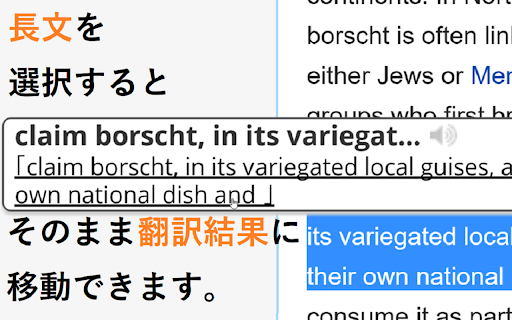
Webページの英語にマウスオーバーさせることで「英和辞典」での意味を表示させるポップアップ辞書機能や、文章を選択することで翻訳結果へスムーズに移動することができる機能を備えた、Weblio公式のエクステンションです。 Weblio公式のポップアップ辞書です。 Webページの英単語にオンマウスしたりダブルクリックしたりすることで、Weblio英和辞典の意味や、Weblio英語翻訳の結果へのリンクを表示させることができるWeblio公式のPOPアップ辞書・マウスオーバー翻訳です。 ◆◆【Weblio 英和辞典エクステンションでできること】 ・マウスをかざすとポップアップするウィンドウでWeblioでの英単語やイディオムの解説を見ることができるマウスオーバー辞書です。 ・「英単語を選択状態にして検索する」を指定することで、英単語をダブルクリックするだけでWeblioの対訳が表示されます。 ・ポップアップさせるためのアクションは、Ctrlキーとマウスホバーを組み合わせることもできます。 ・名詞の複数形や動詞の活用形などにも対応しているため、単数形や原形に直してWeblioを検索しなおす必要がありません。 ・「英単語を選択状態にして検索する」を指定した場合、熟語やイディオムなどを連語検索することができます。 ◆◆【基本的な使い方】 1. 意味を調べたい英単語にマウスポインタをのせるか、調べたい単語やイディオムをハイライトにします。 (マウスカーソルを単語にホバーさせて検索を行うか、熟語やイディオムをなぞって検索を行うか、オプションから設定可能) 2. ポップアップする吹き出しに、ツールチップのように和訳や日本語訳の解説文が表示されます。 ◆◆【特徴】 ・「Weblio 英和辞典エクステンション」は英語を調べることに特化したマウスオン辞書の「拡張機能(アドオン・プラグイン)」です。 ⇒ 日本語を含む言葉には反応しないため、日本語の単語をブラウザ上からコピーする場合でも、スムーズに行うことができます。 ・mouseoverにより、スピーディに英語の対訳や熟語の意味を調べることができます。 ⇒ シンプルな翻訳ツールとしても利用可能です。 ◆◆【「Weblio 英和辞典エクステンション」のアップデート情報】 2017年3月30日(Ver 6.0.3) - 軽微なバグを修正しました 2016年9月5日(Ver 6.0.2) - ポップアップから単語を入力して英和・和英辞典を検索できるようにしました - ポップアップ内の部品レイアウト・デザインの調整を行いました 2016年5月2日(Ver 4.9) -Googleウェブストアの利用規約の変更などに伴い、機能をシンプルにして公開いたしました。 -Weblio英和和英辞典やWeblio翻訳への検索フォームを表示するためのエクステンションについては、下記を参照ください。 https://chrome.google.com/webstore/detail/coapchlfcemaamikdhfaaffocphgbaag?hl=ja 2014年12月9日(Ver 4.1、4.2) -検索部分のチューニングを行いました。 -デザインのリニューアルを行いました。 2013年11月27日(Ver 4.0) -httpsでの検索の不具合について対応しました。 2012年12月7日(Ver 3.5) -調べたい英単語について音声再生ができるようになりました。 ・2012年11月2日(Ver 3.4) -一定の長さ以上のテキストを選択状態にすることによって、Weblio翻訳へのリンクを表示し、翻訳結果のページへスムーズに移動できるようにしました。 ・2011年11月10日(Ver 2.5) -「検索を行う操作」に、『英単語にマウスカーソルをあわせ、Ctrlキーを押して検索』という操作方法を加えました。 (オプション画面から変更できます) ・2011年10月17日(Ver 2.4) -「検索を行う操作」に、『テキストを選択状態にし「E」キーを押すことで検索する』という操作方法を加えました。 (オプション画面から変更できます) ・2011年9月30日(Ver 2.3) -検索結果のポップアップが表示されるまでの時間を変更できるようにしました。(オプション画面から変更できます) -右クリックで表示されるコンテキストメニューに「Weblio検索」を追加できるようにしました。 (初期設定ではOFF。オプション画面からONにできます) -リンクの文字を検索できるようにしました。(初期設定ではOFF。オプション画面からONにできます) -右上のオレンジの「W」のアイコンをクリックすると表示される検索ボックスに、最初からカーソルが入っている状態にしました。 ・2011年5月27日(Ver 2.2) -Weblio英単語帳に追加できるボタンを設置しました。 ◆◆【「Weblio 英和辞典エクステンション」の補足事項】 ・一部のフレームのページでは正しく検索できないことがあります。 ・一部のhttpsのページでも検索することはできますが、オプション画面からhttpのみで検索するように設定することができます。 ・Weblio 英和辞典エクステンションに関するご意見、ご要望、バグなどがございましたら、お手数ですが、下記までご連絡下さい。 https://help.weblio.jp/feedback

Douga Getter
You can easily download videos from popular video sites. Just click the extension icon, then select the video you want to download. The Douga Getter provides a feature that allows you to download videos from websites. On a page opened in your browser, it detects all the videos that have been loaded and notifies you on the action button. When you click the action button, a list of downloadable videos will appear, and you can click the one you want to download. By default, video files smaller than 2MB are not shown, so change the settings if necessary. Please note that Douga Getter takes no responsibility for the content you download. Therefore, before downloading, it is recommended that you check the copyright and permissions of the video. In Japan, it is prohibited by law to download videos that you know have been uploaded without the copyright holder’s permission. Please be mindful of this. We bear no responsibility for any incidents arising from the use of this extension. No guarantees are made regarding the operation of this extension. Use it at your own risk. Distribution of this extension may be discontinued without notice. There is no obligation to provide version upgrades, bug fixes, or other support. 1. Extension This extension does not collect, store, or transmit any personally identifiable information or usage data. All functionality runs entirely within the user’s local browser environment. 2. Service Website ( https://www.douga-getter.com/ ) Our official service website, which works in conjunction with the extension, may collect limited technical information and may use analytics tools (e.g. Google Analytics). • Collection The service website may collect anonymous technical data such as browser type, screen size, language settings, visit duration, and whether the content on the page is displayed correctly. Personally identifiable information is not collected. Please note: We do not collect or store any information about your personal activities, such as which pages you visit or what files you download. Your browsing and download history remain entirely private and are never transmitted to us. • Purpose Collected information is used only to understand general usage patterns, improve service functionality, and enhance user experience. • Sharing We do not sell, share, or disclose collected data to third parties. If analytics tools such as Google Analytics are used, data may be processed by those providers in accordance with their privacy policies. • Choices Users may opt out of Google Analytics data collection by using tools such as the Google Analytics Opt-out Browser Add-on, or by discontinuing use of the service website. • Updates This privacy policy may be updated from time to time. Any changes will be posted on the service website and/or the extension’s store listing page.

5CH STYLE FORMAT
5ちゃんねる(旧2ちゃんねる)のスレッド(記事)ページをすっきり整形&URL直リンク化、画像・レスのPOP表示等、いろいろ機能を付加します。 ▼基本機能 ・5ch.netのスレッドでのみ動作 ・CSSの書き換えによる見栄えの整形 ・リンクURLの直リンク化 ・書き込みボックスの自動フィット ・コメント番号をクリックでレス番号として書き込みボックスへ引用(引用符付き) ・右クリックから選択文字を書き込みボックスへ引用(引用符付き) ▼オプション選択できる機能(ON/OFF可) ・新着コメの読み込みボタン「▼」を設置 ・新着コメのオートリロード&スクロール ・新着コメを色分け ・記事内の画像URL下にサムネイルを表示 ・コメント内の画像URLにマウスオーバーで画像をPOP表示 ・コメント内の「h抜きURL」を補完してリンクを設置 ・コメント内にAAが含まれる時はフォントの最適化を試みる ・ユーザーIDにマウスオーバーでレス履歴をPOP表示 ・ユーザーID右横にユーザーのコメント数を表示 ・ユーザーIDをクリックで「必死チェッカーもどき」検索 ・書き込みボックスをフロートさせる(ドラッグ可) ・全件表示に自動リダイレクト ・ページ最上部、最下部へのジャンプボタンを設置 自分でニュース系スレを見るために作ったということもあってニュース以外の板はあまり検証してませんが、今後ブラッシュアップしていく予定ですのでよかったら使ってみてください。

uAutoPagerize
A browser Extension for auto loading paginated web pages!!! *What's this This is an extension that provides infinite scrolling on various sites. It is a derivative of AutoPagerize. It is an extension that automatically loads and appends the "next page" in search engine, blogs, etc. * How to use When you scroll to the bottom of the page, the page will be added without your permission. When you cannot use the comment box due to the addition, click the green icon in the page to pause it. This may not work well on sites that change pages dynamically using JavaScript. In that case, right-click on the toolbar icon and select "Disable on this page".

Subtitles for Language Learning (Prime Video)
Add foreign language subtitle display and dictionary function on Amazon Prime Video. Enjoy Learning Languages with Movies, TV Shows, and Anime on Amazon Prime Video. Add subtitle display and dictionary function in various languages. Supports 79 languages. Even when official Amazon subtitles do not exist, it will be possible to search for and load subtitles from OpenSubtitles.org or local files. Main functions - Multilingual subtitle display - Subtitle function other than that provided by Amazon - 79 languages by mouse over-> Dictionary function to 79 languages - Dictionary function by character selection - Link function to dictionary site by word click - A function to move the playback position by pressing the button displayed to the left of the subtitles or the "E" and "D" keys. - Ability to translate one sentence with Google Translate - Playback speed change function (shortcut keys "S" "F") - Video brightness, saturation, contrast change function - Opening and closing function of subtitle viewer
