
cdllihdpcibkhhkidaicoeeiammjkokm

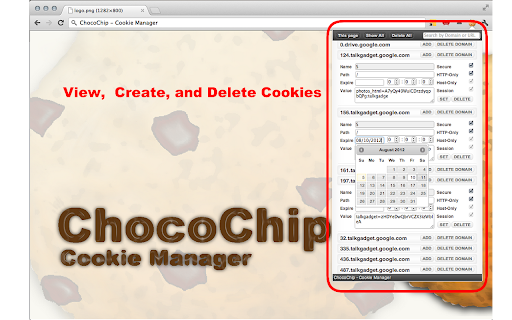
ChocoChip provides the following features! ★ Search cookies by domain or URL ★ Show cookies of the current page or all in your browser ★ Create new cookies and edit existing ones ★ Delete all cookies or some by a domain at once Feedback and rating is always welcome at its Chrome Web Store http://goo.gl/hHAeE

Swoosh Cookie and Local Storage Specialist
Manage Cookies, Local Storage & Session Storage in one place. Powerful, intuitive, and real-time web dev toolkit. Swoosh Cookie and Local Storage Specialist is an all-in-one cookie editor and web storage manager designed for developers, testers, and power users. Manage Cookies, Local Storage, and Session Storage in one intuitive, fast, and powerful interface. Accelerate your web development workflow with real-time storage editing. View, search, create, delete, or batch modify cookies and storage data instantly — no refresh required. Key features: - Unified editor for Cookies, Local Storage, and Session Storage - Automatic real-time updates across tabs and domains - One-click URL encode/decode switch for clean data viewing - Friendly JSON viewer and formatter - Advanced cookie editor with attribute control (domain, path, expiration, secure, etc.) - Detachable full-window mode for focused debugging Why Swoosh? Unlike other cookie or storage extensions, Swoosh combines everything in a clean, developer-friendly UI that saves time and reduces friction in debugging and testing web apps. Privacy first: Swoosh works entirely offline. All operations happen locally in your browser — no data tracking, no analytics, no external servers. Perfect for developers, QA engineers, and anyone who needs a powerful yet simple tool to manage browser storage. Upgrade your workflow today — get Swoosh, the ultimate cookie and local storage specialist.

Remove Cookies For Site
A Chrome extension to remove all cookies for the current site. Click the broken cookie and all cookies for the current site will be deleted.

Disable Cookies
Use this extension to disable/enable cookies on the current site. It works on "per host" basis and will disable cookies for the domain only (the site opened in the currently selected tab). It will not stop third-party cookies set by the current site (analytics etc.) -- to disable third-party cookies you should use the respective content settings (chrome://settings/content/cookies) When you disable cookies, it will delete cookies set by this site and will reload the current page. (Auto-reload/delete can be disabled in the Options page) There are some options available, but basically, the extension does just that and nothing more.

Cookie Backup
Extension that saves cookies. This extension exports cookie information to text (JSON format). It is also possible to import in JSON format.
