
cdibdblikflcjgclckdpnbmggakniceb

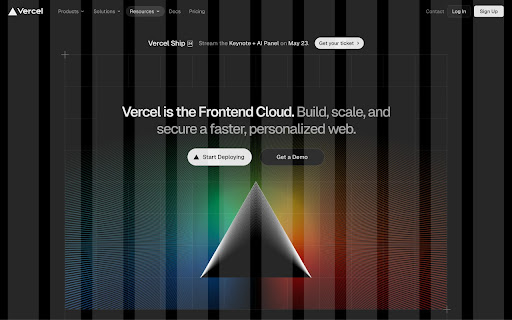
Column grid overlays for frontend developers Column grid is a powerful Chrome extension designed specifically for frontend developers, providing a seamless way to visualize column grids directly in the browser. Say goodbye to tedious manual calculations and guesswork when designing layouts – with Column grid, creating pixel-perfect designs becomes effortless.

Layout Grid for browser
You can set Layout Grid like design tools. Layout Grid for browser: It is an extension that allows you to lay out a LayoutGrid in your browser like a design tool, for instance, Figma, Sketch, Photoshop, and Illustrator. And it provides you a high-performance ruler tools. It is useful for marking up HTML, checking a design, and analyzing any other reference sites. Recommended for such occasions: Markup, Designing, Quality assurance. Features: - Layoutgrid can be laid out by setting a gap to an arbitrary width.For example, 8px, 16px, 24px...etc. in multiples of 8. For example, a multiple of 10... - You can immediately start up and measure the number of pixels. - Simply roll over a line to instantly check the number of pixels - You can immediately launch the extension by simply clicking on the extension button. - Once a guide is created, it can be saved as a URL. - The color of the guide can be changed freely. - The transparency of the guide can be changed freely. - The angle of the guide can be changed freely, even to a 45-degree angle.

CSS Grid Overlay
Easily check the grid alignment of your page across breakpoints. Supports multiples breakpoints and the usual grid values (gutters, columns, max width, etc). Configurations can easily be saved and shared among team members as json objects. [ { "columns": 4, "margins": 16, // px before and after the first and last column // these gutters work like margins: // if distance between columns is 32px, gutters are 16 "gutters": 16, "from": 0, // start of breakpoint in px // Optional values // "to": 599, end of breakpoint in px // grid will be centered after this maxWidth in px // otherwise it'll be full width // "maxWidth": 1440, // if you want to move the grid // (e.g. in a style guide with a left sidebar // you'd use offsetLeft to push the grid to the right // "offsetTop": 0, // "offsetRight": 0, // "offsetBottom": 0, // "offsetLeft": 0, // "backgroundColors": { // "columns": "rgba(234, 23, 140, .3)", // "gutters": "rgba(0, 231, 255, .3)", // "margins": "rgba(0, 191, 165, .3)" // } } ]

Page Ruler
Measure page elements size in pixel with an easy-to-use ruler. Page Ruler is an extension that lets you measure distances (in pixels) on a webpage. It draws a rectangular ruler when you move your mouse on the page. The ruler has width, height, start and end all labeled with corresponding metrics in pixels. When you move your mouse, the rectangle changes its size and all the numerics are updated. To activate the addon please press the toolbar button once. Likewise, to disable the addon please press the toolbar button again. This addon works with mouse clicks in desktop machines. For touch-enabled devices, you can work with touch to draw the rectangle within the page. If you have a feature request in mind or found a bug to report, please fill the bug report form on the addon's homepage (https://mybrowseraddon.com/page-ruler.html).

Dimensions Inspect | Gridman
Swiss army knife for front-end developers Gridman is the must-have Chrome extension for every front-end developer. This toolkit is crafted to boost your productivity and enhance your coding experience. DOM INSPECTION Instantly inspect DOM elements. Just hover to reveal details of the target and its parent elements, simplifying your analysis and debugging process. PERSISTENT Gridman uniquely persists between host reloads. Click on an element, and maintain your insights even after a page refresh, saving you valuable time and effort. TAILWIND Tailwind developers, rejoice! Easily inspect class sets and see how Tailwind CSS is bringing your designs to life. LAYOUTS Whether you're working with CSS Grid or Flexbox, Gridman displays rows, columns, paddings, margins, and more. Understand and manipulate complex layouts with ease. ANYWHERE Simply click the extension icon to activate this toolkit on any webpage. HOVER Unveil the intricacies of the DOM structure with a mere mouse hover. Visualize and understand how elements are nested and related. JOIN With Gridman you're not just using a tool; you're upgrading your entire development process. Download now and experience a revolution in your front-end development journey! REVIEW Your experience with Gridman matters to me deeply. If you've found it helpful, I'd be incredibly grateful if you could take a moment to share your thoughts in a review. Your feedback not only helps to improve but also assists fellow developers in discovering the benefits of this extension. Thank you for your support and for being a vital part of Gridman supporters! NOT WORKING If something didn't work as expected, I kindly request that you consider reaching out with any questions or issues you might have. I understand that each review, whether positive or negative, offers me an opportunity to learn and improve. However, I also believe in the importance of understanding and resolving any issues through communication. Please feel free to ask me anything at: https://fenvox.com/gridman#ask-section. I'm always here to assist you! LOCAL FILES You are trying it towards local file like 'file:///...' - but nothing shows up? > ANSWER: Gridman , like any chrome extension, will not work on local files. Chrome is not allowing it due to security reasons. And it is correct. You can imagine implications if any chrome extension would be able to access file system on your computer. To use Gridman on local files i'd recommend a tiny http-server which you can get here https://www.npmjs.com/package/http-server
