
cmplbmppmfboedgkkelpkfgaakabpicn

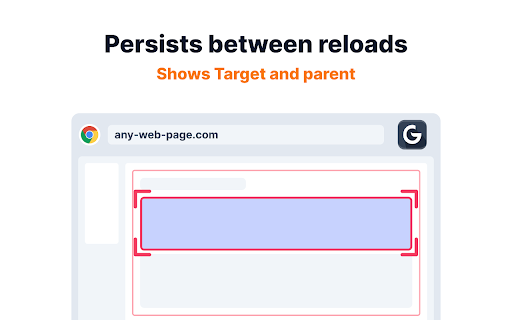
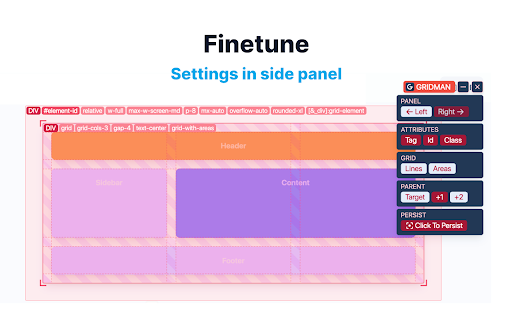

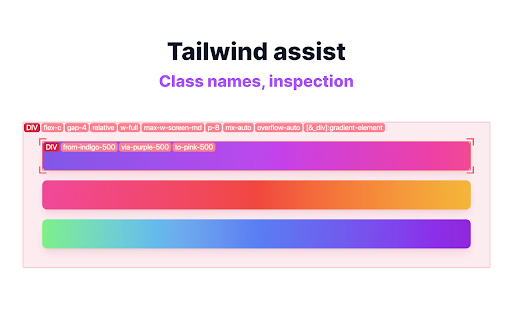
Swiss army knife for front-end developers Gridman is the must-have Chrome extension for every front-end developer. This toolkit is crafted to boost your productivity and enhance your coding experience. DOM INSPECTION Instantly inspect DOM elements. Just hover to reveal details of the target and its parent elements, simplifying your analysis and debugging process. PERSISTENT Gridman uniquely persists between host reloads. Click on an element, and maintain your insights even after a page refresh, saving you valuable time and effort. TAILWIND Tailwind developers, rejoice! Easily inspect class sets and see how Tailwind CSS is bringing your designs to life. LAYOUTS Whether you're working with CSS Grid or Flexbox, Gridman displays rows, columns, paddings, margins, and more. Understand and manipulate complex layouts with ease. ANYWHERE Simply click the extension icon to activate this toolkit on any webpage. HOVER Unveil the intricacies of the DOM structure with a mere mouse hover. Visualize and understand how elements are nested and related. JOIN With Gridman you're not just using a tool; you're upgrading your entire development process. Download now and experience a revolution in your front-end development journey! REVIEW Your experience with Gridman matters to me deeply. If you've found it helpful, I'd be incredibly grateful if you could take a moment to share your thoughts in a review. Your feedback not only helps to improve but also assists fellow developers in discovering the benefits of this extension. Thank you for your support and for being a vital part of Gridman supporters! NOT WORKING If something didn't work as expected, I kindly request that you consider reaching out with any questions or issues you might have. I understand that each review, whether positive or negative, offers me an opportunity to learn and improve. However, I also believe in the importance of understanding and resolving any issues through communication. Please feel free to ask me anything at: https://fenvox.com/gridman#ask-section. I'm always here to assist you! LOCAL FILES You are trying it towards local file like 'file:///...' - but nothing shows up? > ANSWER: Gridman , like any chrome extension, will not work on local files. Chrome is not allowing it due to security reasons. And it is correct. You can imagine implications if any chrome extension would be able to access file system on your computer. To use Gridman on local files i'd recommend a tiny http-server which you can get here https://www.npmjs.com/package/http-server

Grid System
Grid System is a simple, beautiful and interactive grid generator. The Grid System enables the frontend developers to check their websites according to correct grid column system that is used by Bootstrap, Tailwind & Bulma etc. You can enter your container's width, columns, gutter and pick any colour and hit "Launch" button to apply it quickly. It ensures the frontend developers that their websites are according to the UI/UX grid system. It works for all the screen sizes. It has a pretty eye-catching interface which enables the users to quickly navigate through different kinds of grid column system. Hope you will find it useful.

VisBug
Open source web design debug tools built with JavaScript: a FireBug for designers. - Point, click, move, resize & tinker - Edit or style any page, in any state, like it's an artboard - Inspect styles, spacing, distance, accessibility and alignment - Nitpick layouts & content, in the real end environment, at any device size - Leverage adobe/sketch skills - Edit text, replace images - Design within the chaos: use production or prototypes and the odd states they produce, as artboards and design opportunities - Design while DevTools simulates latency, i18n, media queries, platform constraints, CPUs, screensize, etc - Make more decisions on the front end of your site/app (a11y, responsive, edge cases, etc) - No waiting for developers to expose their legos, just go direct and edit the end state (regardless of framework) and execute/test an idea Give power to designers & content creators, in a place where they currently feel they have little to none, **by bringing design tool interactions and hotkeys to the browser**

CSS Scan
The fastest and easiest way to check, copy and edit CSS. This extension is paid and requires a license to use it. You can buy yours at https://getcssscan.com CSS Scan is the fastest way to inspect and copy CSS. Visualize the CSS of any element you hover over instantly and copy its entire CSS rules with a single click. Featured in: CSS Tricks, Smashing Magazine, Product Hunt, Designer News, t3n and many more websites.

Live editor for CSS, Less & Sass - Magic CSS
Run this extension and start writing your CSS/Less/Sass code which gets applied immediately. The code you write will be saved in the browser extension's storage space or the site's local storage. ✓ Live editor for CSS/Less/Sass code - Preview changes as you write code ✓ Autocomplete ✓ Live edit CSS files and auto-save on file system ✓ Open code editor in external window ✓ CSS reloader ✓ Option to reapply styles automatically ✓ Syntax Highlighting ✓ Auto-generate CSS selectors with point-and-click ✓ Emmet support ✓ Color picker ✓ Convert code from Less/Sass to CSS ✓ Beautify / Format code ✓ Minify code ✓ Highlight DOM elements matching the CSS selectors ✓ Option to load this extension in iframes as well ✓ Get SVG icons ✓ Lint CSS code This extension is available for: You might want to use it for: ➤ No need to refresh pages to test your CSS/Less/Sass code ➤ Auto-save your changes to filesystem as you write the code ➤ Reload CSS resources without refreshing the page ➤ Speed-up development by writing code directly on your page ➤ Develop and test your code before finalizing your changes ➤ Apply some temporary styles (like hiding some components) ➤ Do CSS changes on any website ➤ The CSS/Less/Sass code you write gets applied as you write it ➤ The CSS reloader watches CSS files and live updates them immediately ➤ You can develop the code and see the output at the same time ➤ The code is saved in file/browser as soon as you write it ➤ The code editor is draggable and resizable ➤ Use code editor in external window for developing responsive pages ➤ The code you write is auto-saved for the site ➤ You can use "TAB" key to indent your code ➤ Running Magic CSS again, while it is already loaded, disables the code ➤ Press "Esc" or click on close to hide it ➤ The code is added at the bottom of the tag ➤ It includes CSS/Less/Sass beautifier ➤ It includes CSS minifier ➤ It highlights the DOM elements matching the CSS selectors ➤ Use it along with Chrome/Edge/Firefox/Opera Developer tools ➤ You might find it useful in creating your custom themes for websites based on Stylish / Stylist ➤ This extension was previously known as "MagiCSS - Live CSS Editor" Security and privacy: ⓘ No permissions approval is required for installing the extension ⓘ For advanced features, like "Apply styles automatically", permissions are requested on-demand ⓘ Mixpanel is used to get anonymized stats for improving UX ⓘ Browser extension's storage, localStorage etc are utilized for the extension's core features. Visit https://webextensions.org/ for further details. Connect with us:
