
ccmjdgjljbhkkhhgdabpdkjhnningbdc



Your language learning co-pilot Translate languages to the sidebar To use on Safari for iPhone, iPad, and Mac: * Install Parallel Text from https://apps.apple.com/app/parallel-text/id6446043517 Note: Use only on Chrome, Safari, and Chrome-compatible browsers, except Microsoft Edge. Microsoft Edge does not have a capability to translate a portion of the page only, it always translate the whole page, which makes creating parallel text not possible

Bilingual Reader
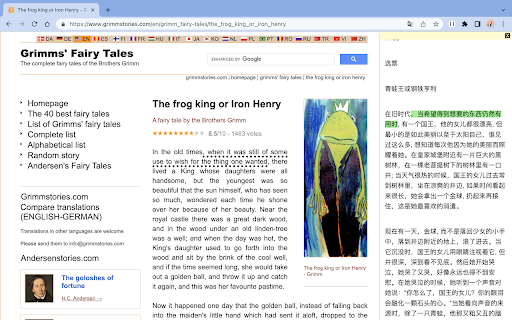
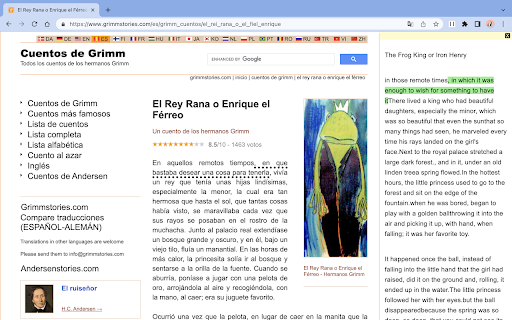
Split screen and read translated content side by side version 1.1.1: bugfix for translate API error; --- Bilingual Reader is a browser extension designed to enhance your reading experience by providing side-by-side translations of web articles. It helps users easily read and compare original text with translated content. * One-Click Split-Screen Translation: Translate web articles with a single click, displaying the original and translated content side by side for easy comparison. * Focused Translation: The extension only translates the main content of a web page, providing a more focused and enjoyable reading experience. * Synchronized Scrolling and Text Highlighting: As you scroll through the original text, the translated content scrolls automatically. Selecting a paragraph in the original text highlights the corresponding translated paragraph. * Adjustable Font Size: Easily modify the font size in the reader to suit your reading preferences. * Customizable Settings: Set your default font and target language for translations, streamlining your user experience. 1. Visit the Chrome Web Store or the browser's extension store and search for "Bilingual Reader". 2. Click the "Add to Chrome" button (or the equivalent for your browser) to install the extension. 1. Navigate to the web article you want to translate. 2. (Optional) Pin the Bilingual Reader icon to your toolbar to make your experience more great! 3. Click the Bilingual Reader icon in your browser toolbar to activate the split-screen translation. 4. (Optional) Adjust the font size, default font, and target language in the extension settings, if desired. 5. Enjoy an enhanced reading experience with side-by-side translations! If you find any websites having layout/ui/translation issues when using Bilingual Reader, please [create an issue](https://github.com/zamia/bilingual-reader/issues) in our GitHub repository.

Ai Translator for Textbox Powered by ChatGPT
Ari™ - Personal AI Translator for Every Online Text Box Translate 85+ languages in any textbox before emailing or posting, fix grammar and punctuation mistakes, rephrase sentences, express nuances, and find your perfect tone of voice. Simple type /ari + your message to start using Introducing TypeAri: Your Ultimate AI Translator for Every Textbox! 🌎🚀 Unlock the power of seamless communication across borders and languages with TypeAri, the revolutionary AI Translator powered by ChatGPT. Say goodbye to language barriers and hello to global connectivity like never before! 🌐 Translate 85+ Languages: TypeAri effortlessly translates your content into over 85 languages, breaking down barriers and opening doors to new opportunities around the world. Whether it's an email, a social media post, or a document, TypeAri has you covered. ✍️ Grammar & Punctuation Perfection: Bid farewell to embarrassing typos and awkward sentences. TypeAri's intelligent algorithms meticulously correct grammar and punctuation errors, ensuring your message is clear, professional, and polished. 🔄 Rephrase with Precision: Need to reword your text? TypeAri suggests elegant rephrasings, ensuring your message retains its essence while sounding just right. Make sure your tone resonates perfectly with your audience, every single time. 🎭 Capture Nuances and Context: Communication isn't just about words; it's about conveying the right emotions and intentions. TypeAri preserves the subtle nuances of your original text, ensuring that your translated message carries the same emotional impact. 🎯 Find Your Voice: Crafting the perfect tone for your communication has never been easier. TypeAri adapts its translations to match your preferred writing style, making sure your personality shines through in every language. 💼 Boost Efficiency: Save time and effort by seamlessly translating content directly within textboxes. Whether you're composing emails, updating your blog, or engaging on social media, TypeAri streamlines your workflow, so you can focus on what truly matters. 🌈 Diverse Applications: From business communications to personal interactions, TypeAri is your go-to language companion. Connect with international clients, collaborate with global partners, and share your thoughts with the world effortlessly. 🔒 Privacy & Security: Rest easy knowing that your sensitive information remains confidential. TypeAri prioritizes your privacy, ensuring that your texts are not stored or accessed beyond the translation process. TypeAri is more than just a translator; it's a bridge that connects cultures, ideas, and people. Break free from linguistic boundaries and embrace a world of possibilities with TypeAri's Ai Translator from any Textbox Powered by ChatGPT. Try it today and witness the future of global communication unfold before your eyes! 🌍📣

YouTube Chatbot extension by Audio2Doc
A chatbot for YouTube videos by Audio2Doc.com This extension is a chatbot that allows you to ask questions about videos on YouTube. Updates: - (05/16/2023) Added ability to save chat history to database. Also, a small bug fix. - (05/15/2023) Fixed a bug. Also, users don't need to refresh a page after signing in. - (05/12/2023) Added login functionality, no need to generate API secret key anymore.

Nekudot
If you're learning Hebrew and don't know how to pronounce new words without nekudot, this tool is for you. With this extension, just highlight the Hebrew text and then click the extension's icon. The Hebrew text will be replaced to include nekudot. It is not perfect, but it performs really well especially if you are looking to pronounce Sephardi, or Israeli, Hebrew where Kamatz and Pataḥ sound the same. Known issues: * "I'm not seeing a Nekudot icon where the extensions are" This is likely because chrome has elected not to show it. You can change this by clicking on the puzzle-piece shaped icon on the top right and pinning the Nekudot icon to the toolbar. * This does not work on Google Docs. This would require making a Google Workspace addon (or require logins and require unreasonable permissions) in addition to this chrome extension and well, nope. Please support further development and show your appreciation at paypal.me/GiladAmar. If not, no worries, it's free and will always be. This extension is open-source at github.com/GiladAmar/Nekudot. So if you're looking to learn how to build a Chrome extension, or use TensorFlow.js in one, please take a peak. This wouldn't be possible without the work done by Elazar Gershuni and Yuval Pinter in arxiv.org/abs/2105.05209 who graciously let me use their LSTM model. Thank you, it's a really cool and original use of machine learning.
