
alailbeladefeanclhfdacldpcanbmfk
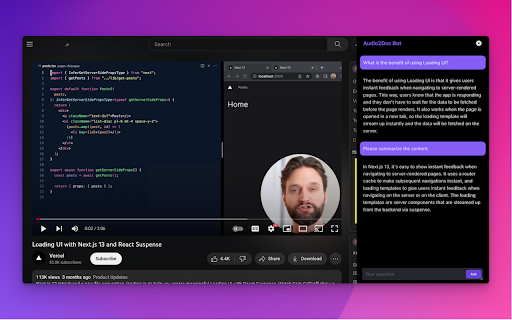
A chatbot for YouTube videos by Audio2Doc.com This extension is a chatbot that allows you to ask questions about videos on YouTube. Updates: - (05/16/2023) Added ability to save chat history to database. Also, a small bug fix. - (05/15/2023) Fixed a bug. Also, users don't need to refresh a page after signing in. - (05/12/2023) Added login functionality, no need to generate API secret key anymore.

YouTube Summary with ChatGPT & Claude
Summarize YouTube videos, web articles, and PDFs to save time, powered by ChatGPT, Claude, Mistral AI, and Gemini. YouTube Summary with ChatGPT & Claude is a free Chrome Extension that lets you quickly summarize YouTube videos, web articles, and PDF you're consuming. Use this extension to save time and learn more quicker. YouTube videos, web articles, and PDF summarization functions are powered by ChatGPT (OpenAI), Claude (Anthropic), Mistral AI and Google Gemini. ## What are the benefits of using YouTube Summary with ChatGPT & Claude? The main benefits are saving time, increasing productivity, and improving learning. YouTube Summary with ChatGPT & Claude reduces the need to watch long videos when you're just looking for the main points. The summaries let you absorb information quickly so you can spend time on other tasks. ## How do I use YouTube Summary with ChatGPT & Claude? Using YouTube Summary is easy. After installing the browser extension, simply open a YouTube video you'd like to summarize. Click the YouTube Summary icon in your browser toolbar, and it will generate a summary and provide an option to access the video transcript if available. You will see a summary of the video with or without timestamps. You can click on the timestamps to jump to the corresponding part of the video. You can also click the "Copy Transcript" button to copy the transcript of the YouTube video to your clipboard. ## Can I customize the length of the YouTube video summaries? Yes, you can customize the length of the video summaries generated by YouTube Summary. Adjust the settings within the extension to tailor the summaries to your preferred level of detail. Also, you can customize the prompt to use to summarize the content. ## Is YouTube Summary with ChatGPT & Claude suitable for educational purposes? Yes, YouTube Summary with ChatGPT & Claude is a valuable tool for educational purposes. It provides concise summaries and transcripts that can aid in research, studying, and learning from YouTube videos. ## Can YouTube Summary with ChatGPT & Claude handle videos in languages other than English? Yes, YouTube Summary is capable of summarizing videos in multiple languages, making it a valuable tool for international users. You can also choose what language you want the transcript to be in. Fore more details, please visit the website: https://glasp.co/youtube-summary

Flow Chat for YouTube Live
Chrome Extension for Flow Chat Messages on YouTube Live. - Flow messages over the video. - Change color, size and speed for messages. - Show author and avatar on messages. - Show super chats and super stickers. - Filter banned words. - Add helper menu buttons on the chat list.

YoutubeDigest: summarize using ChatGPT
Generates summaries for youtube videos using ChatGPT Discover the power of YouTubeDigest, a cutting-edge tool that leverages ChatGPT AI 🧠 to generate concise and informative summaries of your favorite YouTube videos. Say goodbye to wasted time ⏰ and enhance your productivity by previewing video content before committing to watch. Customize your experience with a range of summary formats: - Get a quick tl;dr summary in a single paragraph. 💨 - Digest the main points with bullet-point summaries. 📋 - Dive deeper with layered bullet points, including video chapters. 📚 - Enjoy a comprehensive overview with article-style summaries. 📰 Unlock additional benefits with our versatile extension: - Choose specific time ranges for tailored summaries. ⏳ - Seamlessly summarize and translate content between languages. 🌍 - Export your summaries as PDF, DOCX, or plain text for easy sharing and reference. 📤 Experience YouTube like never before with YouTubeDigest – your ultimate time-saving companion! 💡 FAQ: Do I need a chatgpt account to run this extension ? Yes, the extension requires that the user has a chatGPT account in order for it to work. How do I make it work in Brave browser ? Disable "Prevent sites from fingerprinting me based on my language preferences" in brave://settings/shields, this is needed because the extension needs to access the session you have for chatgpt and that option is preventing us from doing that. Is this extension able to summarize videos without youtube transcript ? No, right now the video must have a transcript, but this will change in the future. Does it only work for youtube ? That is correct, but we can extend that. If you have any requests, please add it in the support tab. How can I request adding a new language ? Please request the new language from the support tab and we will try to prioritize it. Release notes: 2.4.0.0 - Add support for Google Gemini 2.3.0.0 - Summarize as short video - Summarize as tweet and post tweet - Remove Medium V2.2.0.0 - Add medium spoort V2.1.0.0 Provide both GPT 3.5 and GPT4 options V2.0.0.0 Change the extension to use open AI API V1.4.0.0 - Add Chat with video summarization - Bug fixes V1.2.0.3 - Bug fixes for article summarization V1.2.0.2 - Fix include timestamp bug V1.2.0.0 - Add support for custom prompts - Add support for sharable links - Change UX for article to use tabs - Bug fixes V1.1.0.0 - Export experience with timestamp and video link - Auto cleanup for old conversations. - Ability to abort summarization. V1.0.0.2 - Bug fixes - Add model choice to custom settings. - Add Urdu language V1.0.0.1 - Fixing hanging export behavior. - Add dislike dialogue - Add custom settings after summarization. - Fix Articles that don't complete. V1.0.0.0 - Fix the login issue in some browser - Rewrite the article generation code. - Ability to have custom settings for video summarization. - Ability to customize the time range of the summarization. V0.0.2.8 - Add the ability to choose the model for chatgpt plus users. V0.0.2.6 - Add scrolling - UI fixes - Minor summary improvements - More locales V0.0.2.5 Make the model name dynamic to handle the model name changes V0.0.2.4 Fix the extension for chatgpt plus V0.0.2.3 Fixes for metrics V0.0.2.2 - Add initial support for text to speech. - Fix the article generation summary. - Add caching for the summary in local storage so that other users can use it. V0.0.2.1 - Add timestamps for bullet point summary. - Improve the quality of the summary for bullet points and layered bullet points. - Show partial layered bullet points summary instead of waiting till one bullet point is complete.

Youtube Transcript AI Summary
Get AI generated summary for Youtube video transcript with ChatGPT, Claude. Chrome extensions enhance browser functionality and user productivity. This extension provides four core features for processing long-form content using AI-powered tools. ⚡Automatic AI Summary The automatic AI summary feature integrates with the OpenAI API to analyze and condense lengthy text. OpenAI's language models process large volumes of content and generate concise summaries. This youtube video summarizer functionality works across multiple content types, enabling rapid content review without manual processing. Users can quickly extract key information from articles, documents, or transcripts through automated analysis. ✋Manual Summary Processing The manual summary feature allows direct content submission to ChatGPT, OpenAI's large language model. This option provides greater control when automatic summaries require refinement or when users need to summarize a youtube video with specific parameters. Manual processing enables customized analysis based on user-defined criteria and context requirements. ✋Text Splitting Functionality The text splitting feature divides long content into smaller, manageable sections. This improves readability and helps users navigate extensive documents more effectively. The feature addresses concentration challenges and supports varied reading preferences. Text segmentation reduces cognitive load while maintaining content coherence and logical flow. ⚙️Customized Prompt Entry The customized prompt entry system allows users to specify analysis parameters for the AI summary function. Custom prompts direct the algorithm's focus toward specific content aspects, improving summary accuracy and relevance. This feature enables targeted information extraction and personalized content analysis based on individual requirements. 🎯Implementation Benefits These four features combine to create an efficient content processing toolkit. The extension serves students, researchers, and professionals who regularly handle substantial amounts of written material. Users gain time efficiency while maintaining comprehensive content understanding through automated and manual processing options. Version: 1.1.4 1- Support for GPT4 added. 2- Added more GPT models and removed deprecated ones. 3- Added support to select different subtitle language for summaries. Version: 1.0.6 Introducing Pro Features and improved ChatGPT integration. Version: 1.0.2 1- This version now automates ChatGPT via it's Pro version. This breaks long texts into chunks so the limit of ChatGPT isn't breached and you get the accurate summaries. 2- In Pro version, we support getting Captions for Youtube videos and summarize them accordingly. 3- More control on prompts that can be used on both OpenAPI and ChatGPT.
