
ccmibanfhdbhgcpdbjnpbcflfcniaabo

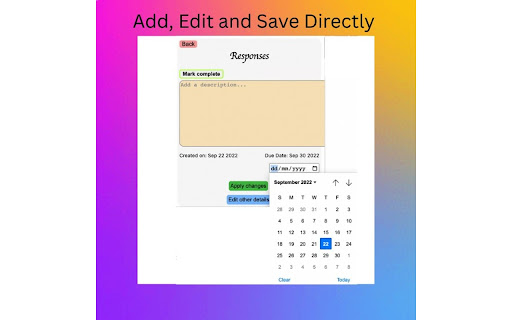
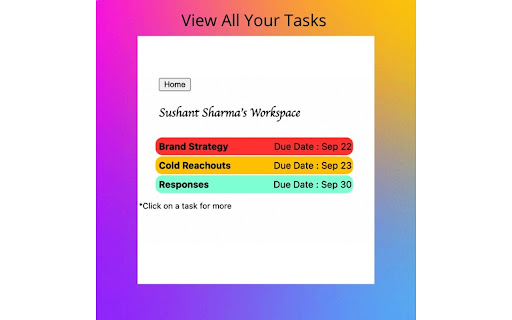
Task Manager for ClickUp An easy task management tool for ClickUp. Users can easily see their tasks color coded according to due date and can make changes to them.

Clickup RTL
With Clickup RTL you can view the clickup app in rtl mode. Affects task's inner view, forms, notifications section and etc. As all we know, unfortunately Clickup doesn't support RTL by default. It means you will have plenty of problems in Arabic, Hebrew, Persian, Urdu, Kashmiri, Pashto, Uighur, Sorani Kurdish, and Sindhi languages. With "Clickup RTL!" you can view the Clickup app in RTL mode with a better font. Affects task's inner view, forms, notifications section, etc.

Clickup File Manager
A simple Extension that allows you to manage files on ClickUp A Simple Chrome Extension that allows users to manage their documents on Clickup, users can upload, download, create and delete folders/documents accordingly which helps in saving them tons of time. This extension also serves as a record keeper, easy to share and simple UI for faster usability.

Save to ClickUp
Save any webpage to ClickUp in two clicks. Auto-tracks time the moment you open a task. Cleans up the ClickUp interface. An ultra fast alternative to the official ClickUp extension, now with AI ✨: → Reads the task you are on: Open any task, list, or doc. Type a prompt or speak one. AI reads the page and proposes the action. You approve before anything changes. → Bulk edit with AI Filter a list, multi-select rows, describe the change. Brain proposes the exact field updates, status, assignee, due date, custom fields, across every selected row. → Save a webpage: Captures the full article body, not just the URL. Capture the visible area or scroll the entire page. Attached directly to the task. Read it later on your phone or tablet straight from ClickUp, even after the source goes behind a paywall. → Create a task in two clicks Name, description, comment, and screenshot. Pick the workspace and list. Submit. Five clicks with the official extension becomes two. → Track time from any tab Stopwatch with a billable toggle. The timer keeps running if you close the popup. → Auto time tracking Open a ClickUp task. Timer starts. Leave the task. Timer stops. You do not have to remember to click play. → ClickUp Boosters: Toggles that run inside ClickUp across every workspace and list to declutter your UI. UpSys is a ClickUp Verified Consulting Partner. Save to ClickUp started as our internal toolkit. Every feature in it solves a friction we hit on real client projects. We use it before anything ships to you. The extension is free, except for AI - Task AI ($9/seat/month): Perform any AI action on tasks - Workspace AI ($19/seat/month): Perform any AI action on ClickUp lists and docs. A 20-person team pays $180/month for ClickUp Brain. Two power users on our plan pay $18. Works on Chrome, Firefox, and Edge. Install in two clicks. Free.

Clickup Automatic Time Tracking
This extension automatically starts the time tracking notifications and tasks and provides some additional shortcuts for clickup. After installing, make sure to RELOAD CLICKUP for the extension to start working :). This extension is new and free - if you find any bugs, have any feedback or simply want to support its development, please submit them to us at https://forms.clickup.com/9004103430/f/8cazdr6-85675/U45IJBL4PQ0BUALBTN . 🕑 The Clickup time tracking extension starts a timer automatically when a task is opened. 📝 Activating the timer is also linked to clicking through notifications. 📣 You have an option to hide the clickup notification bubble - so you don't get distracted from your focus. ⚙️ Features (like automatically stopping the timer) can be toggled on or off in extension settings. ⌘⇧ Y & ⌘⇧ X are shortcuts for completing/uncompleting tasks and stopping/starting the timer. ➕ More shortcuts and features are planned for future updates. 📦 Check the extension settings regularly for new options.
