
cciemibfcmeeiijeefebhojenhnpoibc

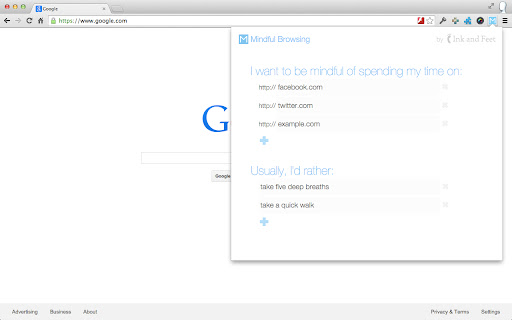


Beautifully interrupts mindless browsing, and gets you back to your life. Entirely in your control. You specify which sites you'd like to be mindful about your time on, and provide a list of things you'd generally rather do instead. Mindful Browsing doesn't block you from visiting sites - it simply asks if you'd like to visit, and if so, reminds you 10 minutes later. Beautiful. Mindful Browsing features stunning photographs from some of the world's best landscape photographers. If you're a photographer and are interested in having your work featured, email steven@mindfulbrowsing.org. Free. Open. Safe. Mindful Browsing was built by me, Steven Skoczen, to help with my own mindless browsing. Friends liked it, so I made it available for free on the Chrome store. Mindful Browsing doesn't track any of your activity, and the code is open-source so that you (or a geeky friend) can verify nothing sneaky is going on. I hope you Mindful Browsing makes your life a bit better. If you have ideas, I'd love to hear from you. Note: If you're looking for a way to block sites entirely, there are a host of other extensions out there. Do a search for stay focused, or block site, or study blocker. A lot of people have built ways to completely block sites for a period of time. Mindful Browsing isn't one of them - we believe that it's better to learn to be mindful about browsing than relying on a computer to enforce it. Think of it this way: if you hurt your leg, in the long run, would you rather do rehab and build your muscles, or use crutches for the rest of your life? :) Version 2.0.1 - Fixes a bug where you'd have to click "Yes" more than once if you were away from a tab for a while. Version 2.0.0 - Rewritten to use the new Chrome Web Store Standards, reduce third-party libraries and make the extension faster, pre-load smaller images, and reduce resource usage overall. Also fixed a number of sticky bugs with saving. It's been a long time coming, but it's finally updated! Version 1.2.6 - Updates to Chrome Extension V3 permissions. This means the extension no longer needs the tabs or webNavigation permissions. Hooray for fewer permissions! Version 1.2: - Lots of new images, now changing daily - Hides the confirmation for small popups (like Facebook and Twitter's "Authorize this app" screens.) - Saves the daily image locally, for much faster and prettier responses. - A few odds and ends, like better fonts support, some tweaked spacing, and other beauties. Version 1.1: - Fixes a couple bugs, including close button and empty lists. - Makes edit popup easier to read. - Even better credit of the incredible photographers we feature.

News Feed Eradicator
Eradicate distractions and take back control of your browsing Do you often want to check social media, and then find yourself disappearing for hours as you're consumed by the endless scrolling? Do you want your life back, but can't bear to delete social media altogether? News Feed Eradicator removes the most addicting part of Facebook, Twitter and other social networks - the feed - and replaces it instead with an inspirational quote. You can still use the other functionality as usual, you just won't get sucked into the attention hole. See screenshots for supported websites.

FocusMe
Connector to the FocusMe desktop application to track and block websites. Visit https://focusme.com to get the app. Block distracting websites and apps or set time limits. Time Tracker shows you how you spend your days. Flexible blocking allows you to whitelist parts of a site but bloc the rest. Pomodoro and Breaks features to stay focused and productive. Stay protected even when your willpower gets low and you try to bypass your own rules! The extension is recommended for users' of FocusMe desktop application to improve URL detection. It's not strictly required as the application has other methods to obtain the URL which generally work very well, but using the addon can improve accuracy and speed of URL detection on some systems. Visit https://focusme.com to get the app.

Pause - Stop Mindless Browsing
Pause distracting websites before they open. Be mindful and intentional with your browsing using this simple extension. Pause breaks the cycle of distraction and mindless browsing and helps you be more focused, productive, and intentional with your technology use. When you open a distracting website, Pause creates a gentle interruption by displaying a calming green screen. After pausing for five seconds (adjustable), you can choose to continue to the site, remain on the green screen with the site temporarily blocked, or close the tab. The interruption created by Pause gently nudges you to make informed, intentional decisions about how you are spending your time. - Pause comes pre-seeded with a list of 50 top distracting websites, which you can add to or edit as needed. - You can also adjust the length of the Pause time (5 seconds is the default.) Keep Pause enabled in your browser. It’s a simple and powerful tool to help you control distraction and create more mindful browsing habits that will help you stay focused. Pause is a product of Freedom Labs, where we develop new ways to meaningfully interact with technology. Like our other extensions, Pause is highly privacy-conscious. None of your data is sent anywhere (the cloud, our servers, etc.) It remains secure on your own device. Learn more about Freedom here: https://freedom.to

Productivity Owl
Want to be productive? Let the Productivity Owl guide you to accomplishment. *** WARNING: This extension is very annoying. The owl is flying across your pages, annoying you, criticizing you, giving you psychological exercises, and closing your tabs. If you are not serious about being productive, this extension may not be for you.*** Do you need a new boss when working from home? Meet the Productivity Owl. The owl is very strict. He will berate and mock you. You'll be forced to complete tasks to earn break time. If you do consistent work, use the timeboxing scheduler for work/vacation, and complete the owl's psychological exercises then you might be able to earn the owl's respect. Just like the first version, the owl has 3 types of websites: Allowed, Blocked and Countdown. If a website is not on the allowed/blocked lists, you'll get a certain amount of time to get the information you need before the owl closes the tab. You can still use the scheduler to schedule free-time, and now you can also schedule work time. Version 2.0 introduced a task manager, and you get rewarded break minutes for each task you complete. There are also psychological interventions and browsing statistics in this version. Although it is technically possible to earn the owl's respect - it's highly unlikely. The owl is very judgmental. It may take years before anyone earns the owl's "ultimate respect." Of course if you uninstall the extension or disable it, all respect is lost. *************** APACHE 2.0 LICENSE OPEN SOURCE *************** Since this extension is on every webpage you visit, I wanted to let everyone know there are NO TRACKERS or DATA COLLECTORS in the owl. The owl is 100% open source. You can view the source code on Github: https://github.com/mrieck/productivityowl *Thanks to everyone who has been using the Productivity Owl over the years. He's been helping me be productive for the last 15 years. Hope he can help you too.
