
cceclgeciefpanebkfkogecbjjchmico
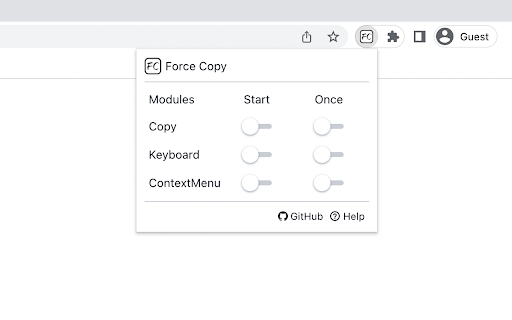
Force Copy allows you to lift copy restrictions, keyboard restrictions, and right-click menu restrictions on Web pages. All functions of the extension are turned off by default. When you need it, click the extension program and select the corresponding module to start it. ⭐ Start means that the domain name remains open. Even if the page is closed, it will still remain started the next time it is opened. ⭐ Once means that it will only take effect in the current Tab page. After closing the Tab page, it will remain closed the next time it is opened. Note that refreshing the page will not turn off the function. This is useful in many situations, especially in rich text editor websites.

Enable right click - allow copy & select
Enable context menus on protected websites. Unblock right click menu. Highlight and allow copy option for all pages works again. Enable Context Menu and Select, Allow select, Allow copy, Allow right click in so restricted pages. Installing this free extension enables you to cut, copy, and paste via right-click menus and the ribbon toolbar when using Office on the web. Due to limitations of web browsers, copying and pasting in Microsoft Office for the web through menus requires additional permissions which are provided through this extension. Enable copy and right-click on protected websites. Usage: - Click browser action icon to enter "copy mode" for current site Features: - Unlocks copy (for real) - Remembers which site to unblock for future visits ---> Once this extension is installed you must reload any open tabs in order for it to workIf you change the extension settings any open tabs must be reloaded in order for them to take effect

Allow Copy +
🤩 If you like "Allow Copy +" rate 5 stars to extension 🤩 FEATURES: - remove copy protection, enable copy text, remove block selection; - allow right mouse click and turn on context menu; - activate / deactivate for specific domain; - sync with all chrome browsers with the same google account; - free and easy to use. 🚨🚧🚨BETA FEATURES: (Please, do not be scrupulous about these features, they are still in test mode) - grab text from image https://youtu.be/0rgolOJs_7g (extract text from images on linkedin wall, from instagram wall and some other websites); - extract text from google docs, and extract text from same technology used websites HOW TO USE: Just click ICON. GREEN - activated copying. ORANGE - deactivated copying. Activization works for the website(domain). HOW TO USE, DETAILY: Its turned off by default, and you can see ORANGE icon. To activate text selection and copying: - open copying protected web site; - click on extension's icon. After this the icon should be GREEN, it means that "Allow Copy +" is activated on current website. If you close and reopen current website the "Allow Copy +" will be activated. To deactivate for website just click icon one more time (the icon must changed to ORANGE color). - How do I copy a copy protected web page? - How can one copy text from a site in which the copy function is disabled? - How do I copy text from a protected webpage on Chrome? - How do I copy text from a content-protected website? - How can I copy text from a web page where the text is copy protected? - How do I copy text from a website that cannot be copied? - How do I copy text from websites that don’t allow it? - Why can't I copy text from some websites? - How do you force copy text from a website? - How do I copy past an unselectable text? - How do I absolute enable right click & copy if disabled? - How do I copy text when right click is disabled? - How do I enable right click copy in Chrome? - How do you copy and paste without right clicking? - Why can I not right click to copy and paste? I'm happy to help. Please, add review to "Allow Copy +" extension. Thank you.

Enable Copy Everywhere
Allow right-click for copying text from restricted web pages. Enable copy-paste on all the websites. Unlock the freedom to enable copy-paste on websites with the Enable Copy Everywhere Chrome extension in 2025! This powerful text copy unblocker Chrome tool empowers users to bypass copy restriction Chrome on popular websites, allowing seamless text copying, even from protected websites that have disabled the right-click function. Perfect for researchers, students, and anyone needing to capture content without limitations, this easy-to-use tool makes copying restricted text as simple as a single click. Bypass Restrictions: Effortlessly copy text from protected websites with disabled right-click or copy functions. One-Click Enable/Disable: Instantly turn the extension on or off with a single click from your toolbar. Simple and Free: A free copy-paste Chrome extension that is user-friendly and completely free to install and use. Cross-Browser Support: Available on Chrome and Edge for maximum compatibility. Install the "Enable Copy Everywhere" Chrome extension by clicking on "Add to Chrome." Activate the extension by selecting the icon in your Chrome toolbar. Allow copy-paste everywhere and enjoy unrestricted access to text across the web with Enable Copy Everywhere. This disable copy protection extension is the ultimate Chrome extension for copying restricted text, giving you the power to enable right-click on restricted websites and bypass copy restrictions Chrome effortlessly. 1. What does the Enable Copy Everywhere Chrome Extension do? The extension allows users to copy text from any website, even if the site has disabled right-clicking or copy functions. It's ideal for accessing content without restrictions. Yes, Enable Copy Everywhere is entirely free to download and use. The extension is designed to work on most websites with copy restrictions, though a few heavily protected sites may still block copy functions.

Blend & Run: Enable copy and paste
Extension to copy & paste text on websites which block it. Blend & Run is a Chrome extension that helps you paste text/code on websites that block copy & paste. Feel free to contribute: https://github.com/HASHCUT69/Blend-n-Run This extension was developed by Sandeep Pani, Sathvik Achanta, and Akash Muriki.
