
cbmjohnaegbagpbbjcmklpebfpilhjab
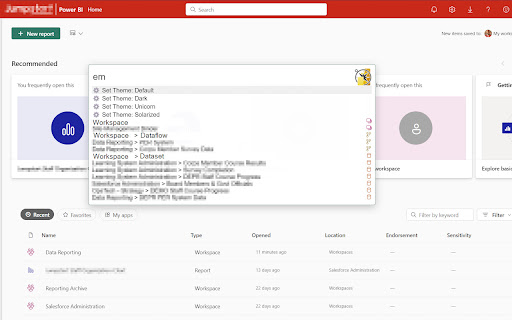
An easier way to navigate Power BI! This extension helps you get to any workspace, reports, dataflow, or dataset more quickly, and adds some color back into Power BI. Open the Navigator and - [New Permission] Can now save some settings, like the theme toggle, needs Storage permission to save preferences - Go to your Home page with "Home" - Commands looking weird? Run "Refresh Metadata" to make sure you have what you need - Adds colors to the icons in resource listings ** You can hold shift or control when you press enter or click your mouse to open the selected item in a new tab ** Default shortcut key (use Command instead of Control on Mac, and/or customize your options at chrome://extensions/shortcuts) Contribute to this extension at https://github.com/dannysummerlin/powerbi-navigator ## Privacy Policy This extension only runs locally in communication with your Power BI tenant. No data is collected from any user, nor is extension activity tracked or reported to a third-party. ## Terms of Service This extension is not intended to support the work of any individual or organization that is discriminatory or outright illegal.

BI Data Extractor by Table Capture
Extract data from business intelligence dashboards to Excel (XLSX) or CSV, including compatibility with Power BI. BI dashboards contain a lot of data, but often you can't simply copy/paste that data. The BI Data Extractor by Table Capture allows you to export tables and charts from these reports, views and dashboards to Microsoft Excel (as a .xlsx file), to CSV or to you clipboard. This extension adds export functionality to dashboards on Power BI (compatible with powerbi.com & powerbi.us). Not affiliated with Microsoft. Latest updates: - Internationalization: Chinese, Japanese, Russian, Vietnamese (February 2026) - Internationalization: French, Spanish, Portuguese (March 2025) - Added support for auto-scroll config (September 2024) - Added support for "Power BI for US government" (August 2024)

PowerBI Matrix Export
export the report to export Power BI matrix in the current report format.

BI Table Exporter
Export Power BI tables and matrices to Excel, CSV, JSON, HTML, and PDF in one click. Tired of Power BI's 30,000 row CSV limit? Need to export embedded reports that have no download button? BI Table Exporter detects tables automatically — even inside iframes — and exports them instantly. All processing happens in your browser: your data never leaves your device. 🚀 KEY FEATURES: • Works with Power BI Service, Power BI Embedded, and Power BI Report Server • Detects tables inside iframes and cross-domain embeds • No 30,000 or 150,000 row limits — export unlimited rows with Pro 📊 FREE VERSION: • Export up to 500 rows per table • CSV and JSON formats (free) • Excel, HTML, PDF included with Pro • No registration, no data collection, no external servers 🔒 PRIVACY & SECURITY: • All data processed locally in your browser • No data sent to external servers • No personal information collection • Open source transparency 🔍 PERFECT FOR: • Power BI analysts needing Excel exports from embedded reports • Teams working with Power BI Service and Power BI Embedded • Users who hit the 30,000 or 150,000 row limit with native export • Anyone who needs Power BI data in CSV, JSON, HTML, or PDF format 📈 WHY USERS CHOOSE BI TABLE EXPORTER: • Native Power BI export limits you to 30K rows (CSV) or 150K rows (Excel) • Embedded reports often have NO export option at all • BI Table Exporter detects tables automatically — even in iframes • All processing is local: your data never leaves your browser

Power BI PDF Export
Power BI PDF Export Chrome extension Overview Browser extension to help Power BI users export any dashboard in PDF without going to the Power BI portal. This also allows the users to export any page, even if it has Non-Certified Power BI Custom Visuals. Our browser extension is designed to simplify the process of exporting reports from Power BI to PDF format. With our extension, you can easily save your reports as PDF files directly from the Power BI interface without the need for additional tools or complex procedures. Report export: Simply select the report you want to export and click the extension's icon. Ease of use: Our extension integrates directly into the Power BI interface, providing simplicity and convenience. With our extension, PDF export becomes fast and convenient, allowing you to easily save important data and share it with colleagues and stakeholders.
