
cbhfdchmklhpcngcgjmpdbjakdggkkjp
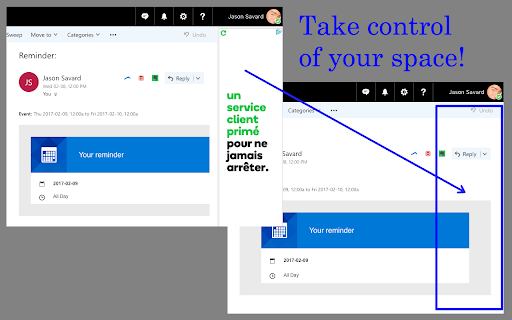
Block ads on the right side of the screen when using Gmail, Yahoo Mail, Hotmail and Outlook.com which expand your message space Removes ads and sponsored links leaving more space to focus on emails. Great for parental control to child proof those ads. Click "Website" or visit jasonsavard.com for more info.

IronVest Extension
Protect your Passwords, Payments, and Privacy. IronVest is your all-in-one, security and privacy wallet that goes beyond any existing solutions to protect access to your accounts, secure your credit cards, and protect your privacy online with masked email addresses, single-use virtual cards**, and masked mobile numbers. Use IronVest to prevent fraud by protecting access to your most sensitive accounts like banks, investments, health records, email, and more. Traditional password managers are not secure enough. They store your most valuable usernames and passwords behind one single master password. And if that gets hacked, all your accounts are exposed. VPNs provide a virtual private internet connection, but they are not designed to stop fraudsters from accessing your accounts. They create a false sense of security. IronVest takes passwords and account logins to another level of security. With easy to use, face biometrics right from your browser, we ensure only you can access your most sensitive accounts like your bank account, email, investments, health records, and more. - A next-gen password manager that protects all your account login information. - Truly seamless creation of strong, encrypted passwords on any site or service across all of your devices. - Autofill your user name and password to login to your accounts on web browsers, iPhone, iPad, and Android devices. - Protect your passwords with our patented biometric protection for account logins and account resets. - 2FA code protection! 2FA codes sent to your mobile are vulnerable. IronVest is the only solution that only you can access your 2FA codes and autofills them for you. ** The ultimate in Privacy Protection ** Protecting your digital identity goes hand in hand with protecting your online security by keeping your personal information out of the hands of fraudsters and hackers. So we created a comprehensive set of privacy features that includes: - Masked (private) email addresses - Keep your private email private. Get access to your masked email inbox or have them forwarded to your real email. Masked mobile number - Don’t give away your personal mobile number anymore. - Virtual credit cards - Create 1-time use virtual cards on the fly with one-click Site tracker. Know which companies are tracking you and block them with ease. ** How we protect your data ** - Zero-knowledge infrastructure - we can’t access your passwords. - Passwords and key data are secured with AES-256 encryption. - Separate keys are used for authentication/authorization and data encryption. - Encryption keys are stored using host-proof hosting. - Encrypted data is stored using optional personal storage accounts. - Key JavaScript functions run in protected contexts, not in the page. ** Secure, private and convenient online shopping and payments ** Even the most reputable sites and brands you trust get hacked. Keep your credit cards safe from data breaches - Pay on any site without giving away your credit card info by using virtual credit cards. - What you buy is your business. Keep what you buy private with virtual cards**. - Prefer using your real credit card? Protect it on our decentralized network and autofill when you need it. - Autofill info by just looking at the browser camera. We take care of the biometric authentication. Autofill your personal info on any site with identity management profiles The safest and most convenient way to autofill your info on travel, shopping, utilities or any online site. Create multiple profiles with real info, masked info or any combination Autofill for fast and easy online form filling and checkout experiences Have your masked emails and masked phone forwarded to you if you wish - Install the extension (or sign up first on ironvest.com) - Sign up for IronVest - Use the extension to easily autofill your passwords, email address, or credit cards - Flexible identity management - use any combination of personal info you want - Masked email or real email - Virtual credit card or your real credit card - Real phone or masked virtual phone number ** Two simple ways to sign up - Free and Premium Unlimited ** - Free - Get most security and privacy features - Unlimited - Even more protection with unlimited masked credit cards and a virtual mobile number ** SUPPORT ** We have a full-time support team that can help at support@ironvest.com as well as live chat for premium users. If you loved the Abine Blur digital wallet and passwords manager, you will love IronVest even more. Navigate the web with confidence and ease using the IronVest security and privacy extension. IronVest - the most secure and user-friendly way to protect access to your accounts, login seamlessly, shop privately, and protect your digital identity. Secure your accounts. Protect your privacy. ** Due to payment and banking infrastructure upgrades, masked cards are temporarily unavailable but will be back soon with even more advanced features

X-notifier Neo
Notifier for Gmail, iCloud, Hotmail, Yahoo, AOL and so on Notifier for Gmail, iCloud, Hotmail, Yahoo, AOL and so on X-notifier Neo checks your webmail accounts and notifies the number of unread emails. If you prefer old version, you can get it here. http://xnotifier.tobwithu.com/history.php?br=cr

Outlook Ad Blocker
Remove ads from your email inbox This extension remove ads from your email inbox when using outlook via browser at outlook.live.com/mail Last Updates 2024: Fake Email Ad start appear again and it was removed - Remove the new fake email ad on top of inbox items when reading panel is hide - Remove the new fake email ad on top of inbox items - Remove right sidebar big ad and extend the email read area - Remove upgrade banner below folders

AdBlocker Lite
AdBlocker Lite is a browser add-on that enables you to block annoying ads seamlessly on popular websites. It has 2 modes, Lite and Full. In lite mode, the extension uses the least amount of CPU power and memory and it runs based on pure CSS. Lite mode is ideal for slow machines. In full mode, more ads are targeted and more CPU power and memory are required. 1. It allows you to block annoying ads, scripts, images, iframes and many more. 2. Ultra-lite extension with no significant memory and CPU usage. 3. Unlike other similar products, AdBlocker Lite uses hard coded filtering rules for fast and reliable performance. 4. Provides an easy access filtering list if you wish to allow advertisement on some websites. 5. Includes ON|OFF button to quickly disable or enable the extension. 6. Includes Highlight/Block modes; in highlight mode, you can only highlight ads without blocking (hiding) them, but in block mode, ads are blocked. 7. Easily switch between full and lite modes (default is lite mode). 8. Add custom blocking rules. Currently, only rules in the form of css-selectors are accepted. 9. Badge icon text shows the number of blocked ads (active in full mode only). Note 1: In AdBlocker Lite you can allow some websites (including its homepage) to show non-intrusive advertisements. By doing this you support websites that rely on advertising. Some websites are added by default, but this list can be modified at any time. Note 2: AdBlocker Lite is designed to block ads on popular websites only (i.e. facebook, youtube, gmail, yahoo mail, etc). Besides, it does not block popup-ads, if you need a full-featured adblocker please use other adblocker addons in the addon store. Note 3: To add a custom rule, please use css-selectors. For example, the following rule hides a div element with class test: div[class='test']. Please note, you can only add valid CSS rules, otherwise, it won't be added to the list.
