
caenoflbbjmfjjeiofhngjglbmonjlnh
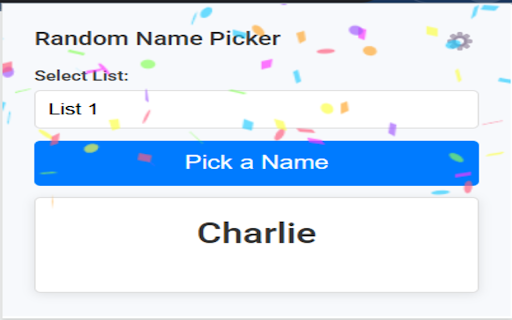
Randomly picks a name from a configurable list with a scrolling animation and optional auto-remove. Randomly picks a name from a configurable list with a scrolling animation and optional auto-remove.

Popsicle Sticks - Random student picker
Randomly select a student in your class from any tab Free and ad free! Popsicle Sticks is an easy way to randomly select a student. After cycling through the class, the names are automatically shuffled again to ensure every student gets a chance to answer. - Add and remove classes/periods - Add students one at a time or in bulk - Copy students from existing classes - Saves history so you can click away - Pop out mode for easy projecting - Light and dark mode - Class and student data synced to your Chrome account - Download data for backup

Slides Timer
Create timers using placeholders. ie >, >, >, >, >, > Slides Timer is a powerful extension that automatically brings your Google Slides to life with dynamic timers and clocks. Whether you're running a classroom activity, a business presentation, or a workshop, Slides Timer provides a seamless and beautiful way to keep your audience engaged and on track. Simply place your timer configuration between > and let the extension do the rest! 🚀 KEY FEATURES (FREE) Countdown & Count-up: Use - to count down or + to count up (e.g., >). 🕰️ Live Clock & Date: Display the current time or date with > or >. ♾️ Continuous Timers: Use ~ to keep your timer running across different slides. ⏭️ Slide Triggers: Automatically advance slides (-+) or go back (--) when a timer hits zero. 🔔 Audio/Video Alarms: Trigger your inserted audio (@) or video (!) files at specific times. 💎 PREMIUM FEATURES (PRO) Unlock powerful tools to customize your experience: 🎨 Custom Formatting: Full control over time/date displays using common indicators (e.g., >). 🍅 Pomodoro Cycles: Infinite work/break chaining for ultimate productivity (e.g., >). ⏱️ Analog Clock Faces: Beautifully rendered analog clocks using |analog. 📊 Dynamic Progress Bars: Visual progress bars that fill or empty as your timer runs (|bar). 💯 Scoreboards: Track points between slides with shared IDs and custom increments. 🏷️ Custom Tags: Personalize your starting and ending markers (default >). 🖌️ Custom Clock Interfaces: Get access to exclusive, advanced clock visual interfaces. ⏰ Advanced Alarm Scheduling: Take deeper control over when and how your alarms trigger. 🔄 Data Synchronization: Keep your custom settings and tags synced across your devices. ⭐ Priority Support: Dedicated and faster assistance when you need help. ⌨️ KEYBOARD CONTROLS (PRO) Enhance your presentation flow with premium quick hotkeys: Pause/Start: Press y to pause or resume the active timer. Reset: Press r to reset the timer to its starting value. 🛑 Manual Start: Use $ in your tag (e.g., >) to start the timer in a paused state. ⚙️ Custom Hotkeys: Personalize all of your keyboard shortcuts directly in the extension popup. 📖 COMMON EXAMPLES > : 5-minute countdown. ⏱️ > : 10-minute count-up. 🍅 > : A cycle of 25m work and 5m break. 📊 > : A 30-second progress bar. 🕰️ > : Current time without seconds or AM/PM. 📅 > : Countdown to a specific date! 💯 > : Scoreboard starting at 0, press [ for +1 and ] for +5. 🛠️ FORMATTING REFERENCE Customize your > and > tags with these indicators: 🕛 hh : 12-hour format (double digit) 🕒 HH : 24-hour format (double digit) mm : Minutes ⏱️ ss : Seconds 📆 dddd : Day of the week (long) 🗓️ MMMM : Month (long) 📅 yyyy : Year (4 digits) 💳 SUBSCRIPTION & MANAGEMENT Manage your PRO subscription directly through the extension popup. Click "Manage Subscription" to view invoices or update payment methods via our secure portal at https://slidestimer.web.app 🔒 PRIVACY This extension does not collect or handle personal user data beyond your Chrome Profile ID for subscription verification. 💡 Tip: Be sure to refresh your Google Slides tab after installation for the timer to activate!

spin the wheel custom
A customizable spin wheel with modern design Spin the Wheel Custom 🎡 Make decision-making fun and effortless! Spin the Wheel Custom is a simple and interactive Chrome extension that lets you create your own customizable spinning wheels. Whether you're choosing what to eat, picking a random winner, or planning an activity, this extension adds a playful twist to everyday decisions. 🖊️ Fully customizable: Add your own labels, colors, and segments. 🎨 Personalize themes and wheel styles. 💾 Save and manage multiple wheels. 🔔 Optional sound and animation effects. 📌 Pin your wheel for quick access in a new tab or popup. Perfect for teachers, streamers, event hosts, or anyone who loves a bit of randomness in life!

Dice Roler
Choose amount of dice and how many sides the dice have, then click ROLL DICE to see the result. Choose amount of dice and how many sides the dice have, then click ROLL DICE to see the result.
