
bphphhafmipppeiaddijbcnkhfpijnjp
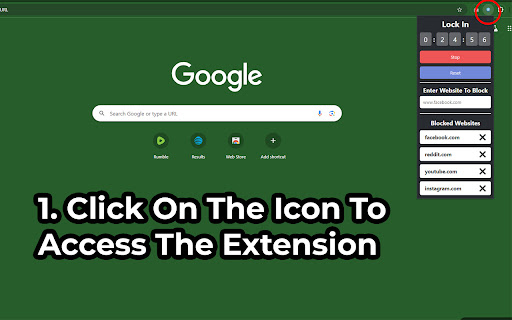


Allows user to set a timer and block websites while timer is going so they can better focus. A timer extension that allows user to easily block websites while their timer/focus mode is running. When the timer is up, or when you stop or reset the timer, just refresh the page or open a new tab with the site that was previously blocked and you'll be able to see it again. To use the extension, pin it to your extension toolbar and click on it's icon. Have any issues? Want to add new features? Checkout the GitHub here - https://github.com/ghughes13/csl-lock-in ===1.1.0=== -Improved popup design -Extension now stores blocked sites in chrome's local storage to persist blocked site list across sessions ===1.0.0=== -Created basic working version of the extension

Block Site - Site Blocker & Focus Mode
Block sites, protect your time with site blocker! Website blocker and password protection help you stay focused. Block Site is one of the best productivity tools available to help people procrastinate less, become more productive and reach their life goals. You’ll never have to worry again about how to stay focused at work. Block disturbing websites easily and Stay focused. This Block Site & Stay Focused extension allows you to block any website. Please note that, the extension blocks the whole domain. When you want to take a break you may deactivate the blocking easily for all blocked sites. Want to know how to block a website? We’ve got you covered! Just add websites to your block list and we’ll do the rest, we’ll even throw in some really funny images if you try and go on the sites while they’re blocked Stay Focused Extension You can now remove all distracting and harmful websites from your life by blocking them while you need to stay in the zone and be productive. You can even set yourself a focus timer and make sure you keep on track throughout the day while at work or school. Focus Mode The focus mode timer feature enables you to control your schedule via the Pomodoro technique timer. Break down your tasks into intervals, traditionally 25 minutes followed by a short break. With ‘Focus Mode’ you can set times when to disable websites and when to browse freely - no willpower necessary. Block by words Keyword Blocker that allows you to define a list of forbidden words that, when used, will block the content (discussion, comment, poll, etc.) This extension will soon be able to be used for blocking triggers or avoiding spoilers. Password Protection If you’ve blocked an app or a website you can unlock it with a passcode of your choosing, making it that bit harder to procrastinate. You can also password protect the options page to keep you from easily removing sites from your list. Adult Content Ever wondered how to block adult content on your device? Well now you can...easily! With the built in adult blocker that blocks all known adult sites by default making sure that you don’t see any inappropriate content. Site blocker may also come in handy if you don`t want to be annoyed by a certain website. In that case you just block site and forget about it. The extension is a real productivity tool that denies access to websites you don`t want to see. Surf the internet safely! Safer browsing and digital protection just got stronger with our brand new dashboard. Track all things internet safety in one place. Sites Blocker extension is going to help you increasing your productivity at workplace. BlockSite easy to install, easy to use and absolutely free extension specially for you! Don't hesitate, install Free Site Blocker & Focus Mode and feel the improvement.

Aware - Screen Time Tracker & Site Blocker
See where your browser time actually goes. Block distracting sites, run focus sessions, and build better habits - free to start. Aware is a screen time tracker and site blocker for Chrome. It runs silently in the background and gives you an honest picture of where your time goes - no setup, no accounts, no timers to start. ──────────────────────── FREE — forever ──────────────────────── • Automatic time tracking on every site • Hourly bar chart (24h) and weekly view (Mon–Sun) • 200+ sites auto-categorized (Social, AI, Entertainment, Education...) • Last 7 days in day view, current + previous week in week view • Top 5 most-used sites per day or week • Daily goal with streak counter • 1 focus session per day (30 min) • Hourly nudge when you've been on a site for 1h • 5 notification sounds or mute • Badge counter, dark mode, idle detection • 100% local — no accounts, no cloud sync ──────────────────────── PRO — from $9.99 ──────────────────────── • Site blocking — set daily time limits per site; get blocked automatically when you hit them • 1-minute warning before any limit is reached • Nuclear focus mode — start a session you literally cannot stop early • Unlimited focus sessions with custom durations (25, 45, 60, 90 min) • Goal alerts at 80% and 100% of your daily limit • Unlimited history — go back as far as your data goes • Weekly summary every Monday morning • Full site list with detailed breakdowns • Export JSON backup Start with a free 7-day Pro trial — no payment required. ──────────────────────── HOW IT WORKS ──────────────────────── Install → browse normally → click the icon for today's breakdown. That's it. Aware counts time only when Chrome is focused. It pauses when you're idle or on another app. Per-hour bars show exactly when you were most active. ──────────────────────── PRIVACY ──────────────────────── All data stays on your device. Aware records only domain names and seconds elapsed — never page content, passwords, or screenshots. No email, no sign-up, no ads. The only data sent externally is an anonymous device ID used solely to prevent trial abuse. Delete everything in one click under Settings → Clear data. ──────────────────────── PERFECT FOR ──────────────────────── Remote workers who want to understand their browsing patterns Students balancing study and distraction Anyone who's ever wondered where the last 2 hours went

Web Site blocker
Easy way to block distracting websites to prevent access while you work The Web Site Blocker Chrome extension empowers users to permanently deny access to websites or implement scheduled restrictions. Safeguard yourself from distracting or harmful content or shield your children from inappropriate material. - URL Blocking: Block distracting and harmful websites, including subdomains. - White List: Activate this option to block all websites except those included in the whitelist. - Password Protection: Secure the options page with a password to prevent easy removal of blocked sites. - Custom Rules Keyword based control. Allow or block access to a specific site only if the URL contains specific keyword - White & Black Time Configuration: Customize your daily schedule with the Scheduling feature, allowing you to set specific days and times for accessing certain sites. Stay focused and maintain daily routines effortlessly.

Block & Focus
Set your work and break times, and let this extension block the sites that are keeping you away from your goals. Block the websites that distract you and stay focused while you work. List the sites you don't want to visit while working and set how many minutes they should stay blocked. While the timer runs, those sites are replaced with a motivational phrase to keep you on track. Prefer to work in intervals? Turn on break time: set how long you want to focus and how long you want to rest. During each break your blocked sites open back up, then lock again automatically when the next work cycle begins. * Block any list of websites for a period of time you choose. * Add exceptions so specific pages stay reachable. * Optional break cycles where your blocked sites become available again. * Tabs already open on a blocked site are blocked the moment the timer starts. * Blocked tabs unblock automatically when a break begins. * Pause and stop buttons so you stay in control of your time. * Keyboard shortcuts to turn the timer on and off. * See how many work cycles you've completed in a session. * Optional sound when a work or break cycle ends. * Optional desktop notification when a cycle ends. * Show the remaining time right on the toolbar icon. Tip: you can turn the timer on and off anytime from the extension icon next to the Chrome address bar.
