
dcpbedhdekgkhigjgmlcbmcjoeaebbfm

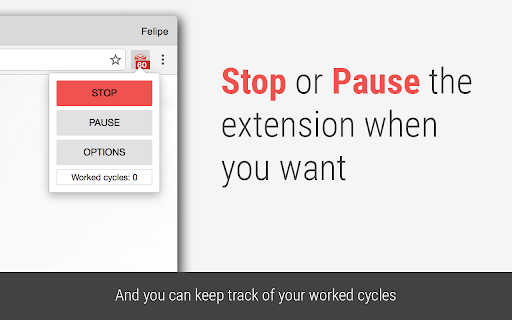


Set your work and break times, and let this extension block the sites that are keeping you away from your goals. Block the websites that distract you and stay focused while you work. List the sites you don't want to visit while working and set how many minutes they should stay blocked. While the timer runs, those sites are replaced with a motivational phrase to keep you on track. Prefer to work in intervals? Turn on break time: set how long you want to focus and how long you want to rest. During each break your blocked sites open back up, then lock again automatically when the next work cycle begins. * Block any list of websites for a period of time you choose. * Add exceptions so specific pages stay reachable. * Optional break cycles where your blocked sites become available again. * Tabs already open on a blocked site are blocked the moment the timer starts. * Blocked tabs unblock automatically when a break begins. * Pause and stop buttons so you stay in control of your time. * Keyboard shortcuts to turn the timer on and off. * See how many work cycles you've completed in a session. * Optional sound when a work or break cycle ends. * Optional desktop notification when a cycle ends. * Show the remaining time right on the toolbar icon. Tip: you can turn the timer on and off anytime from the extension icon next to the Chrome address bar.

LeechBlock NG
LeechBlock is a simple productivity tool for blocking time-wasting sites. LeechBlock NG (Next Generation) is a simple free productivity tool designed to block those time-wasting sites that can suck the life out of your working day. (You know: the ones that rhyme with 'Blue Cube', 'Space Hook', 'Sticky Media', 'Quitter', and the like.) All you need to do is specify which sites to block and when to block them. You can specify up to 30 sets of sites to block, with different times and days for each set. You can block sites within fixed time periods (e.g., between 9am and 5pm), after a time limit (e.g., allow up to 10 minutes in every hour), or with a combination of time periods and time limit (e.g., allow up to 10 minutes in every hour between 9am and 5pm). • Lockdown: Block sites immediately for a specified duration. • Access control: Set a password or random access code for the options page, to slow you down in moments of weakness! • Delaying: Set a countdown to delay access to sites instead of completely blocking them. • Password: Require a password to allow access to blocked sites. • Wildcards: Block a range of sites (e.g., *.somesite.com). • Exceptions: Whitelist sites you don't want to be blocked (e.g., +allowedsite.com). • Keywords: Block or allow pages based on keywords (e.g., ~badword).

News Feed Eradicator
Eradicate distractions and take back control of your browsing Do you often want to check social media, and then find yourself disappearing for hours as you're consumed by the endless scrolling? Do you want your life back, but can't bear to delete social media altogether? News Feed Eradicator removes the most addicting part of Facebook, Twitter and other social networks - the feed - and replaces it instead with an inspirational quote. You can still use the other functionality as usual, you just won't get sucked into the attention hole. See screenshots for supported websites.

Limit - Set Limits for Distracting Sites
Limit your time spent on distracting sites. Limit is an extension that allows you to set time limits for distracting websites. When you control your time on distracting websites, you’ll find you have far more time to focus on the things that matter most. To use Limit, simply enter the websites you find distracting and choose a daily time limit. For example, you could limit yourself to ten minutes a day on Facebook, or half an hour a day on Duolingo. When you approach your limit, Limit gently notifies you your time is almost up, so you can wrap up. And when you've reached your limit, you'll be directed to Freedom's calming Green Screen when you try to visit a limited website. - You can add or delete any website from the list of sites - Your time limit for each site is configurable, from 5 to 500 minutes - Limit comes pre-seeded with 10 distracting sites Limit is a product of Freedom Labs, where we develop new tools to help you balance your relationship with technology. Like our other extensions, Limit is highly privacy-conscious. None of your data is sent anywhere (the cloud, our servers, etc.) It remains secure on your own device. Learn more about Freedom here: https://freedom.to We hope you find Limit to be a simple and useful tool for developing healthier online habits and routines. Please note: Limit 1.0.3 is third release with Manifest 3 compatibility. You may experience slight differences in behavior due to the significant changes required to comply with Manifest V3. Please send us your feedback at support@freedom.to and we'll continue to improve Limit. Thank you! Release notes - 1.0.3: 🐞 Fixes a bug with our countdown timer notifications

Productivity Owl
Want to be productive? Let the Productivity Owl guide you to accomplishment. *** WARNING: This extension is very annoying. The owl is flying across your pages, annoying you, criticizing you, giving you psychological exercises, and closing your tabs. If you are not serious about being productive, this extension may not be for you.*** Do you need a new boss when working from home? Meet the Productivity Owl. The owl is very strict. He will berate and mock you. You'll be forced to complete tasks to earn break time. If you do consistent work, use the timeboxing scheduler for work/vacation, and complete the owl's psychological exercises then you might be able to earn the owl's respect. Just like the first version, the owl has 3 types of websites: Allowed, Blocked and Countdown. If a website is not on the allowed/blocked lists, you'll get a certain amount of time to get the information you need before the owl closes the tab. You can still use the scheduler to schedule free-time, and now you can also schedule work time. Version 2.0 introduced a task manager, and you get rewarded break minutes for each task you complete. There are also psychological interventions and browsing statistics in this version. Although it is technically possible to earn the owl's respect - it's highly unlikely. The owl is very judgmental. It may take years before anyone earns the owl's "ultimate respect." Of course if you uninstall the extension or disable it, all respect is lost. *************** APACHE 2.0 LICENSE OPEN SOURCE *************** Since this extension is on every webpage you visit, I wanted to let everyone know there are NO TRACKERS or DATA COLLECTORS in the owl. The owl is 100% open source. You can view the source code on Github: https://github.com/mrieck/productivityowl *Thanks to everyone who has been using the Productivity Owl over the years. He's been helping me be productive for the last 15 years. Hope he can help you too.
