
aoabjfoanlljmgnohepbkimcekolejjn
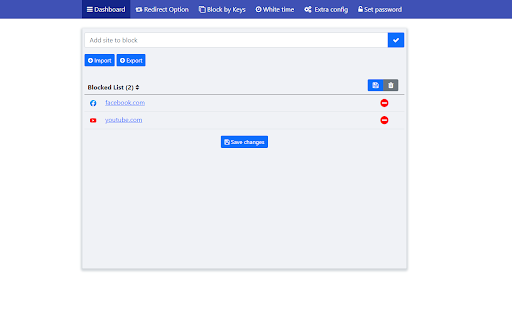


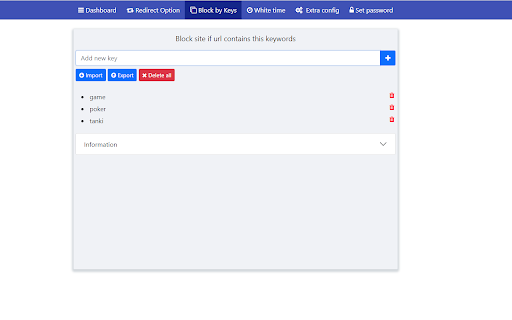

Easy way to block distracting websites to prevent access while you work The Web Site Blocker Chrome extension empowers users to permanently deny access to websites or implement scheduled restrictions. Safeguard yourself from distracting or harmful content or shield your children from inappropriate material. - URL Blocking: Block distracting and harmful websites, including subdomains. - White List: Activate this option to block all websites except those included in the whitelist. - Password Protection: Secure the options page with a password to prevent easy removal of blocked sites. - Custom Rules Keyword based control. Allow or block access to a specific site only if the URL contains specific keyword - White & Black Time Configuration: Customize your daily schedule with the Scheduling feature, allowing you to set specific days and times for accessing certain sites. Stay focused and maintain daily routines effortlessly.

Block Site
A customizable, password-protected website blocker and redirector. *** Block Site is now on the safer manifest v3. Please report the compatibility bugs you are experiencing. You can export the current rules to a JSON file and send it to me to investigate. *** This extension will block access to websites of your choosing. A master password controls all customization options, as well as access to any blocked site. It's also possible to redirect navigation from one specific website to another. Features: 1. Block unwanted domains. 2. Prevent access to a range of websites using wildcard matching or regular expression matching. 3. Reverse mode allows access to only some hostnames and blocks access to all others. 4. Custom redirection; you can redirect a single blocked hostname to a new destination. 5. Display a custom message on blocked pages. 6. Time and date-based blocking. Only block access to the websites at specified times and dates. This feature can be configured per hostname. 7. Protect data leakage. This extension prevents certain hostnames from gathering network activity from your computer since blocking occurs before any network request is emitted to the server. 8. Auto-closes blocked tabs after some time. 10. Closes annoying pop-ups as soon as the opening request is received. 11. Pause and resume blocking from the right-click context menu of the toolbar button. 12. Support overwriting configurations by managed storage 13. Block cached page load with service worker 14. Block dynamic page change with history push method For the FAQs and general feature suggestions please use: https://webextension.org/listing/block-site.html For technical bug reports use: https://github.com/ray-lothian/Block-Site/issues

Block these URLs, Domains or Keywords
Site blocker. Blocks URL, Domain or URL with keywords. Redirect. Help yourself to be more productive and save time! Block distracting or harmful sites easily! What does this extension do: - blocks URLs; - blocks Domains; - blocks URLs with keywords; - redirect blocked pages (if you want); - saves your time; - password available. Why this extension is better than other site blockers: - Totally free; - Low CPU usage; - No ads and popups; - No data collecting; - 4 color themes (red, blue, green, black); - Simple to use. Don't forget to allow the extension to run in incognito mode! If you forget your password - write me a letter!

Simple Website Blocker
Block the websites that steal your focus, and improve your productivity. This is a simple extensions that allows you to create a list of websites that should be blocked. The extension can fully block or prompt the user to continue whenever a website in the list is opened.

FocusShield Site Blocker
Site Blocker for Productivity, Parental Control, and Addiction Management: Protect Your Online Access with FocusShield FocusShield is a powerful browser extension that helps you take control of your online access and boost your productivity. With its password-protect feature, you can easily block access to distracting websites, inappropriate content, and time-wasting online services, making it an ideal tool for: - Parents who want to protect their children from harmful online content - Employers who want to maximize their employees' productivity by blocking distracting websites during work hours - Students who want to minimize distractions and focus on their studies - Individuals who struggle with online addiction and want to limit their access to certain websites - Privacy-conscious users who want to protect their sensitive data from prying eyes Some of the key features of FocusShield include: - Password-protect: Set up a password (PIN code) to block access to specific websites or online services, ensuring that only authorized users can access them. - The flexible timetable feature of FocusShield allows you to set a schedule for when access to certain websites or online services is password-protected. This feature is useful for employers, parents, and students who want to customize their level of protection based on specific time periods. Overall, FocusShield is a versatile and easy-to-use site blocker that can help you achieve your goals and take control of your online habits. Whether you're a parent, employer, student, or individual user, it's a valuable tool for managing your online access and staying focused and productive.
