
bongficojipchbeemolcoojnamfabehf

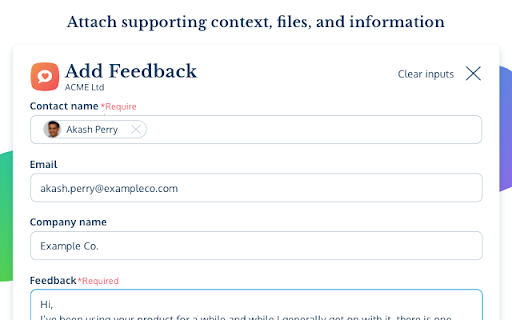
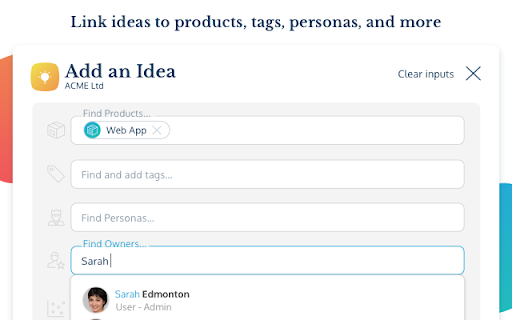

This extension lets you quickly add an idea to your ProdPad project from any website you're on. Use the ProdPad Quick-Add extension to send ideas and feedback straight to your backlog from any website you are visiting. Click the Quick-Add extension within Chrome, add idea/feedback, attach supporting info, and send it to your ProdPad backlog within seconds. Now it’s ready to be picked up and turned into a dev-ready product spec. EASILY INSTALLED IN 1 MINUTE OR LESS. No API key required. One sign-in is all it takes to get up and running. INVITE UNLIMITED TEAM MEMBERS FOR ENDLESS IMPROVEMENT Invite your full team to send ideas straight to your product backlog in ProdPad. And log crucial new customer, user, and market feedback to validate decisions moving forward. GROW YOUR IDEAS IN PRODPAD Develop ideas into solid product specs by attaching user stories, mockups, user personas, and other essential information – all from within ProdPad. IDENTIFY HIGH PRIORITY IDEAS FAST WITH A VISUAL CHART See what’s a high-impact idea and what’s not with the Priority Chart. WHAT IS PRODPAD? ProdPad is a product management tool that’s helping 1000s of companies get better every day by building amazing products that customers really want. We keep you out of the “feature factory” for good with lean roadmaps, idea, and feedback management that ties actions to outcomes. WHAT DOES PRODPAD DO? – Aligns teams around lean roadmaps that show what needs to happen Now, Next, and Later – Connects ideas with feedback to create outstanding products – Cuts your backlog in half with a priority chart and AI assistance – Keeps you focused on success with OKRs built-in to everything – Makes it easy to collect customer feedback from multiple sources – Syncs with the tools you already trust to create a smooth workflow NEED INTEGRATIONS? We got them. ProdPad integrates with the tools you already use: Jira, Trello, Azure DevOps, Rally, GitHub, Zapier, and MANY more! GOT A QUESTION FOR US? Send us an email: hello@prodpad.com – we respond fast.

Axure Cloud Extension
Capture screenshots of your prototype to attach to Axure Cloud comments. When commenting, click the camera icon to add a screenshot. Easily add context to your Axure Cloud discussions by attaching screenshots of your prototype to a comment. After installing the extension, refresh your browser, and then click the camera icon when adding a comment. Please note: This is only for use for screenshotting in Axure Cloud and attaching to comments within Axure Cloud discussions and is not a general screenshot tool. If you have any issues or questions, please email support@axure.com To download the latest version of Axure RP or a free 30-day trial, visit axure.com/download.

Teamwork.com
Teamwork.com is the only platform for profitably managing client projects, with complete operations control and project management. With Teamwork.com’s Chrome extension, you can enhance your workflows by easily tracking your time and managing your tasks from any webpage. Key features: - Track time: Start the timer and create time logs from any website. - Instant task creation: Add detailed tasks as you work form any webpage. - Effortless project creation: Create projects without having to open the Teamwork.com app. How to install the Chrome extension: 1. Click Add to Chrome. 2. In the popup, click Add extension. 3. Click the Teamwork.com extension icon at the top of your browser window. 4. Log in to your Teamwork.com account. 5. Start logging time, adding tasks, and creating projects seamlessly.

Usersnap - Capture visual feedback & bugs
Capture your screen, collect user feedback, and track bugs reports on any website, prototype, or application. Send feedback and report bugs on any website with screenshots and annotations directly in the browser. Usersnap (https://usersnap.com/) makes it easier for digital product teams to do user acceptance tests (UAT) and communicate design and development feedback. Microsoft, Canva and other software companies streamline QA and user feedback workflows with Usersnap. Usersnap can integrate with 50+ third-party solutions, such as… Jira Slack Zapier Wordpress Intercom 1. In-Browser Screenshots: you’ll get a screenshot of what your users experience. Quickly uncover browser-specific issues. 2. No-Code Installation: with the browser extension, there’s no need to install any additional code on your site/app. 3. Collaborate & Communicate: assign and track each item in Usersnap with your team. Add labels, attachments and comments to work better together. 4. Console Log Errors: client-side javascript errors are captured with the screenshot. Minimize your time troubleshooting. 5. Metadata Analyzed: Usersnap automatically includes the environment data to the tickets. URL, browser info, screen size, time, and location are some examples. Capture your first 20 feedback items for free. No credit card needed.

Visual Bookmarks with All My Faves
Visualize your bookmarks and access them from anywhere. Visualize your web on allmyfaves.com The Web is a vast ocean of content, and we’re all interested in different things. The Visual Bookmarks tool is like your own little house on the Web prairie where you add and manage all of your bookmarks under one visual roof. Say hello to All My Faves, the cross-platform visual bookmarking tool that saves all of your favorites to a single visual venue without interfering your Web browsing. (learn more at: https://allmyfaves.com/user/register). Visual Bookmarks perks: - Instant bookmarking: Save web pages effortlessly and quickly. - Distinctive logos: Each added website is accompanied by its own logo. - Access your bookmarks through one clean visual homepage. - Accessible across all your devices. - Easy and intuitive access to your favorite websites. Welcome to your new homepage, where you can truly make the web your own Try Visual Bookmarks today and embark on a personalized browsing journey! Learn more about our privacy policy at https://allmyfaves.com/privacy Visualize your faves with https://allmyfaves.com/
