
fiidicpfcmmoobdpadllfjklbdegfjaf
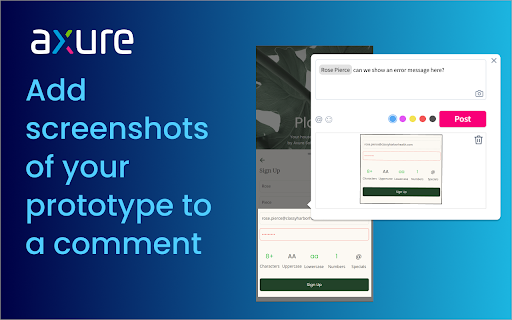


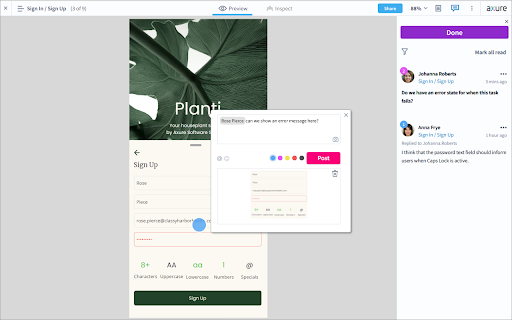
Capture screenshots of your prototype to attach to Axure Cloud comments. When commenting, click the camera icon to add a screenshot. Easily add context to your Axure Cloud discussions by attaching screenshots of your prototype to a comment. After installing the extension, refresh your browser, and then click the camera icon when adding a comment. Please note: This is only for use for screenshotting in Axure Cloud and attaching to comments within Axure Cloud discussions and is not a general screenshot tool. If you have any issues or questions, please email support@axure.com To download the latest version of Axure RP or a free 30-day trial, visit axure.com/download.

FigmaCN
中文 Figma 插件,设计师人工翻译校验。 👁 设计师人工翻译校验 📌 原有功能不受影响 🌍 翻译贡献者: Yancy Min 普鲁文 Pluwen ❤️ 赞助我们:Love.Figma.Cool Made by Figma.Cool

划词翻译
一站式划词 / 截图 / 网页全文 / 音视频 AI 翻译扩展,支持谷歌、DeepL、ChatGPT、百度、有道等 22 个国内外主流翻译服务,且均可用于全文翻译。能在 PDF 里使用。 划词翻译最初发布于 2013 年,距今已有 11 年历史,且仍在持续更新当中。 - 内置高准确度的谷歌翻译,能确保翻译结果跟 translate.google.com 是一致的。 - 鼠标划词功能,支持丰富的设置项,比如黑 / 白名单、关闭鼠标划词后通过快捷键来触发翻译等。 - 鼠标悬浮取词。 - 语音朗读。 - 内置独立翻译窗口,用于翻译浏览器外的文本。可以勾选持续监听剪切板,在任意程序复制文本即可自动弹出并翻译。 - 网页全文翻译,可以切换原文 / 译文 / 双语对照、自动开启等。 - 截图 / 图片翻译。 - 内置 PDF 阅读器,用于在 PDF 文件上实现鼠标划词、鼠标悬浮取词、截图翻译等功能。对 PDF 进行全文翻译的功能正在加紧开发中。 - 麦克风翻译。 - 音视频翻译(内测中),翻译网页中的音频 / 视频。 - 支持历史记录和收藏夹。收藏夹内容可以导出成多种文件,例如 json 和 csv。 完整功能介绍请查看 https://hcfy.ai/docs/guides/summary/ 英文单词会提供音标、详细释义、美音 / 英音朗读和词根,词根可以被点击,点击后即可查看词根的翻译结果。如果你需要,划词翻译也可以在划词后自动朗读被划选的单词。 默认使用弹窗在文本附近显示翻译结果,也可以固定在一处显示。 支持在任意程序里复制文本后,按下 Ctrl + Shfit + 1(macOS 将 Ctrl 改为 Command)查看翻译结果,无需切换回浏览器。这个快捷键是可以修改的。 支持历史记录和收藏夹,这两个功能也可以关闭。 如果你遇到了问题或者想要新的功能,可以在评论区留言,我基本上都会答复。官网(https://hcfy.ai)里也有其它反馈渠道。

Axhub
AI Design 辅助扩展,可用于原型发布,网页微调、导出和还原 Axhub 推出的 Chrome 扩展: 支持 快速编辑 AI 生成的页面 支持 辅助 AI 提取页面主题和还原页面 支持 任意网页复制到 Figma 或 Axure (可编辑) 支持 同步 Axure 原型到 Axhub 或 私有化部署服务器 相关 MCP 功能已经迁移到 skills ,调用更加方便 https://github.com/lintendo/Axhub-Skills/ 有问题和建议欢迎反馈

Window Resizer
Resize the browser window to emulate various screen resolutions. This extension re-sizes the browser's window in order to emulate various resolutions. It is particularly useful for web designers and developers by helping them test their layouts on different browser resolutions. The resolutions list is completely customizable (add/delete/re-order). You can set the window's width/height, window's position, preset icon (phone, tablet, laptop, desktop) and even the option to apply the new dimensions to the entire window or just to the viewport. The extension also features customizable global key shortcuts, an option to export your settings and import them on another computer and more! Please report all bugs (or suggestions) using the support link on the extension's details page.
