
bohcdnelkeimoooidokojkcjdaahjbkb

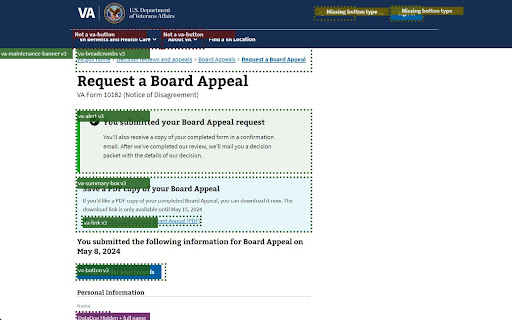
Highlights VA web components and accessibility issues Checks VA.gov by highlighting accessibility issues, elements that need to be converted to web components, and information that needs to be hidden by DataDog Real User Monitoring (RUM) sessions - internal tool, not for general usage.

IBM Equal Access Accessibility Checker
A web browser extension for checking accessibility issues The IBM Equal Access Accessibility Checker is an open source tool for web developers and auditors that utilizes IBM's accessibility rule engine, which detects accessibility issues for web pages and web applications. The extension integrates into the browser development tools, providing an integrated checking experience, helping users quickly identify the source of accessibility issues and try fixes.

Patriot Portal by VetClaims.ai
Securely collect and manage your VA.gov data with privacy-first Chrome extension Patriot Portal by VetClaims.ai - Your Private VA Data Assistant Patriot Portal helps veterans maximize VA benefits with a 100% private, on-device Chrome extension. Analyze your VA.gov data, discover missed compensation opportunities, track real payments, and organize your claims - all without sending data anywhere. PRIVACY FIRST - Your Data Never Leaves Your Device - No cloud storage, accounts, or tracking - Chrome's built-in encryption protects your information - One-click delete or export anytime - 100% on-device processing - we can't see your data even if we wanted to Discover what you're missing: - Presumptive Condition Scanner - Automatically flags PACT Act, Agent Orange, Gulf War, radiation, and Camp Lejeune exposures - Secondary Conditions Finder - Reveals linked conditions that can boost your rating - Rating Increase Analyzer - Identifies under-rated conditions with upgrade potential - 0% Optimizer - Highlights conditions stuck at 0% that could be raised - Compensation Calculator - Updated 2026 VA pay rates with real VA math (bilateral factor included) - Compensation Ladder - See exactly how your monthly pay increases at each 10% step from your current rating to 100% - Disabilities - Ratings, effective dates, combined rating with proper VA math, temporary review countdowns - Claims Journey - Visual timeline with progress tracking, urgency highlights, and milestone markers - Real Payments - Your actual VA compensation amounts (not estimates), payment breakdown by type, deposit details, and bank info - Benefits Discovery - See all 17+ benefits you've unlocked at your current rating (CHAMPVA, DEA Chapter 35, dental, property tax exemptions, and more) - VA Profile - Your contact information, mailing address, and account details pulled directly from VA.gov - Service History - Deployments with location mapping, unit history, exposures, awards, and discharge character - Documents & Letters - Decision letters, benefit letters, and VA correspondence Know your actual pay: - Shows your real monthly and annual VA compensation from payment history - not just estimates - Breaks down payments by type: Compensation & Pension, retroactive pay, travel reimbursement, and more - Detects Special Monthly Compensation (SMC) and Aid & Attendance payments - Tracks deposit method, bank name, and account info - Links to VA Pay Charts and the full VA Disability Calculator - DBQ form matching for your specific conditions - Recommended VA forms based on your situation (21-526EZ, 21-4138, 21-0781, and more) - CH31 Vocational Rehabilitation eligibility assessment - Missing evidence alerts with direct links to needed documents - Deadline trackers for C&P exams, appeals, and Intent to File expiration - In-progress form detection - see what you've started on VA.gov but haven't submitted - Red-flag alerts when ratings or claims need immediate attention - Shareable summary cards for VSOs or healthcare providers Export your data to specialized tools: - Veterans Benefits Finder (https://allmybennies.com) - Discover state and federal benefits you qualify for - CH31 VR&E Packet Generator (https://ch31help.com) - Auto-generate your Vocational Rehabilitation application packet - VA Disability Calculator Pro (https://calc.vetclaims.ai) - Model "what-if" scenarios for future claims - One-click export opens each tool with your data pre-loaded (via secure URL - no servers involved) WHO IT'S FOR Perfect for: - Veterans preparing for new claims or C&P exams - Veterans seeking to maximize their earned benefits - One-click VA.gov data import (20+ API endpoints) - Real payment history with deposit details - Combined rating + bilateral factor calculator using official VA math - 2026 compensation rates with pay ladder projections - Benefits discovery engine (17+ benefit categories) - Presumptive + secondary condition discovery - Claims journey timeline with progress and urgency tracking - Claim phase regression detection - CH31 VR&E eligibility assessment - In-progress VA form detection - JSON export, backup, and restore - Ecosystem export to VetClaims.ai partner tools - No registration required - ever Step 1: Pin the Extension 1. Click the puzzle piece in Chrome's top-right corner 2. Find "Patriot Portal" and click the pin icon 3. Look for the red shield icon in your toolbar 1. Click the red shield, review the Privacy Policy, and accept 2. Click "Login to VA.gov" and sign in with Login.gov, ID.me, DS Logon, or MyHealtheVet 3. Click "Start Collection," wait for the progress bar, then open your Dashboard That's it. Your full VA benefits dashboard is ready - payments, claims, disabilities, service history, and personalized recommendations. - Real compensation display - see your actual VA pay, not just estimates - 2026 VA pay rates - updated compensation tables - Payment breakdown - view payments by type with bank and deposit info - Benefits discovery - 17+ benefit categories unlocked at your rating - Claims journey timeline - visual progress tracking with urgency flags - Compensation ladder - see your pay at every 10% step to 100% - VA Profile card - contact info and account details from VA.gov - Ecosystem export - one-click export to Benefits Finder, CH31 Generator, and Calculator Pro - In-progress form detection - see unfinished VA.gov forms - Improved dashboard layout - equal-height cards, polished animations Q: Is my data safe? A: Yes - all processing happens locally on your device. We never send data to servers. Q: Do you store my VA.gov login? A: No - Patriot Portal only checks that you're signed in. Your credentials are never accessed. Q: How does the ecosystem export work? A: Your data is encoded into a URL and opened in a new tab. It goes directly to the partner app in your browser - no server round-trip. Q: What happens when I uninstall? A: All local data is removed. There's no copy in the cloud. - In-app: "Need help?" link in the popup - Email: support@vetclaims.ai - VA account issues: va.gov or 1-800-827-1000 - Not affiliated with the Department of Veterans Affairs - Information only - not legal or medical advice - VA makes all official benefit determinations Install Patriot Portal today and take control of your VA benefits journey.

Adswerve - dataLayer Inspector+
DataLayer Tools for Digital Analysts The Adswerve dataLayer Inspector+ is a tool kit of utilities for a digital analyst. Inspect Google Analytics activity - Monitor the dataLayer in real time - See the Google Analytics hits in the console, as they happen - Evaluate common dataLayer pushes formats: events and ecommerce Insert additional resources in the page - Push a dataLayer message for setup - Add a GTM container to test it - Insert code into the page to monitor and modify How to use the dataLayer Inspector+: https://adswerve.com/resources/adswerve-data-layer-inspector-2 Update for v2024.11.1.1 Due to new restrictions on external script tags in Chrome extensions, the "Insert GTM Container" option has been removed from dataLayer Inspector+. Follow these steps to insert a GTM container into a web page with the "Inject Code" feature instead: Go to tagmanager.google.com. Under the Admin tab for your container, select "Install Google Tag Manager." As shown in the screenshot below, where it says "Paste this code as high in the of the page as possible," copy just the snippet code content. Note: Do not include , only the code between them. In the DataLayer Inspector popup, under "Add Functionality," check "Inject Code." Paste the code snippet from Tag Manager into the text box that appears. Click the button to "Save Settings & Reload." The GTM container will be inserted until the "Inject Code" box is unchecked and "Save Settings & Reload" is clicked again. Be sure to do this when you've finished testing.

VA Assistant
Extension to help Veterans review VA data. Inspired by the fantastic work of the *VA Claims Tracker*, this extension provides a tabbed interface into different portions of the VA website, leverage API calls to pull your information. This extension only queries and displays data. No personal data is stored in the extension, only the settings shown on the "Settings Tab". No data is collected or analyzed by the extension author. No authentication data is stored. * Added a button to check for `Claims` between 2022 and 2024 that match `phil` for either `jurisdiction` or `tempJurisdiction` * Added `ID` column to `Appeals` tab * Shows the VA Appeal ID for reference * Added better icons for `Appointments` * Added `Reset Settings` button in the `Settings` section. * Published Firefox Version * Re-organized tabs to have sub-tabs for certain data structures. * Added section to `VA Payments` * `Travel Pay` * Added sections to `VA Health` * `Vaccines` * `Prescriptions` * `Allergies` * `Imaging and Radiology` * `Labs and Tests` * Added sections to `VA Profile` * `Overview` * `Health Care Overview` * `GI Bill Overview` * `VA Home Loan` * `Service History`
