
bnmjgdokjblbmbpjpjkelopgkakkclef

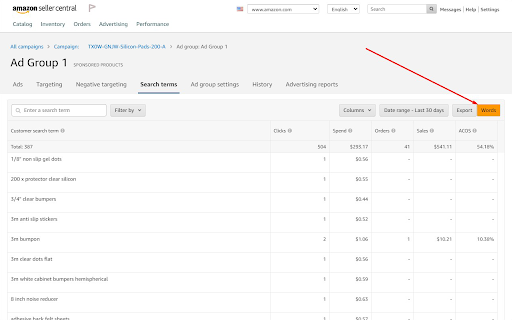
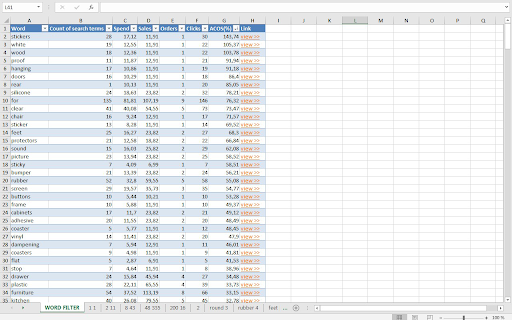
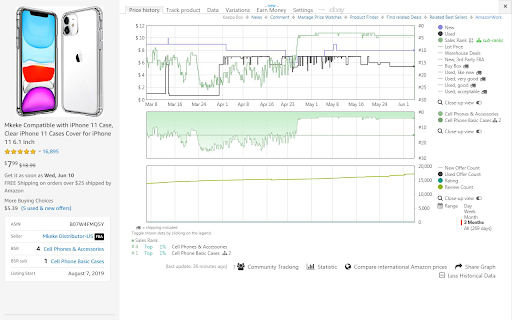
PAID (require paid Azometer account at azometer.com - $29/month ) In Amazon Sellercentral on Advertising reports page and on Search terms of Ad Group page: • Export Ad Words of Search Terms to XLS to find negative words • Print product labels in Sellercentral to .docx PAID (require paid Keepa account at keepa.com - €15/month) View Best Sellers Rank and Review history charts on Amazon search pages: • Keepa (BSR/Review History Chart)

AmzGPT: Amazon listing edit
A free tool to help you find more keywords, and optimize your listing. AmazonGPT is a free AI-powered listing optimizer that helps Amazon sellers improve their search ranking by optimizing their listings. With AmazonGPT, you no longer need to search for Amazon tips or templates for your listings. With just one click, ChatGPT OpenAI can provide you with better listing choices. Optimizing the title of your Amazon listing Optimizing the description of your Amazon listing Finding and suggesting keywords Copying optimized listing content with just one click Exporting optimized listing content as a .doc file 🚀 How to Use Optimizing the title a. Go to the listing page of your product b. Open AmazonGPT and select Title Generator c. Search and select keywords d. Click the Generate Title button and get suggestions Optimizing the description a. Go to the listing page of your product b. Open AmazonGPT and select Description Generator c. Search and select keywords, and set parameters d. Click Generate Description and get suggestions 🚀 How It Works AmazonGPT analyzes your current product information, such as the title, description, and keywords, and uses ChatGPT to provide you with optimized listing content.

ChatGPT for Amazon from ProductScope AI
All-in-One ChatGPT for Amazon Brands & Marketers by ProductScopeAI ProductScope AI’s Chrome extension for Amazon Insights helps brands research, optimize and grow their business faster & more efficiently with AI. Perfect for Amazon sellers (FBA, FBM, Merch by Amazon and even KDP sellers) who want to dive into their detailed customer insights harvested from their Amazon reviews and then make data-driven decisions about their products. With the free Amazon Seller Chrome Extension, you can gain unique review insights, download your reviews, optimize your Amazon listing, conduct in-depth product analysis, perform keyword research, create and edit amazon product photos and much more. Here are some of the features offered by the ProductScope AI Chrome Extension: Product Reviews Analyzer Reviews Insights Customer Purchase Motivations Customer Demographics Listing Improvements Product Keywords Amazon Product Photos Download Amazon Reviews Listing Quality Amazon SEO ChatGPT Assistant for Amazon Take advantage of the best Chrome extension for Amazon sellers, streamline your product research, optimize your listings & images, and ultimately increase your sales and profitability on Amazon. 🔍 Deep Customer Insights - Leveraging the Voice of Customer Analysis, we transform customer reviews into actionable strategies, helping you understand the likes, dislikes, and desires of your customer base to enhance conversion rates. ✏️ AI-Enhanced Listing Builder - Craft compelling product listings in minutes, infused with high-impact keywords and insights derived from your reviews, all thanks to our advanced language models. 📸 Stunning Product Images - Generate hundreds of lifestyle images effortlessly from your imagination with our AI Photoshoot tool & powerful but simple post-processing editor in minutes for 1/10th the cost of normal photoshoots, for all your social media/marketing needs. 🤖 Dobby - Your E-commerce Mentor - Meet Dobby, your round-the-clock e-commerce AI Chatbot assistant, ready to assist you in making data-driven decisions and staying competitive on Amazon. 🌟 What kind of Customer Insights are provided via the free Chrome Extension? 🌟 1️⃣ Deep Dive Analytics: Unravel the mysteries of your target audience. Discover the 'who', 'what', 'where', and 'why' behind every review, but aggregated for you. 2️⃣ Customer Sentiments (Pros & Cons): Pinpoint your product's strengths and areas of improvement from the customer's viewpoint. 3️⃣ Buyer Motivations: Craft irresistible product listing titles/bullets/descriptions by tapping into customer buying triggers. 4️⃣Product Improvement Suggestions: Insights into what the customers are wanting or expecting the product to include or offer in order to be valued more 5️⃣ One-Click Analysis: Instantly analyze reviews, spot opportunities, and uncover the pros & cons. 🔗Start Getting Unique Insights plus using all of our core ProductScope AI Tools Today for Free → https://productscope.ai 📌 FAQs: Q: How does the ProductScope AI Chrome Extension help me? A: Our Free Customer Insights Extension can pull all verified reviews for any ASIN on any marketplace, analyze them against multiple data points, leveraging the most advanced Amazon ChatGPT model (GPT-4) to offer strategic customer insights, use them to craft highly optimized Amazon listings and even tie in branded AI Photoshoots in minutes for any of your products or your clients brand's. Q: What's "Voice of Customer Analysis"? A: ProductScope AI’s Voice of Customer (VoC) Analysis utilizes Artificial Intelligence to analyze Amazon reviews, transforming them into meaningful insights about customer demographics, intent, sentiment, and motivation. This provides a comprehensive Amazon voice of the customer understanding, which can help shape your product development and market positioning strategies. Customer Profile - The "Who", "What", "Where" and "Why" for your product based on your customers reviews Pro Sentiments - Insights showcasing the positive sentiments of the ASIN product Con Sentiments - Insights showcasing the negative sentiments of the ASIN product Product Features - Features of the product taken directly from customer reviews in their language Buyer Motivations - these are the reasons the customers are buying the product Product Improvement Suggestions - Insights into what the customers are wanting or expecting the product to include or offer in order to be valued more Just hop onto your Amazon.com (or .ca or .uk) product detail page (i.e., www.amazon.com/dp/{ASIN}), click on our chrome extension (it looks like an orange bumblebee), and you can run Analyze Reviews to grab your customer insights, then you can choose to open up any other web tool directly from the extension. You can also grab the Amazon main image into our AI Photoshoot tool or optimize the listing directly from the Chrome extension as it's fully paired with our Web app tools! Q: How can Customer Review Analysis benefit me? A: Gain a deeper understanding of customer perceptions, refine your listings, influence product development, generate the right style product photoshoot images and help you tailor your marketing strategies. Q: How can I use the Chrome extension to download, export, or review insights from Amazon products? A: Our Chrome extension is designed as an all-encompassing tool for Amazon sellers and buyers alike, enabling you to download reviews from Amazon with ease. With features like the Amazon review downloader, you can effortlessly export Amazon reviews for comprehensive analysis. Whether you're looking to export reviews for a single product or download reviews in bulk, our tool simplifies the process, allowing for a seamless review export experience. This functionality is perfect for those seeking to gain deeper insights into customer feedback or to utilize review data for product improvement and competitive analysis. Q: Is a credit card needed for the Free tier? A: Absolutely not! The Chrome Extension is completely free and installing it or even creating an account at https://productscope.ai doesn’t require a credit Card. Your free account also gets you access to our full fledged Web application platform where you can try all our other AI-powered tools as part of a risk-free. So, why wait? Download the ProductScope AI Amazon Chrome extension for free today! 💌 Reach Out: For queries or feedback, drop us a line at [support@productscope.ai]

Amazon BSR & Rating Colorizer
Color codes BSR and ratings on Amazon ** NEW ** Added support for new Amazon sites. This plugin extends the plugin 'DS Amazon Quick View Extended' by adding colorized BSR numbers based on your desired BSR range. * Now also color codes ratings. * Possible to disable and enable features. Feel free to report bugs and feature request when reviewing the extension. IMPORTANT!! To use this extension you need to: * Have 'DS Amazon Quick View Extended' installed * After installation enter a BSR Range by pressing the extension icon

Amazon Index Checker
Free keyword ranking & index check tool by SellerApp - The most accurate seller tool for all amazon market places. Don’t have the time to track the right keywords for your listings? We don’t blame you. We understand that your time is valuable to you. Heck, that’s why we've got you the Keyword Rank Tracker. Amazon SEO takes time. Tracking keywords manually takes time. Marketing takes time. It’s not much freedom if you’re spending all of your time in front of a computer instead you could be spending doing what you love — spending your time your way. The combined Index Checker and Keyword Rank Tracker is built with focus on ease of use and effectivity. Save your time, benefit from the indexing information, page ranking, and the keyword position all on one screen. Helps you accurately identify the keyword ranks for you to know the position of your product listing for the most important keywords - Check your current Amazon keyword ranking, indexing information, Page Rank and positions - Helps you check ranking on all marketplaces - US, EU, UK, CN, JP, FR, DE, IT, NL, CA, MX, BR, AU - Helps monitor the effectiveness of your marketing efforts with changes in your PPC campaigns, keywords in your listings - Manually refresh your real time keyword ranking results - Export your daily keyword indexing, ranking and other ranking information to a Google spreadsheet for custom analysis and backup Keyword research, on-page and off-page optimization are just small parts of the SEO puzzle. It is more critical to control how your listing is performing in search. It's really important to understand what is going on your listing, and to track your most important product keywords to be alerted whenever something is going wrong -to know if you're losing rankings for a certain keyword or a pool of keywords. If you're not ranking for your most important keywords anymore, you could lose a lot of money in sales. The listing keyword search ranks keep constantly changing and you should stay vigilant against your keyword performance. Rank tracking also helps you find out how your competitors are ranking in search and find the best ways to outrank them. Make sure you keep an eye on the competition with the ranking tracker. Q1. How to check keyword ranking on amazon? Enter all the your most important keywords in the keyword tracker and click on ‘Analyze’. The Extension crawls through the Amazon listing pages to analyze your listing position in the search results. Q2. How to index keywords on Amazon? Keywords on Amazon are indexed based on the sales made by the listing for the keyword. Amazon considers the product making the most sales as the most relevant one and places it on the top of the search results for the keyword. Q3. How to enter keywords in listing? The keywords can be entered in different parts of the listing including the title, bullet points, the product description and the backend keywords. Amazon’s search engine picks up the keywords from your listing under all these portions to index it for your product listing.
